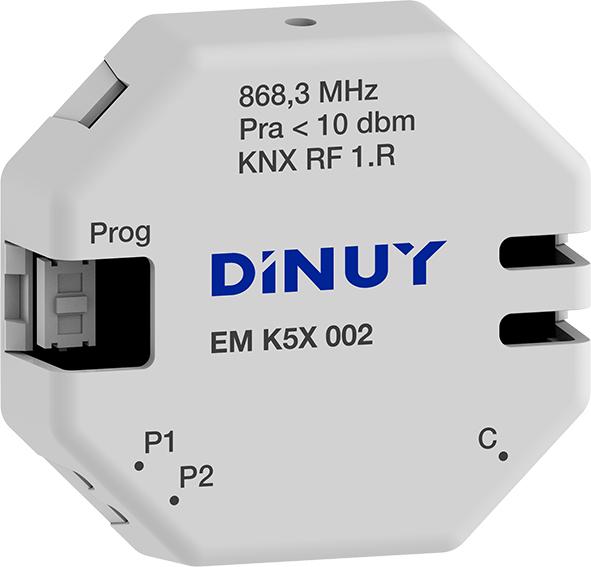
KNX-RF Pushbutton Interface EMK5X002
 Dinuy · Order number EMK5X002 · KNX-RF Devices › Sensors › Interface for Pushbutton
Download .knxprod DINUY KNX-RF Push button Interface 0.0 · 146 KB
Product
| Manufacturer | Dinuy |
|---|---|
| Product name | KNX-RF Pushbutton Interface |
| Order number | EMK5X002 |
| Hardware | Pushbuttons emitter |
| Medium | KNX RF |
| Rail mounted | No |
| Registration | Certified · 2018-09-25 |
| Languages | es-ES, en-GB, de-DE, en-US |
| Catalog entry | M-009A_H-EMK5X00218072018-0_HP-2002-00-FFB9_CI-EMK5X002-1 |
| Fingerprint | FFB9 |
| SHA-256 | 6641f8f25dfa13fcdf28ead0bf287745df49d9edd0076ac079750af02edbf6d4 |
| First seen | 2026-11-25 |
| Markets | 68 markets |
Application program: DINUY KNX-RF Push button Interface 0.0
| Application number | $2002 |
|---|---|
| Version | 0.0 |
| Mask version | MV-27B0 (RF System B) |
| KNX Data Secure | No |
| Minimum ETS version | 5.0 |
| Parameters | 171 |
| Group objects | 85 |
Group objects (85)
| No | Name | Function | Size | DPT | Flags |
|---|---|---|---|---|---|
| 1 | Switch Off/On | 0= Off, 1= On | 1 Bit | 1.1 switch | CT |
| 1 | [PB1] Switch Off/On | 0= Off, 1= On | 1 Bit | 1.1 switch | CT |
| 2 | Switch Off/On long action | 0= Off, 1= On | 1 Bit | 1.1 switch | CT |
| 2 | [PB1] Switch Off/On long action | 0= Off, 1= On | 1 Bit | 1.1 switch | CT |
| 3 | Timed Start/Stop | 1 = timed start, 0 =switch off and stop timer | 1 Bit | 1.10 start/stop | CT |
| 3 | [PB1] Timed Start/Stop | 1 = timed start, 0 =switch off and stop timer | 1 Bit | 1.10 start/stop | CT |
| 5 | Dimming control | Dimming control telegram | 4 Bit | 3.7 dimming control | CT |
| 5 | [PB1] Dimming control | Dimming control telegram | 4 Bit | 3.7 dimming control | CT |
| 8 | Switch Off/On ch1 | 0= Off, 1= On | 1 Bit | 1.1 switch | CT |
| 8 | [PB1] Switch Off/On ch1 | 0= Off, 1= On | 1 Bit | 1.1 switch | CT |
| 9 | Switch Off/On ch2 | 0= Off, 1= On | 1 Bit | 1.1 switch | CT |
| 9 | [PB1] Switch Off/On ch2 | 0= Off, 1= On | 1 Bit | 1.1 switch | CT |
| 10 | Switch Off/On ch3 | 0= Off, 1= On | 1 Bit | 1.1 switch | CT |
| 10 | [PB1] Switch Off/On ch3 | 0= Off, 1= On | 1 Bit | 1.1 switch | CT |
| 11 | Switch Off/On ch4 | 0= Off, 1= On | 1 Bit | 1.1 switch | CT |
| 11 | [PB1] Switch Off/On ch4 | 0= Off, 1= On | 1 Bit | 1.1 switch | CT |
| 14 | [PB1] Move control | 0 = Up, 1= Down | 1 Bit | 1.8 up/down | CT |
| 14 | Move control | 0 = Up, 1= Down | 1 Bit | 1.8 up/down | CT |
| 15 | [PB1] Step control | 0= decrease, 1= increase | 1 Bit | 1.7 step | CT |
| 15 | Step control | 0= decrease, 1= increase | 1 Bit | 1.7 step | CT |
| 18 | [PB1] Scene number | Scene number 1 bits | 1 Bit | 1.22 scene | CT |
| 18 | Scene number | Scene number 8 bits | 1 Byte | 18.1 scene control | CT |
| 18 | Scene number | Scene number 1 bits | 1 Bit | 1.22 scene | CT |
| 18 | [PB1] Scene number | Scene number 8 bits | 1 Byte | 18.1 scene control | CT |
| 19 | Save scene | 1- save scene | 1 Bit | 1.11 state | CT |
| 19 | [PB1] Save scene | 1- save scene | 1 Bit | 1.11 state | CT |
| 22 | 2 Bytes Floating value Telegram on operation | 2 bytes floating value | 2 Bytes | 9.1 temperature (°C) | CT |
| 22 | Bit value Telegram on operation | Bit value | 1 Bit | 1.11 state | CT |
| 22 | 2 Bytes value Telegram on operation | 2 bytes value | 2 Bytes | 7.1 pulses | CT |
| 22 | Byte value Telegram on operation | 1 byte value | 1 Byte | 5.10 counter pulses (0..255) | CT |
| 22 | 2 Bits value Telegram on operation | 2 Bit value | 2 Bit | 2.1 switch control | CT |
| 22 | 4 Bytes value Telegram A on operation | 4 bytes value | 4 Bytes | 12.1 counter pulses (unsigned) | CT |
| 22 | 2 Bytes signed value Telegram on operation | 2 byte signed value | 2 Bytes | 8.1 pulses difference | CT |
| 22 | [PB1] Byte value Telegram on operation | 1 byte value | 1 Byte | 5.10 counter pulses (0..255) | CT |
| 22 | [PB1] Bit value Telegram on operation | Bit value | 1 Bit | 1.11 state | CT |
| 22 | [PB1] 2 Bytes signed value Telegram on operation | 2 byte signed value | 2 Bytes | 8.1 pulses difference | CT |
| 22 | [PB1] 2 Bytes value Telegram on operation | 2 bytes value | 2 Bytes | 7.1 pulses | CT |
| 22 | [PB1] 2 Bits value Telegram on operation | 2 Bit value | 2 Bit | 2.1 switch control | CT |
| 22 | [PB1] 4 Bytes value Telegram A on operation | 4 bytes value | 4 Bytes | 12.1 counter pulses (unsigned) | CT |
| 22 | [PB1] 2 Bytes Floating value Telegram on operation | 2 bytes floating value | 2 Bytes | 9.1 temperature (°C) | CT |
| 23 | 4 Bytes value Telegram A on LONG operation | 4 bytes value | 4 Bytes | 12.1 counter pulses (unsigned) | CT |
| 23 | Bit value Telegram on LONG operation | Bit value | 1 Bit | 1.11 state | CT |
| 23 | 2 Bits value Telegram on LONG operation | 2 Bit value | 2 Bit | 2.1 switch control | CT |
| 23 | Byte value Telegram on LONG operation | 1 byte value | 1 Byte | 5.10 counter pulses (0..255) | CT |
| 23 | 2 Bytes value Telegram on LONG operation | 2 bytes value | 2 Bytes | 7.1 pulses | CT |
| 23 | 2 Bytes Floating value Telegram on LONG operation | 2 bytes floating value | 2 Bytes | 9.1 temperature (°C) | CT |
| 23 | 2 Bytes signed value Telegram on LONG operation | 2 byte signed value | 2 Bytes | 8.1 pulses difference | CT |
| 23 | [PB1] 2 Bytes signed value Telegram on LONG operation | 2 byte signed value | 2 Bytes | 8.1 pulses difference | CT |
| 23 | [PB1] 2 Bytes value Telegram on LONG operation | 2 bytes value | 2 Bytes | 7.1 pulses | CT |
| 23 | [PB1] Byte value Telegram on LONG operation | 1 byte value | 1 Byte | 5.10 counter pulses (0..255) | CT |
| 23 | [PB1] 2 Bits value Telegram on LONG operation | 2 Bit value | 2 Bit | 2.1 switch control | CT |
| 23 | [PB1] Bit value Telegram on LONG operation | Bit value | 1 Bit | 1.11 state | CT |
| 23 | [PB1] 4 Bytes value Telegram A on LONG operation | 4 bytes value | 4 Bytes | 12.1 counter pulses (unsigned) | CT |
| 23 | [PB1] 2 Bytes Floating value Telegram on LONG operation | 2 bytes floating value | 2 Bytes | 9.1 temperature (°C) | CT |
| 26 | [PB2] Switch Off/On | 0= Off, 1= On | 1 Bit | 1.1 switch | CT |
| 27 | [PB2] Switch Off/On long action | 0= Off, 1= On | 1 Bit | 1.1 switch | CT |
| 28 | [PB2] Timed Start/Stop | 1 = timed start, 0 =switch off and stop timer | 1 Bit | 1.10 start/stop | CT |
| 30 | [PB2] Dimming control | Dimming control telegram | 4 Bit | 3.7 dimming control | CT |
| 33 | [PB2] Switch Off/On ch1 | 0= Off, 1= On | 1 Bit | 1.1 switch | CT |
| 34 | [PB2] Switch Off/On ch2 | 0= Off, 1= On | 1 Bit | 1.1 switch | CT |
| 35 | [PB2] Switch Off/On ch3 | 0= Off, 1= On | 1 Bit | 1.1 switch | CT |
| 36 | [PB2] Switch Off/On ch4 | 0= Off, 1= On | 1 Bit | 1.1 switch | CT |
| 39 | [PB2] Move control | 0 = Up, 1= Down | 1 Bit | 1.8 up/down | CT |
| 40 | [PB2] Step control | 0= decrease, 1= increase | 1 Bit | 1.7 step | CT |
| 43 | [PB2] Scene number | Scene number 1 bits | 1 Bit | 1.22 scene | CT |
| 43 | [PB2] Scene number | Scene number 8 bits | 1 Byte | 18.1 scene control | CT |
| 44 | [PB2] Save scene | 1- save scene | 1 Bit | 1.11 state | CT |
| 47 | [PB2] Bit value Telegram on operation | Bit value | 1 Bit | 1.11 state | CT |
| 47 | [PB2] Byte value Telegram on operation | 1 byte value | 1 Byte | 5.10 counter pulses (0..255) | CT |
| 47 | [PB2] 2 Bytes value Telegram on operation | 2 bytes value | 2 Bytes | 7.1 pulses | CT |
| 47 | [PB2] 2 Bytes signed value Telegram on operation | 2 byte signed value | 2 Bytes | 8.1 pulses difference | CT |
| 47 | [PB2] 2 Bytes Floating value Telegram on operation | 2 bytes floating value | 2 Bytes | 9.1 temperature (°C) | CT |
| 47 | [PB2] 2 Bits value Telegram on operation | 2 Bit value | 2 Bit | 2.1 switch control | CT |
| 47 | [PB2] 4 Bytes value Telegram A on operation | 4 bytes value | 4 Bytes | 12.1 counter pulses (unsigned) | CT |
| 48 | [PB2] Bit value Telegram on LONG operation | Bit value | 1 Bit | 1.11 state | CT |
| 48 | [PB2] 2 Bytes value Telegram on LONG operation | 2 bytes value | 2 Bytes | 7.1 pulses | CT |
| 48 | [PB2] Byte value Telegram on LONG operation | 1 byte value | 1 Byte | 5.10 counter pulses (0..255) | CT |
| 48 | [PB2] 2 Bits value Telegram on LONG operation | 2 Bit value | 2 Bit | 2.1 switch control | CT |
| 48 | [PB2] 2 Bytes signed value Telegram on LONG operation | 2 byte signed value | 2 Bytes | 8.1 pulses difference | CT |
| 48 | [PB2] 2 Bytes Floating value Telegram on LONG operation | 2 bytes floating value | 2 Bytes | 9.1 temperature (°C) | CT |
| 48 | [PB2] 4 Bytes value Telegram A on LONG operation | 4 bytes value | 4 Bytes | 12.1 counter pulses (unsigned) | CT |
| 51 | Temperature | Temperature value 2 bytes floating | 2 Bytes | 9.1 temperature (°C) | CT |
| 52 | Alarm high temperature | 1 = heat alarm | 1 Bit | 1.5 alarm | CT |
| 53 | Alarm low temperature | 1 = cold alarm | 1 Bit | 1.5 alarm | CT |
| 56 | Battery alarm | 1 = battery alarm | 1 Bit | 1.5 alarm | CT |
Parameters (100)
| Parameter | Type | Default |
|---|---|---|
| Function | list | Not defined |
| Debounce time | list | 10 msec |
| Long press time | list | 0,3 sec |
| Distinction between short and long action | unsignedInt 0…1 | 0 |
| Number of objects for short/long operation | list | 1 |
| Short action | list | On |
| Long action | list | On |
| SW_PUL1_GENERIC1 | unsignedInt 0…255 | 0 |
| SW_PUL1_GENERIC2 | unsignedInt 0…255 | 0 |
| SW_PUL1_GENERIC3 | unsignedInt 0…255 | 0 |
| SW_PUL1_GENERIC4 | unsignedInt 0…255 | 0 |
| SW_PUL2_GENERIC1 | unsignedInt 0…255 | 0 |
| SW_PUL2_GENERIC2 | unsignedInt 0…255 | 0 |
| SW_PUL2_GENERIC3 | unsignedInt 0…255 | 0 |
| SW_PUL2_GENERIC4 | unsignedInt 0…255 | 0 |
| Function | list | Dimming and switch |
| Long action | list | Dim brighter / darker |
| DIM_PUL1_GENERIC1 | unsignedInt 0…255 | 0 |
| DIM_PUL1_GENERIC2 | unsignedInt 0…255 | 0 |
| DIM_PUL1_GENERIC3 | unsignedInt 0…255 | 0 |
| DIM_PUL1_GENERIC4 | unsignedInt 0…255 | 0 |
| DIM_PUL2_GENERIC1 | unsignedInt 0…255 | 0 |
| DIM_PUL2_GENERIC2 | unsignedInt 0…255 | 0 |
| DIM_PUL2_GENERIC3 | unsignedInt 0…255 | 0 |
| DIM_PUL2_GENERIC4 | unsignedInt 0…255 | 0 |
| Functional construction | list | 1 Push button |
| Shutter functionality | list | Short = Step, Long = Move |
| Action after short operation | list | Step Down |
| Action after long operation | list | Move Up |
| PER_PUL1_GENERIC2 | unsignedInt 0…255 | 0 |
| PER_PUL1_GENERIC3 | unsignedInt 0…255 | 0 |
| PER_PUL1_GENERIC4 | unsignedInt 0…255 | 0 |
| PER_PUL2_GENERIC2 | unsignedInt 0…255 | 0 |
| PER_PUL2_GENERIC3 | unsignedInt 0…255 | 0 |
| PER_PUL2_GENERIC4 | unsignedInt 0…255 | 0 |
| Type of scene control | list | 8 Bit scene |
| Scene number | unsignedInt 1…2 | 1 |
| Store scene with long action | unsignedInt 0…1 | 0 |
| Scene number | unsignedInt 1…64 | 1 |
| After short action operation | list | Recall |
| SCN_PUL1_GENERIC2 | unsignedInt 0…255 | 0 |
| SCN_PUL1_GENERIC3 | unsignedInt 0…255 | 0 |
| SCN_PUL1_GENERIC4 | unsignedInt 0…255 | 0 |
| Scene number | unsignedInt 1…2 | 2 |
| Scene number | unsignedInt 1…64 | 2 |
| SCN_PUL2_GENERIC2 | unsignedInt 0…255 | 0 |
| SCN_PUL2_GENERIC3 | unsignedInt 0…255 | 0 |
| SCN_PUL2_GENERIC4 | unsignedInt 0…255 | 0 |
| Temperature sensor enable | unsignedInt 0…1 | 0 |
| Enable Temperature Sensor function via communication object | list | Disable |
| Temperature Sensor function state after reset | list | Disable |
| How often the output value is refreshed (in minutes) (0 = no refresh) | unsignedInt 0…255 | 0 |
| Send Temperature Value when it changes a value of ... (0 = do not send) | list | 0 |
| Value of Temperature to turn Alarm on | list | 15 |
| Enable High Temperature Alarm | list | Disable |
| In High Temperature alarm state, send Alarm communication object | list | Disable |
| In High Temperature alarm state, send Temperature value communication object | list | Disable |
| In High Temperature alarm state, time (in minutes) to resend communication objects (0 = do not resend) | unsignedInt 0…255 | 0 |
| Value of Temperature to turn alarm on | list | -10 |
| Enable Low Temperature Alarm | list | Disable |
| In Low Temperature alarm state, send Alarm communication object | list | Disable |
| In Low Temperature alarm state, send Temperature value communication object | list | Disable |
| In Low Temperature alarm state, time (in minutes) to resend communication objects (0 = do not resend) | unsignedInt 0…255 | 0 |
| Temperature correction sign | list | Positive |
| Temperature correction value | list | 0 |
| RASTRO_ETS | unsignedInt 0…255 | 20 |
| Test mode enable | unsignedInt 0…1 | 0 |
| Push button 1 enable | unsignedInt 0…1 | 0 |
| Push button 2 enable | unsignedInt 0…1 | 0 |
| Push button output channels | list | PB1 and PB2 same output channel |
| RASTRO_ETS | unsignedInt 0…255 | 10 |
| Maximum time between two operations | list | 0,5 sec |
| Number of operations | list | 2 |
| Switch 1 operation | list | On |
| Switch 2 operation | list | On |
| Switch 3 operation | list | On |
| Switch 4 operation | list | On |
| generic 1 | unsignedInt 0…255 | 0 |
| generic 2 | unsignedInt 0…255 | 0 |
| generic 3 | unsignedInt 0…255 | 0 |
| generic 4 | unsignedInt 0…255 | 0 |
| Value type on operation | list | 1 Bit |
| Value type on short operation | list | 1 Bit |
| Value type on long operation | list | 1 Bit |
| Bit value | list | 0 |
| 2 Bit value | list | 0 |
| 1 Byte value | unsignedInt 0…255 | 255 |
| 2 Byte value | unsignedInt 0…65535 | 65535 |
| 2 Byte signed value | signedInt -32768…32767 | -1 |
| Sign | list | Positive |
| Integer part | unsignedInt 0…99 | 0 |
| Decimal part | unsignedInt 0…99 | 0 |
| 4 Byte value | unsignedInt 0…4294967295 | 4294967295 |
| generic1 | unsignedInt 0…255 | 255 |
| generic2 | unsignedInt 0…255 | 255 |
| generic3 | unsignedInt 0…255 | 255 |
| generic4 | unsignedInt 0…255 | 255 |
| Short action | list | Start timed switch |
| Long action | list | Start timed switch |
| Long action | list | Start timed switch |
Version history
| Application | App no | Fingerprint | First seen | Size | File |
|---|---|---|---|---|---|
| DINUY KNX-RF Push button Interface 0.0 latest | $2002 | FFB9 | 2026-11-25 | 146 KB | Download |
About this file
This is the official ETS product database for the Dinuy KNX-RF Pushbutton Interface (EMK5X002), published by the manufacturer in the KNX online catalog. To use it, open ETS, go to Catalogs → Import and choose the downloaded .knxprod file. The device then appears in your catalog and can be added to a project. Older versions are kept so existing projects can be matched to the application program they were commissioned with.
More from Dinuy
- KNX RF/TP Coupler Secure CO K5X 003 CO K5X 003
- Movement Detector DMK5X 001-230
- 4-channel Universal Interface EMK5X004
- 2-channel switching actuator/blind actuator PE K5X 002
- Actuator RF 1ch Blind / 2ch Switch - 4 Inputs PEK5X001
- DINUY RF 3-channel LED Strip Dimmer_4input ch RE K5X RGB
- Multi driver led dimmer RE KNX XXX
- Temperature sensor SE K5X 005
- KNX-RF Multi-Sensor SE K5X 0XX
- KNX RF/TP Coupler CO K5X 002
- KNX IP Interface Secure CO KNT IPI CO KNT IPI
- KNX IP Router Secure CO KNT IPR CO KNT IPR