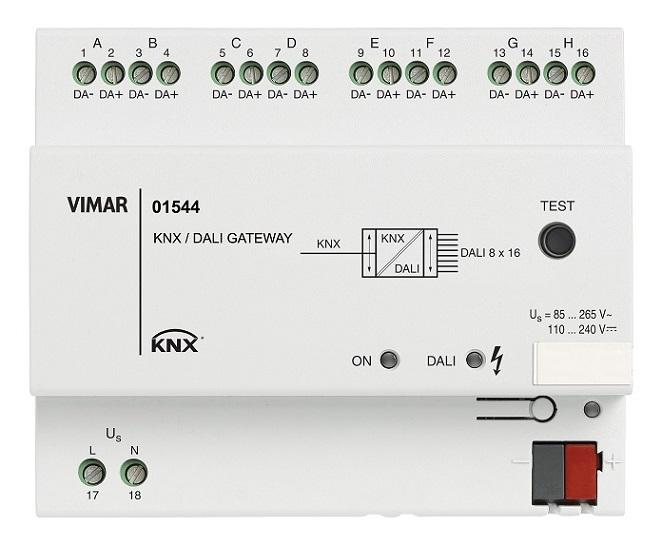
01544 DALI Gateway 8-fold 01544
VIMAR · Order number 01544 · Illumination › DALI
DALI_Gateway_8-fold_KNX
Download .knxprod DALI_Gateway_8-fold_KNX 1.1 · 464 KB
Product
| Manufacturer | VIMAR |
|---|---|
| Product name | 01544 DALI Gateway 8-fold |
| Order number | 01544 |
| Hardware | 01544 DALI-Gateway,8-fold |
| Medium | Twisted Pair |
| Bus current (mA) | 10 |
| Rail mounted | Yes |
| Width (mm) | 107 |
| Registration | Certified |
| Languages | de-DE, en-US, it-IT |
| Catalog entry | M-002C_H-01544-1-O0002_HP-A018-11-2E6B-O0002_CI-01544-1 |
| Fingerprint | 2E6B |
| SHA-256 | 759a7021b10de0dacca0ab6222e6d1a15289dea52bdcbdeb5b0fa5e9c29282a4 |
| First seen | 2026-11-25 |
| Markets | 69 markets |
Application program: DALI_Gateway_8-fold_KNX 1.1
| Application number | $A018 |
|---|---|
| Version | 1.1 |
| Mask version | MV-0701 (7.1) |
| KNX Data Secure | No |
| Parameters | 511 |
| Group objects | 111 |
Group objects (111)
| No | Name | Function | Size | DPT | Flags |
|---|---|---|---|---|---|
| 0 | Channel A | On / Off | 1 Bit | CW | |
| 1 | Channel A | Relative Dimming | 4 Bit | CW | |
| 2 | Channel A | Set Brightness Value | 1 Byte | CW | |
| 3 | Channel A | Slave Operation On / Off | 1 Bit | CRWU | |
| 4 | Channel A | Burn in Lamps | 1 Bit | CRWU | |
| 5 | Channel A | Telegr. Status On / Off | 1 Bit | CRT | |
| 6 | Channel A | Telegr. Status Brightness Valu | 1 Byte | CRT | |
| 7 | Channel A | Telegr. Fault Ballast | 1 Bit | CRT | |
| 8 | Channel A | Telegr. Fault Lamp | 1 Bit | CRT | |
| 9 | Channel A | Telegr. Fault DALI | 1 Bit | CRT | |
| 10 | Channel B | On / Off | 1 Bit | CW | |
| 11 | Channel B | Relative Dimming | 4 Bit | CW | |
| 12 | Channel B | Set Brightness Value | 1 Byte | CW | |
| 13 | Channel B | Slave Operation On / Off | 1 Bit | CRWU | |
| 14 | Channel B | Burn in Lamps | 1 Bit | CRWU | |
| 15 | Channel B | Telegr. Status On / Off | 1 Bit | CRT | |
| 16 | Channel B | Telegr. Status Brightness Valu | 1 Byte | CRT | |
| 17 | Channel B | Telegr. Fault Ballast | 1 Bit | CRT | |
| 18 | Channel B | Telegr. Fault Lamp | 1 Bit | CRT | |
| 19 | Channel B | Telegr. Fault DALI | 1 Bit | CRT | |
| 20 | Channel C | On / Off | 1 Bit | CW | |
| 21 | Channel C | Relative Dimming | 4 Bit | CW | |
| 22 | Channel C | Set Brightness Value | 1 Byte | CW | |
| 23 | Channel C | Slave Operation On / Off | 1 Bit | CRWU | |
| 24 | Channel C | Burn in Lamps | 1 Bit | CRWU | |
| 25 | Channel C | Telegr. Status On / Off | 1 Bit | CRT | |
| 26 | Channel C | Telegr. Status Brightness Valu | 1 Byte | CRT | |
| 27 | Channel C | Telegr. Fault Ballast | 1 Bit | CRT | |
| 28 | Channel C | Telegr. Fault Lamp | 1 Bit | CRT | |
| 29 | Channel C | Telegr. Fault DALI | 1 Bit | CRT | |
| 30 | Channel D | On / Off | 1 Bit | CW | |
| 31 | Channel D | Relative Dimming | 4 Bit | CW | |
| 32 | Channel D | Set Brightness Value | 1 Byte | CW | |
| 33 | Channel D | Slave Operation On / Off | 1 Bit | CRWU | |
| 34 | Channel D | Burn in Lamps | 1 Bit | CRWU | |
| 35 | Channel D | Telegr. Status On / Off | 1 Bit | CRT | |
| 36 | Channel D | Telegr. Status Brightness Valu | 1 Byte | CRT | |
| 37 | Channel D | Telegr. Fault Ballast | 1 Bit | CRT | |
| 38 | Channel D | Telegr. Fault Lamp | 1 Bit | CRT | |
| 39 | Channel D | Telegr. Fault DALI | 1 Bit | CRT | |
| 40 | Channel E | On / Off | 1 Bit | CW | |
| 41 | Channel E | Relative Dimming | 4 Bit | CW | |
| 42 | Channel E | Set Brightness Value | 1 Byte | CW | |
| 43 | Channel E | Slave Operation On / Off | 1 Bit | CRWU | |
| 44 | Channel E | Burn in Lamps | 1 Bit | CRWU | |
| 45 | Channel E | Telegr. Status On / Off | 1 Bit | CRT | |
| 46 | Channel E | Telegr. Status Brightness Valu | 1 Byte | CRT | |
| 47 | Channel E | Telegr. Fault Ballast | 1 Bit | CRT | |
| 48 | Channel E | Telegr. Fault Lamp | 1 Bit | CRT | |
| 49 | Channel E | Telegr. Fault DALI | 1 Bit | CRT | |
| 50 | Channel F | On / Off | 1 Bit | CW | |
| 51 | Channel F | Relative Dimming | 4 Bit | CW | |
| 52 | Channel F | Set Brightness Value | 1 Byte | CW | |
| 53 | Channel F | Slave Operation On / Off | 1 Bit | CRWU | |
| 54 | Channel F | Burn in Lamps | 1 Bit | CRWU | |
| 55 | Channel F | Telegr. Status On / Off | 1 Bit | CRT | |
| 56 | Channel F | Telegr. Status Brightness Valu | 1 Byte | CRT | |
| 57 | Channel F | Telegr. Fault Ballast | 1 Bit | CRT | |
| 58 | Channel F | Telegr. Fault Lamp | 1 Bit | CRT | |
| 59 | Channel F | Telegr. Fault DALI | 1 Bit | CRT | |
| 60 | Channel G | On / Off | 1 Bit | CW | |
| 61 | Channel G | Relative Dimming | 4 Bit | CW | |
| 62 | Channel G | Set Brightness Value | 1 Byte | CW | |
| 63 | Channel G | Slave Operation On / Off | 1 Bit | CRWU | |
| 64 | Channel G | Burn in Lamps | 1 Bit | CRWU | |
| 65 | Channel G | Telegr. Status On / Off | 1 Bit | CRT | |
| 66 | Channel G | Telegr. Status Brightness Valu | 1 Byte | CRT | |
| 67 | Channel G | Telegr. Fault Ballast | 1 Bit | CRT | |
| 68 | Channel G | Telegr. Fault Lamp | 1 Bit | CRT | |
| 69 | Channel G | Telegr. Fault DALI | 1 Bit | CRT | |
| 70 | Channel H | On / Off | 1 Bit | CW | |
| 71 | Channel H | Relative Dimming | 4 Bit | CW | |
| 72 | Channel H | Set Brightness Value | 1 Byte | CW | |
| 73 | Channel H | Slave Operation On / Off | 1 Bit | CRWU | |
| 74 | Channel H | Burn in Lamps | 1 Bit | CRWU | |
| 75 | Channel H | Telegr. Status On / Off | 1 Bit | CRT | |
| 76 | Channel H | Telegr. Status Brightness Valu | 1 Byte | CRT | |
| 77 | Channel H | Telegr. Fault Ballast | 1 Bit | CRT | |
| 78 | Channel H | Telegr. Fault Lamp | 1 Bit | CRT | |
| 79 | Channel H | Telegr. Fault DALI | 1 Bit | CRT | |
| 80 | Channels A...H | On / Off | 1 Bit | CW | |
| 81 | Channels A...H | Relative Dimming | 4 Bit | CW | |
| 82 | Channels A...H | Set Brightness Value | 1 Byte | CW | |
| 83 | Channels A...H | Central Control On / Off | 1 Bit | CRWU | |
| 84 | Light Scene 1/2 | Recall Scene | 1 Bit | CW | |
| 85 | Light Scene 3/4 | Recall Scene | 1 Bit | CW | |
| 86 | Light Scene 5/6 | Recall Scene | 1 Bit | CW | |
| 87 | Light Scene 7/8 | Recall Scene | 1 Bit | CW | |
| 88 | Light Scene 9/10 | Recall Scene | 1 Bit | CW | |
| 89 | Light Scene 11/12 | Recall Scene | 1 Bit | CW | |
| 90 | Light Scene 13/14 | Recall Scene | 1 Bit | CW | |
| 91 | Light Scene 15/16 | Recall Scene | 1 Bit | CW | |
| 92 | Light Scene 1/2 | Store Scene | 1 Bit | CW | |
| 93 | Light Scene 3/4 | Store Scene | 1 Bit | CW | |
| 94 | Light Scene 5/6 | Store Scene | 1 Bit | CW | |
| 95 | Light Scene 7/8 | Store Scene | 1 Bit | CW | |
| 96 | Light Scene 9/10 | Store Scene | 1 Bit | CW | |
| 97 | Light Scene 11/12 | Store Scene | 1 Bit | CW | |
| 98 | Light Scene 13/14 | Store Scene | 1 Bit | CW | |
| 99 | Light Scene 15/16 | Store Scene | 1 Bit | CW | |
| 100 | Light Scene 9/10 | Restore Default Values | 1 Bit | CRWTU | |
| 101 | Light Scene 11/12 | Restore Default Values | 1 Bit | CRWTU | |
| 102 | Light Scene 13/14 | Restore Default Values | 1 Bit | CRWTU | |
| 103 | Light Scene 15/16 | Restore Default Values | 1 Bit | CRWTU | |
| 104 | Light Scenes 1...16 | Control Scenes | 1 Byte | CW | |
| 105 | Light Scenes 1...16 | Restore Scenes | 1 Byte | CRWTU | |
| 106 | General | Telegr. Fault 230 VAC | 1 Bit | CRT | |
| 107 | General | Fault Acknowledgement | 1 Bit | CW | |
| 108 | General | Telegr. Communication send | 1 Bit | CRT | |
| 109 | General | Telegr. Communication receive | 1 Bit | CW | |
| 110 | General | Detect Ballasts | 1 Bit | CW |
Parameters (61)
| Parameter | Type | Default |
|---|---|---|
| Channel setting | list | global |
| Reaction on DALI or EIB/KNX bus voltage failure | list | no change |
| Reaction on DALI or EIB/KNX bus voltage recovery | list | no change |
| Reaction on EIB/KNX communication fault | list | no change |
| Channel reaction on ballast or lamp failure | list | no change |
| Burn-in lamps | list | No |
| Lamp burn-in period in hours (1-255) | unsignedInt 1…255 | 100 |
| Operation Mode | list | normal |
| Initial Brightness value when turned on | list | 50% |
| Dim period to reach hold brightness value | list | 5s |
| Hold brightness value | list | 100% |
| Hold time | list | 5min |
| Dim period to reach Brightness value before turned off | list | 30s |
| Brightness value when turned off | list | min. physical brightness |
| Brightness value when turned on | list | last brightness value |
| Minimal brightness value | list | min. physical brightness |
| Maximum brightness value | list | 100% |
| Permit channel to be turned on via Dimm telegram | list | Yes |
| Permit channel to be turned off via Dimm telegram | list | No |
| Setting brightness value turns channel on | list | Yes |
| Dim period to reach turn on brightness resp. off state (Object On/Off) | list | 2s |
| Dim period to reach set brightnes value (Object Set Brightness Value) | list | 2s |
| Dimming speed, time for 0-100% (Object Relative Dimming) | list | 5s |
| Dimming Speed, time for 0-100% (Object Relative Dimming) | list | 5s |
| Brightness value when turned on | list | 100% |
| Permit channel to be turned on via Dimm telegram | list | No |
| Activate light scenes | list | No |
| Permit storage of light scenes | list | Yes |
| Allow light scenes to be reset to default values | list | No |
| Control scenes via | list | 1-bit-telegrams |
| Restore default light scene after bus voltage recovery | list | No |
| Overwrite scene with dowload | list | Yes |
| Transition time for light scene | list | 2s |
| Channel 1: Light scene value | list | aktiv |
| Channel 1: Light scene value | list | 50% |
| Channel 2: Light scene value | list | 50% |
| Channel 2: Light scene value | list | aktiv |
| Channel 3: Light scene value | list | 50% |
| Channel 3: Light scene value | list | aktiv |
| Channel 4: Light scene value | list | 50% |
| Channel 4: Light scene value | list | aktiv |
| Channel 5: Light scene value | list | 50% |
| Channel 5: Light scene value | list | aktiv |
| Channel 6: Light scene value | list | 50% |
| Channel 6: Light scene value | list | aktiv |
| Channel 7: Light scene value | list | 50% |
| Channel 7: Light scene value | list | aktiv |
| Channel 8: Light scene value | list | 50% |
| Channel 8: Light scene value | list | aktiv |
| Send telegram "Status On/Off" | list | no |
| Send telegram "Status Brightness Value" | list | no |
| Transmission delay time: Telegram "Status Brightness Value" | list | 10s |
| Send telegram "Fault Ballast" | list | no |
| Send telegram "Fault Lamp" | list | no |
| Send telegram "Fault DALI" | list | no |
| Send telegram "Fault 230 VAC" | list | no |
| Acknowledge faults | list | No |
| send / receive communicationtelegram cyclic | list | no |
| Transmission period | list | 1min |
| Receive period | list | 1min |
| Transmission / Receive period | list | 1min |
Version history
| Application | App no | Fingerprint | First seen | Size | File |
|---|---|---|---|---|---|
| DALI_Gateway_8-fold_KNX 1.1 latest | $A018 | 2E6B | 2026-11-25 | 464 KB | Download |
About this file
This is the official ETS product database for the VIMAR 01544 DALI Gateway 8-fold (01544), published by the manufacturer in the KNX online catalog. To use it, open ETS, go to Catalogs → Import and choose the downloaded .knxprod file. The device then appears in your catalog and can be added to a project. Older versions are kept so existing projects can be matched to the application program they were commissioned with.
More from VIMAR
- 01538 Dimmer actuator 2-fold 100W, MDRC 01538
- 01500.1 Power supply,320mA,MDRC 01500.1
- 01500.2 Power supply unit 320mA KNX 01500.2
- 01501.1 Power supply,640mA,MDRC 01501.1
- 01501.2 Power supply unit 640mA KNX 01501.2
- 01504.1 Line-/Area Coupler, MDRC 01504.1
- 01504.2 Line coupler 01504.2
- 01506 By-me Plus KNX Secure TP router 01506
- 01507 By-me Plus KNX Secure IP router 01507
- 01510 4 Fold Input 01510
- 01514 2Inputs/Outputs Interface 01514
- 01515.1 Universal Interfaces, 4-fold 01515.1