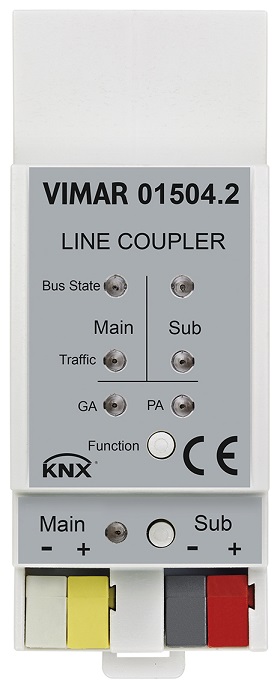
01504.2 Line coupler 01504.2
VIMAR · Order number 01504.2 · Coupler › Linecoupler
Linerepeater
Download .knxprod Linerepeater 2.0 · 70 KB
Product
| Manufacturer | VIMAR |
|---|---|
| Product name | 01504.2 Line coupler |
| Order number | 01504.2 |
| Hardware | Linienkoppler |
| Medium | Twisted Pair |
| Bus current (mA) | 30 |
| Rail mounted | Yes |
| Width (mm) | 35 |
| Device kind | Coupler |
| Registration | Certified |
| Languages | de-DE, en-US, it-IT, es-ES, fr-FR, pt-PT, ru-RU, sv-SE |
| Catalog entry | M-002C_H-01504.2E2.20-0-O0072_HP-05E0-20-D639-O0072_CI-01504.2E2.20-0 |
| Fingerprint | D639 |
| SHA-256 | 4c1aa748d41778e8651b59afe29ca334053176bfabdf03fef63d6a22775476c1 |
| First seen | 2026-11-25 |
| Markets | 69 markets |
Application program: Linerepeater 2.0
| Application number | $05E0 |
|---|---|
| Version | 2.0 |
| Mask version | MV-0912 (Coupler 0912) |
| KNX Data Secure | No |
| Minimum ETS version | 4.0 |
| Parameters | 45 |
| Group objects | 0 |
Group objects (0)
| No | Name | Function | Size | DPT | Flags |
|---|
Parameters (17)
| Parameter | Type | Default |
|---|---|---|
| Fallback time for manual operation | list | 1 hour |
| Time for error LED | list | 2 sec |
| Manual function | list | pass all telegrams |
| LDdef2 | unsignedInt 0…255 | 255 |
| LKgroupConfig | unsignedInt 0…255 | 51 |
| Configuration | list | groups, physical: route |
| Group telegrams | list | transmit all |
| Main group telegrams 14 / 15 | list | transmit all |
| Physical telegrams | list | block |
| Physical: Repetition if errors on main line | list | normal |
| Group: Repetition if errors on main line | list | normal |
| Telegram confirmations on line | list | if routed |
| Send confirmation on own telegrams | list | no |
| Sub group telegrams 14 / 15 | list | transmit all |
| Physical: Repetition if errors on sub line | list | normal |
| Group: Repetition if errors on sub line | list | normal |
| Telegram confirmations on line | list | always |
Version history
| Application | App no | Fingerprint | First seen | Size | File |
|---|---|---|---|---|---|
| Linerepeater 2.0 latest | $05E0 | D639 | 2026-11-25 | 70 KB | Download |
| Linecoupler 1.0 | $05E0 | 99FD | 2026-11-25 | 70 KB | Download |
About this file
This is the official ETS product database for the VIMAR 01504.2 Line coupler (01504.2), published by the manufacturer in the KNX online catalog. To use it, open ETS, go to Catalogs → Import and choose the downloaded .knxprod file. The device then appears in your catalog and can be added to a project. Older versions are kept so existing projects can be matched to the application program they were commissioned with.
More from VIMAR
- 01500.1 Power supply,320mA,MDRC 01500.1
- 01500.2 Power supply unit 320mA KNX 01500.2
- 01501.1 Power supply,640mA,MDRC 01501.1
- 01501.2 Power supply unit 640mA KNX 01501.2
- 01504.1 Line-/Area Coupler, MDRC 01504.1
- 01506 By-me Plus KNX Secure TP router 01506
- 01507 By-me Plus KNX Secure IP router 01507
- 01510 4 Fold Input 01510
- 01514 2Inputs/Outputs Interface 01514
- 01515.1 Universal Interfaces, 4-fold 01515.1
- 01521 Switch actuator 12-fold 10A 01521
- 01521.1 Switch actuator 12-fold 10A 01521.1