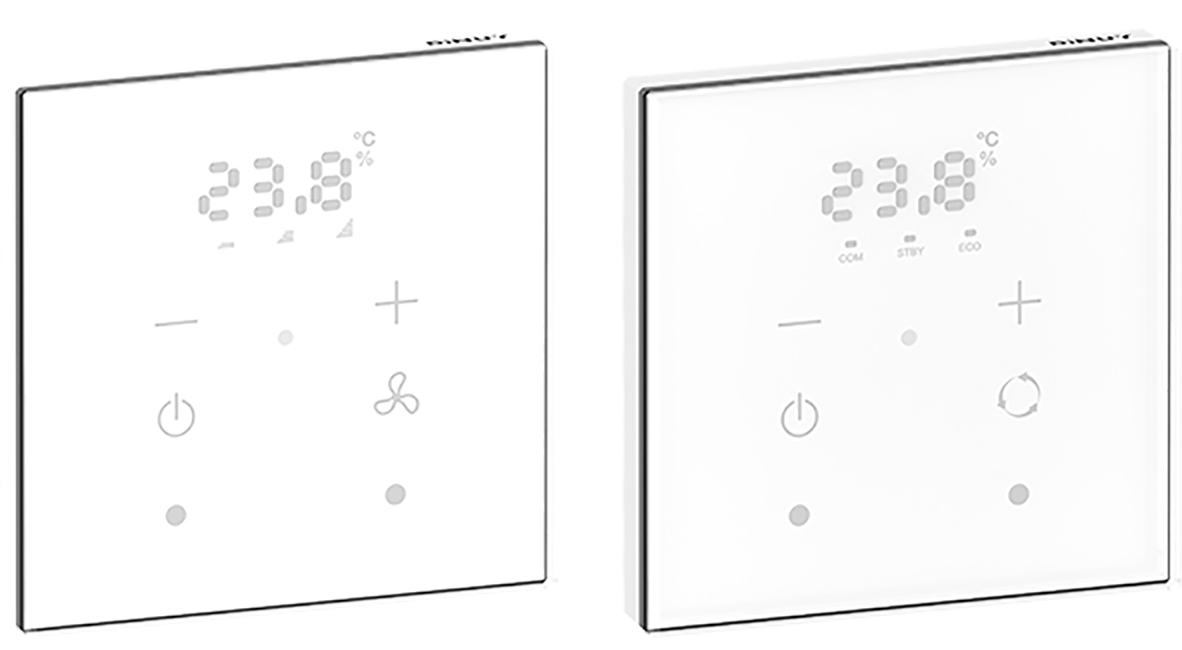
Dinuy Thermostat TM KNT 001_002
 Dinuy · Order number TM KNT 001_002 · KNX-TP Devices › Touch Pushbuttons › Touch Room Temperature Controller
Download .knxprod TMKNT001_002 1.0 · 241 KB
Product
| Manufacturer | Dinuy |
|---|---|
| Product name | Dinuy Thermostat |
| Order number | TM KNT 001_002 |
| Hardware | TMKNT001_002 |
| Medium | Twisted Pair |
| Bus current (mA) | 10 |
| Rail mounted | No |
| Registration | Registered · 2025-11-04 |
| Languages | es-ES, en-GB, en-US |
| Catalog entry | M-009A_H-TMKNT001002100625-1_HP-2015-10-F184_CI-TM.20KNT.20001.5F002-1 |
| Fingerprint | F184 |
| SHA-256 | 06903b0376af2571d12bb389385e2f0f8da34af26740ce5e4a33d616c1a101e1 |
| First seen | 2026-11-25 |
| Markets | 68 markets |
Application program: TMKNT001_002 1.0
| Application number | $2015 |
|---|---|
| Version | 1.0 |
| Mask version | MV-07B0 (System B) |
| KNX Data Secure | No |
| Minimum ETS version | 5.0 |
| Parameters | 373 |
| Group objects | 137 |
Group objects (137)
| No | Name | Function | Size | DPT | Flags |
|---|---|---|---|---|---|
| 1 | [In1] Disable Input | 1 = Disable | 1 Bit | 1.3 enable | CW |
| 2 | [In1] Sensor Temperature Value | Temperature Value ºC | 2 Bytes | 9.1 temperature (°C) | CRT |
| 2 | [In1] Window state | 1 = Open, 0 = Closed (Not inverted) | 1 Bit | 1.9 open/close | CRT |
| 3 | [In1] Temperature Sensor Over-Heating | 1 = Over-Heating; 0 = No Over-Heating | 1 Bit | 1.5 alarm | CRT |
| 4 | [In1] Temperature Sensor Over-Cooling | 1 = Over-Cooling; 0 = No Over-Cooling | 1 Bit | 1.5 alarm | CRT |
| 5 | [In2] Disable Input | 1 = Disable | 1 Bit | 1.3 enable | CW |
| 6 | [In2] Sensor Temperature Value | Temperature Value ºC | 2 Bytes | 9.1 temperature (°C) | CRT |
| 6 | [In2] Window state | 1 = Open, 0 = Closed (Not inverted) | 1 Bit | 1.9 open/close | CRT |
| 7 | [In2] Temperature Sensor Over-Heating | 1 = Over-Heating; 0 = No Over-Heating | 1 Bit | 1.5 alarm | CRT |
| 8 | [In2] Temperature Sensor Over-Cooling | 1 = Over-Cooling; 0 = No Over-Cooling | 1 Bit | 1.5 alarm | CRT |
| 9 | [In3] Disable Input | 1 = Disable | 1 Bit | 1.3 enable | CW |
| 10 | [In3] Sensor Temperature Value | Temperature Value ºC | 2 Bytes | 9.1 temperature (°C) | CRT |
| 10 | [In3] Window state | 1 = Open, 0 = Closed (Not inverted) | 1 Bit | 1.9 open/close | CRT |
| 11 | [In3] Temperature Sensor Over-Heating | 1 = Over-Heating; 0 = No Over-Heating | 1 Bit | 1.5 alarm | CRT |
| 12 | [In3] Temperature Sensor Over-Cooling | 1 = Over-Cooling; 0 = No Over-Cooling | 1 Bit | 1.5 alarm | CRT |
| 13 | [In4] Disable Input | 1 = Disable | 1 Bit | 1.3 enable | CW |
| 14 | [In4] Sensor Temperature Value | Temperature Value ºC | 2 Bytes | 9.1 temperature (°C) | CRT |
| 14 | [In4] Window state | 1 = Open, 0 = Closed (Not inverted) | 1 Bit | 1.9 open/close | CRT |
| 15 | [In4] Temperature Sensor Over-Heating | 1 = Over-Heating; 0 = No Over-Heating | 1 Bit | 1.5 alarm | CRT |
| 16 | [In4] Temperature Sensor Over-Cooling | 1 = Over-Cooling; 0 = No Over-Cooling | 1 Bit | 1.5 alarm | CRT |
| 17 | [PB1] Disable Button | 1 = Disable, 0 = Enable | 1 Bit | 1.3 enable | CW |
| 18 | [PB1] Short Press: 2-Bit value | 2-Bit value sending | 2 Bit | 2.1 switch control | CRT |
| 18 | [PB1] Short Press: 2-Byte signed value | 2-Byte signed value sending | 2 Bytes | 8.1 pulses difference | CRT |
| 18 | [PB1] Short Press: 4-Byte value | 4-Byte value sending | 4 Bytes | 12.1 counter pulses (unsigned) | CRT |
| 18 | [PB1] Short Press: Send Scene | 0 = Scene 1, 1 = Scene 2 | 1 Bit | 1.22 scene | CRT |
| 18 | [PB1] Short Press: 2-Byte floating value | 2-Byte floating value sending | 2 Bytes | 9.1 temperature (°C) | CRT |
| 18 | [PB1] Short Press: Send Scene | 8-bit Scene Control | 1 Byte | 18.1 scene control | CRT |
| 18 | [PB1] Short Press: 1-Bit value | 1-Bit value sending | 1 Bit | 1.11 state | CRT |
| 18 | [PB1] Short Press: Switch | 1 = On; 0 = Off | 1 Bit | 1.1 switch | CRT |
| 18 | [PB1] Short Press: 1-Byte value | 1-Byte value sending | 1 Byte | 5.10 counter pulses (0..255) | CRT |
| 18 | [PB1] Short Press: 2-Byte value | 2-Byte value sending | 2 Bytes | 7.1 pulses | CRT |
| 18 | [PB1] Press | 1 = On; 0 = Off | 1 Bit | 1.1 switch | CRT |
| 18 | [PB1] Short Press: Blind Step/Stop | 0 = Step Up / Stop, 1 = Step Down / Stop | 1 Bit | 1.7 step | CRT |
| 19 | [PB1] Long Press: 2-Byte floating value | 2-Byte floating value sending | 2 Bytes | 9.1 temperature (°C) | CRT |
| 19 | [PB1] Long Press: 2-Byte signed value | 2-Byte signed value sending | 2 Bytes | 8.1 pulses difference | CRT |
| 19 | [PB1] Long Press: Save Scene | 0 = Save Scene 1, 1 = Save Scene 2 | 1 Bit | 1.6 binary value | CT |
| 19 | [PB1] Long Press: 4-Byte value | 4-Byte value sending | 4 Bytes | 12.1 counter pulses (unsigned) | CRT |
| 19 | [PB1] Press 2 | 1 = On; 0 = Off | 1 Bit | 1.1 switch | CRT |
| 19 | [PB1] Long Press: 1-Byte value | 1-Byte value sending | 1 Byte | 5.10 counter pulses (0..255) | CRT |
| 19 | [PB1] Long Press: 2-Byte value | 2-Byte value sending | 2 Bytes | 7.1 pulses | CRT |
| 19 | [PB1] Long Press: 2-Bit value | 2-Bit value sending | 2 Bit | 2.1 switch control | CRT |
| 19 | [PB1] Long Press: 1-Bit value | 1-Bit value sending | 1 Bit | 1.11 state | CRT |
| 19 | [PB1] Long Press: Dimming | Dimming control | 4 Bit | 3.7 dimming control | CRT |
| 19 | [PB1] Long Press: Switch | 1 = On; 0 = Off | 1 Bit | 1.1 switch | CRT |
| 19 | [PB1] Long Press: Save Scene | 0 = No action, 1 = Save Scene | 1 Bit | 1.3 enable | CW |
| 19 | [PB1] Long Press: Move Blind | 0 = Up, 1 = Down | 1 Bit | 1.8 up/down | CRT |
| 20 | [PB1] Press 3 | 1 = On; 0 = Off | 1 Bit | 1.1 switch | CRT |
| 21 | [PB1] Press 4 | 1 = On; 0 = Off | 1 Bit | 1.1 switch | CRT |
| 22 | [PB1] LED "Button 1" | 0 = Off; 1 = On | 1 Bit | 1.1 switch | CW |
| 23 | Digits without brightness | 1 = Disable, 0 = Enable | 1 Bit | 1.3 enable | CW |
| 24 | [PB2] Disable Button | 1 = Disable, 0 = Enable | 1 Bit | 1.3 enable | CW |
| 25 | [PB2] Short Press: Send Scene | 0 = Scene 1, 1 = Scene 2 | 1 Bit | 1.22 scene | CRT |
| 25 | [PB2] Short Press: 4-Byte value | 4-Byte value sending | 4 Bytes | 12.1 counter pulses (unsigned) | CRT |
| 25 | [PB2] Press | 1 = On; 0 = Off | 1 Bit | 1.1 switch | CRT |
| 25 | [PB2] Short Press: 2-Byte value | 2-Byte value sending | 2 Bytes | 7.1 pulses | CRT |
| 25 | [PB2] Short Press: 2-Byte floating value | 2-Byte floating value sending | 2 Bytes | 9.1 temperature (°C) | CRT |
| 25 | [PB2] Short Press: Blind Step/Stop | 0 = Step Up / Stop, 1 = Step Down / Stop | 1 Bit | 1.7 step | CRT |
| 25 | [PB2] Short Press: 1-Bit value | 1-Bit value sending | 1 Bit | 1.11 state | CRT |
| 25 | [PB2] Short Press: 2-Bit value | 2-Bit value sending | 2 Bit | 2.1 switch control | CRT |
| 25 | [PB2] Short Press: 1-Byte value | 1-Byte value sending | 1 Byte | 5.10 counter pulses (0..255) | CRT |
| 25 | [PB2] Short Press: 2-Byte signed value | 2-Byte signed value sending | 2 Bytes | 8.1 pulses difference | CRT |
| 25 | [PB2] Short Press: Switch | 1 = On; 0 = Off | 1 Bit | 1.1 switch | CRT |
| 25 | [PB2] Short Press: Send Scene | 8-bit Scene Control | 1 Byte | 18.1 scene control | CRT |
| 26 | [PB2] Long Press: Switch | 1 = On; 0 = Off | 1 Bit | 1.1 switch | CRT |
| 26 | [PB2] Long Press: 1-Bit value | 1-Bit value sending | 1 Bit | 1.11 state | CRT |
| 26 | [PB2] Long Press: 2-Byte value | 2-Byte value sending | 2 Bytes | 7.1 pulses | CRT |
| 26 | [PB2] Long Press: Save Scene | 0 = No action, 1 = Save Scene | 1 Bit | 1.3 enable | CW |
| 26 | [PB2] Press 2 | 1 = On; 0 = Off | 1 Bit | 1.1 switch | CRT |
| 26 | [PB2] Long Press: 1-Byte value | 1-Byte value sending | 1 Byte | 5.10 counter pulses (0..255) | CRT |
| 26 | [PB2] Long Press: 2-Bit value | 2-Bit value sending | 2 Bit | 2.1 switch control | CRT |
| 26 | [PB2] Long Press: Move Blind | 0 = Up, 1 = Down | 1 Bit | 1.8 up/down | CRT |
| 26 | [PB2] Long Press: Dimming | Dimming control | 4 Bit | 3.7 dimming control | CRT |
| 26 | [PB2] Long Press: 4-Byte value | 4-Byte value sending | 4 Bytes | 12.1 counter pulses (unsigned) | CRT |
| 26 | [PB2] Long Press: 2-Byte signed value | 2-Byte signed value sending | 2 Bytes | 8.1 pulses difference | CRT |
| 26 | [PB2] Long Press: Save Scene | 0 = Save Scene 1, 1 = Save Scene 2 | 1 Bit | 1.6 binary value | CT |
| 26 | [PB2] Long Press: 2-Byte floating value | 2-Byte floating value sending | 2 Bytes | 9.1 temperature (°C) | CRT |
| 27 | [PB2] Press 3 | 1 = On; 0 = Off | 1 Bit | 1.1 switch | CRT |
| 28 | [PB2] Press 4 | 1 = On; 0 = Off | 1 Bit | 1.1 switch | CRT |
| 29 | [PB2] LED "Button 2" | 0 = Off; 1 = On | 1 Bit | 1.1 switch | CW |
| 30 | [Th] Special mode 1 Byte Feedback | HVAC 1 Byte mode | 1 Byte | 20.102 HVAC mode | CRT |
| 31 | [Th] On/Off Feedback | 1 = On; 0 = Off | 1 Bit | 1.1 switch | CRT |
| 32 | [Th] On/Off | 1 = On; 0 = Off | 1 Bit | 1.1 switch | CW |
| 33 | [Th] Set-point Feedback | Current Set-point | 2 Bytes | 9.1 temperature (°C) | CRT |
| 34 | [Th] Comfort Set-point Input | Comfort Set-point | 2 Bytes | 9.1 temperature (°C) | CW |
| 34 | [Th] Set-point Input | Set-point | 2 Bytes | 9.1 temperature (°C) | CW |
| 35 | [Fancoil] Heating Valve Output (%) | 0-100% | 1 Byte | 5.1 percentage (0..100%) | CRT |
| 35 | [Fancoil] Valve Output | 1 = On; 0 = Off | 1 Bit | 1.1 switch | CRT |
| 35 | [Th] Heating Output | Output (PWM Proportional - Integral) | 1 Bit | 1.1 switch | CRT |
| 35 | [Th] Output | Output (% Proportional - Integral) | 1 Byte | 5.1 percentage (0..100%) | CRT |
| 35 | [Th] Output | Output (PWM Proportional - Integral) | 1 Bit | 1.1 switch | CRT |
| 35 | [Th] Output | Output (2-point with Hysteresis) | 1 Bit | 1.1 switch | CRT |
| 35 | [Fancoil] Valve (%) Output | 0-100% | 1 Byte | 5.1 percentage (0..100%) | CRT |
| 35 | [Th] Heating Output | Output (% Proportional - Integral) | 1 Byte | 5.1 percentage (0..100%) | CRT |
| 35 | [Fancoil] Heating Valve Output | 1 = On; 0 = Off | 1 Bit | 1.1 switch | CRT |
| 35 | [Th] Heating Output | Output (2-point with Hysteresis) | 1 Bit | 1.1 switch | CRT |
| 36 | [Th] Cooling Output | Output (PWM Proportional - Integral) | 1 Bit | 1.1 switch | CRT |
| 36 | [Fancoil] Cooling Valve Output (%) | 0-100% | 1 Byte | 5.1 percentage (0..100%) | CRT |
| 36 | [Fancoil] Cooling Valve Output | 1 = On; 0 = Off | 1 Bit | 1.1 switch | CRT |
| 36 | [Th] Cooling Output | Output (% Proportional - Integral) | 1 Byte | 5.1 percentage (0..100%) | CRT |
| 36 | [Th] Cooling Output | Output (2-point with Hysteresis) | 1 Bit | 1.1 switch | CRT |
| 37 | [Th] Temperature Sensor 1 | Input Temperature Sensor 1 | 2 Bytes | 9.1 temperature (°C) | CW |
| 38 | [Th] Temperature Sensor 2 | Input Temperature Sensor 2 | 2 Bytes | 9.1 temperature (°C) | CW |
| 39 | [Fancoil] Set Fan Speed in AUTO | 1 = Auto | 1 Bit | 1.3 enable | CW |
| 40 | [Fancoil] Fan On (Auto) / Off | 1 = On; 0 = Off | 1 Bit | 1.1 switch | CW |
| 41 | [Fancoil] Set Speed 1 | 1 = On; | 1 Bit | 1.1 switch | CW |
| 41 | [Fancoil] Set Speed % | Input (% Proportional - Integral) | 1 Byte | 5.1 percentage (0..100%) | CW |
| 42 | [Fancoil] Set Speed 2 | 1 = On; | 1 Bit | 1.1 switch | CW |
| 43 | [Fancoil] Set Speed 3 | 1 = On; | 1 Bit | 1.1 switch | CW |
| 44 | [Fancoil] Speed (%) Output | Output (% Proportional - Integral) | 1 Byte | 5.1 percentage (0..100%) | CRT |
| 44 | [Fancoil] Speed 1 Output | 1 = On; 0 = Off | 1 Bit | 1.1 switch | CRT |
| 45 | [Fancoil] Speed 2 Output | 1 = On; 0 = Off | 1 Bit | 1.1 switch | CRT |
| 46 | [Fancoil] Speed 3 Output | 1 = On; 0 = Off | 1 Bit | 1.1 switch | CRT |
| 47 | [Th] Special Mode Feedback | 2 Bytes Mode Feedback | 2 Bytes | 22.101 RHCC status | CRT |
| 48 | [Th] Special mode Input 1 Byte | HVAC 1 Byte mode | 1 Byte | 20.102 HVAC mode | CW |
| 49 | [Th] Special mode Economy | 0 = Off; 1 = On | 1 Bit | 1.1 switch | CW |
| 50 | [Th] Special mode Stand-by | 0 = Off; 1 = On | 1 Bit | 1.1 switch | CW |
| 51 | [Th] Special mode Protection | 0 = Off; 1 = On | 1 Bit | 1.1 switch | CW |
| 52 | [Th] Special mode Comfort | 0 = Off; 1 = On | 1 Bit | 1.1 switch | CW |
| 53 | [Th] Heating or Cooling mode Feedback | 0 = Cooling; 1 = Heating | 1 Bit | 1.100 cooling/heating | CRT |
| 54 | [Th] Heating or Cooling mode | 0 = Cooling; 1 = Heating | 1 Bit | 1.100 cooling/heating | CW |
| 55 | [Th] Window Alarm 1 | 0 = No alarm; 1 = Alarm | 1 Bit | 1.5 alarm | CW |
| 56 | [Th] Window Alarm 2 | 0 = No alarm; 1 = Alarm | 1 Bit | 1.5 alarm | CW |
| 57 | [Th] Window Alarm 3 | 0 = No alarm; 1 = Alarm | 1 Bit | 1.5 alarm | CW |
| 58 | [Th] Window Alarm 4 | 0 = No alarm; 1 = Alarm | 1 Bit | 1.5 alarm | CW |
| 59 | [Temp] Disable Temperature Sensor | 1 = Disable; 0 = Enable | 1 Bit | 1.3 enable | CW |
| 60 | [Temp] Temperature Value | Temperature Value | 2 Bytes | 9.1 temperature (°C) | CRT |
| 61 | [Temp] Temperature Sensor Over-Heating | 1 = Over-Heating; 0 = No Over-Heating | 1 Bit | 1.5 alarm | CRT |
| 62 | [Temp] Temperature Sensor Over-Cooling | 1 = Over-Cooling; 0 = No Over-Cooling | 1 Bit | 1.5 alarm | CRT |
| 63 | [Hum] Disable Humidity Sensor | 1 = Disable; 0 = Enable | 1 Bit | 1.3 enable | CW |
| 64 | [Hum] Humidity Value | Humidity Value | 2 Bytes | 9.7 humidity (%) | CRT |
| 65 | [Hum] High Humidity Alarm | 1 = High Humidity; 0 = No High Humidity | 1 Bit | 1.5 alarm | CRT |
| 66 | [Hum] Low Humidity Alarm | 1 = Low Humidity; 0 = No Low Humidity | 1 Bit | 1.5 alarm | CRT |
| 67 | [Lux] Enable Brightness Sensor | Brightness sensor enable | 1 Bit | 1.1 switch | CW |
| 68 | [Lux] Brightness Value | Lux value | 2 Bytes | 9.4 lux (Lux) | CT |
| 69 | [Twil] Enable Twilight Function | Twilight function enable | 1 Bit | 1.1 switch | CW |
| 70 | [Twil] Twilight Output | ON - OFF | 1 Bit | 1.1 switch | CT |
| 70 | [Twil] Twilight Output | % Value | 1 Byte | 5.1 percentage (0..100%) | CT |
Parameters (226)
| Parameter | Type | Default |
|---|---|---|
| RASTRO_ETS | unsignedInt 0…255 | 16 |
| Thermostat Model | list | TM KNT 001 (with Fan Speed) |
| Temperature visualization time | unsignedInt 0…255 | 30 |
| Humidity visualization time | unsignedInt 0…255 | 5 |
| Enable sound when the key is pressed | list | Enable |
| Sound frequency | list | 75Hz |
| Sound duration | list | 0.3 sec |
| Maximum Heating Set-point | unsignedInt 5…45 | 25 |
| Maximum Cooling Set-point | unsignedInt 5…45 | 30 |
| Minimum Heating Set-point | unsignedInt 5…45 | 16 |
| Minimum Cooling Set-point | unsignedInt 5…45 | 20 |
| Step of Increase/Decrease | list | 0.5 |
| Button "+" Sensitivity | list | High |
| Button "-" Sensitivity | list | High |
| Button "On/Off" Sensitivity | list | High |
| Button "Speed" Sensitivity | list | High |
| "Button 1" Sensitivity | list | High |
| "Button 2" Sensitivity | list | High |
| Enable Water protection | list | Disable |
| Enable Temperature Sensor | list | Enable |
| Temperature Sensor calibration value | list | 0 |
| "Temperature Sensor" enabled after recovering bus voltage | unsignedInt 0…1 | 1 |
| Temperature value base time | list | 1 min |
| Factor (Total time = Base x Factor) | unsignedInt 0…255 | 1 |
| Temperature variation for sending value | unsignedInt 5…200 | 5 |
| Protection Alarms | list | No protection |
| Over-Heating Temperature | list | 45 |
| Over-Cooling Temperature | list | -30 |
| Hysteresis | unsignedInt 0…50 | 0 |
| Enable Humidity Sensor | list | Enable |
| Humidity Sensor calibration value | list | 0 |
| "Humidity Sensor" enabled after recovering bus voltage | unsignedInt 0…1 | 1 |
| Base time to send Humidity | list | 1 min |
| Humidity variation for sending value (0 = Not send) | list | 0 |
| High Relative Humidity value to send alarm | unsignedInt 0…100 | 80 |
| Low Relative Humidity value to send alarm | unsignedInt 0…100 | 20 |
| Hysteresis | list | 0 |
| Humidity Sensor calibration sign | list | Negative |
| Enable Brightness Sensor | unsignedInt 0…1 | 0 |
| Time base for cyclic transmission | list | 10 sec |
| Activate object "Brightnesst Sensor Disable" | list | Disable |
| Enable Brightness Sensor with | list | ON Telegram |
| Object "Enable Brightness Sensor" state | list | Disable |
| Twilight Function | unsignedInt 0…1 | 0 |
| Type of Twilight object | list | Value |
| Sending at Upper Threshold | list | ON Telegram |
| Sending at Lower Threshold | list | ON Telegram |
| Sending at Upper Threshold | unsignedInt 0…100 | 99 |
| Sending at Lower Threshold | unsignedInt 0…100 | 0 |
| Upper Threshold (Lux) | unsignedInt 1…20000 | 50 |
| Lower Threshold (Lux) | unsignedInt 1…20000 | 16 |
| Activate object "Enable Twilight Function" | unsignedInt 0…1 | 0 |
| Enable Twilight Function with | list | ON Telegram |
| Object "Enable Twilight Function" state | list | Disable |
| Enable Thermostat | unsignedInt 0…1 | 1 |
| Mode | list | Cooling Thermostat |
| Reference Temperature Source | list | One Source |
| Thermostat always On | unsignedInt 0…1 | 0 |
| State after recovering bus voltage | list | Off |
| Enable Turn-on Thermostat when Special commands arrive | list | Enable |
| Send Thermostat Mode after recovering bus voltage | unsignedInt 0…1 | 0 |
| Enable automatic mode change | list | Disable |
| Thermostat Type after recovering bus voltage | list | Cooling Thermostat |
| Control object | list | Different objects for Heating and Cooling |
| Set-point mode | list | Absolute Set-point mode |
| Initial Set-point after recovering bus voltage | unsignedInt 5…45 | 22 |
| Save Set-point after mode change via object | unsignedInt 0…1 | 0 |
| Mode after recovering bus voltage | list | Comfort |
| Enable 1 Bit mode objects | list | Disable |
| Enable Window protection | list | Disable |
| Comfort Set-point | unsignedInt 5…45 | 22 |
| Set-point Offset for Stand-by mode | list | -40 |
| Set-point Offset for Economy mode | list | -60 |
| Set-point for protection from Freezing | unsignedInt 0…15 | 8 |
| Comfort Set-point | unsignedInt 5…45 | 24 |
| Set-point Offset for Stand-by mode | unsignedInt 0…99 | 40 |
| Set-point Offset for Economy mode | unsignedInt 0…99 | 60 |
| Over-Temperature protection Set-point | unsignedInt 30…45 | 40 |
| Regulation Mode | list | 2-point control with Hysteresis |
| Upper Hysteresis | unsignedInt 0…50 | 10 |
| Lower Hysteresis | unsignedInt 0…50 | 10 |
| Forwarding period (0=Disable) | unsignedInt 0…255 | 0 |
| PWM type | list | 1 Byte (%) |
| PI Cycle Time | unsignedInt 0…255 | 15 |
| Proportional band | unsignedInt 0…15 | 5 |
| Attenuation factor | unsignedInt 0…99 | 31 |
| Maximum integral component (%) | unsignedInt 0…99 | 21 |
| Fan-Coil Type | list | Control On/Off |
| Valve Control type | list | Control On/Off |
| Heat / Cool System | list | 2 pipes |
| "Fan On/Off" object ON after recovering bus voltage | unsignedInt 0…1 | 1 |
| Upper Hysteresis to activate Speed 1 | unsignedInt 0…50 | 10 |
| Offset from Set-point to activate Speed 2 | list | -30 |
| Offset from Set-point to activate Speed 3 | list | -50 |
| Offset from Set-point to activate Speed 2 | unsignedInt 0…100 | 30 |
| Offset from Set-point to activate Speed 3 | unsignedInt 0…100 | 50 |
| Fan-Coil Speed Output objects | list | Only one active each Speed |
| Valve independent control | unsignedInt 0…1 | 0 |
| Upper Hysteresis for Valve | unsignedInt 0…50 | 10 |
| Lower Hysteresis for Valve | unsignedInt 0…50 | 10 |
| Lower Hysteresis to activate Speed 1 | unsignedInt 0…50 | 10 |
| DUMMY1 | unsignedInt 0…255 | 0 |
| DUMMY2 | unsignedInt 0…255 | 0 |
| DUMMY3 | unsignedInt 0…255 | 0 |
| DUMMY4 | unsignedInt 0…255 | 0 |
| DUMMY5 | unsignedInt 0…255 | 0 |
| DUMMY6 | unsignedInt 0…65535 | 0 |
| DUMMY7 | unsignedInt 0…65535 | 0 |
| Input Functionality | list | Not assigned |
| Window Contact polarity | list | Not inverted |
| Base time to refresh value | list | 1 min |
| Factor (Total time = Base x Factor) (0 = no refresh) | unsignedInt 0…255 | 1 |
| Over-Heating Temperature | list | 35 |
| Over-Cooling Temperature | list | 10 |
| Functionality enabled after recovering bus voltage | unsignedInt 0…1 | 1 |
| IN0_DUMMY1 | unsignedInt 0…255 | 0 |
| IN0_DUMMY2 | unsignedInt 0…255 | 0 |
| IN0_DUMMY3 | unsignedInt 0…255 | 0 |
| IN0_DUMMY4 | unsignedInt 0…65535 | 0 |
| IN0_DUMMY5 | unsignedInt 0…65535 | 0 |
| IN1_DUMMY1 | unsignedInt 0…255 | 0 |
| IN1_DUMMY2 | unsignedInt 0…255 | 0 |
| IN1_DUMMY3 | unsignedInt 0…255 | 0 |
| IN1_DUMMY4 | unsignedInt 0…65535 | 0 |
| IN1_DUMMY5 | unsignedInt 0…65535 | 0 |
| IN2_DUMMY1 | unsignedInt 0…255 | 0 |
| IN2_DUMMY2 | unsignedInt 0…255 | 0 |
| IN2_DUMMY3 | unsignedInt 0…255 | 0 |
| IN2_DUMMY4 | unsignedInt 0…65535 | 0 |
| IN2_DUMMY5 | unsignedInt 0…65535 | 0 |
| IN3_DUMMY1 | unsignedInt 0…255 | 0 |
| IN3_DUMMY2 | unsignedInt 0…255 | 0 |
| IN3_DUMMY3 | unsignedInt 0…255 | 0 |
| IN3_DUMMY4 | unsignedInt 0…65535 | 0 |
| IN3_DUMMY5 | unsignedInt 0…65535 | 0 |
| LED control | list | Via communication object |
| LED ON when... | list | "1" |
| ON state brightness % | unsignedInt 0…100 | 50 |
| OFF state brightness % | unsignedInt 0…100 | 50 |
| LED Functionality | list | Permanent |
| ON state Red LED % | unsignedInt 0…255 | 0 |
| ON state Green LED % | unsignedInt 0…255 | 100 |
| ON state Blue LED % | unsignedInt 0…255 | 0 |
| OFF state Red LED % | unsignedInt 0…255 | 0 |
| OFF state Green LED % | unsignedInt 0…255 | 100 |
| OFF state Blue LED % | unsignedInt 0…255 | 0 |
| Flash ON time | list | 400 msec |
| Flash OFF time | list | 400 msec |
| Function | list | Not assigned |
| Debounce time | list | 10 msec |
| Distinction between Short and Long Press | unsignedInt 0…1 | 0 |
| Contact type | list | Normally Open |
| Long Press after... | list | 1 sec |
| Number of objects for Short/Long Press | list | 1 |
| Short Press | list | Toggle |
| Long Press | list | On |
| Cyclic transmission | list | No |
| Action on Closing the contact | list | On |
| Action on Opening the contact | list | On |
| Transmit State after recovering bus voltage | unsignedInt 0…1 | 0 |
| Cycle base time | list | 1 sec |
| Factor (Total time = Base x Factor) | unsignedInt 0…255 | 7 |
| Dimming Functionality | list | Dimming and Switching |
| Action on press | list | Dimming Up/Down |
| Long Press | list | Dimming Up/Down |
| Save Scene on Long Press | unsignedInt 0…1 | 0 |
| Maximum time between two press | list | 0.5 sec |
| Number of Press | list | 2 |
| Action Press 1 | list | On |
| Action Press 2 | list | On |
| Action Press 3 | list | On |
| Action Press 4 | list | On |
| PB0_LEVELS_NUMOBJECTS | unsignedInt 0…255 | 0 |
| Functional Construction | list | 1 Pushbutton |
| Shutter Control Functionality | list | Short=Step, Long=Move |
| Long Press | list | Move Up |
| Short Press | list | Step Down |
| Value type on Short Press | list | 1 Bit |
| Value type on Long Press | list | 1 Bit |
| Sign | list | + |
| Integer part | unsignedInt 0…99 | 0 |
| Decimal part | unsignedInt 0…99 | 0 |
| 2 Bytes value | unsignedInt 0…65535 | 0 |
| 2 Bytes signed value | signedInt -32768…32767 | 0 |
| 4 Bytes value | unsignedInt 0…4294967295 | 0 |
| Bit value | list | 0 |
| 2 Bits value | list | 0 |
| 1 Byte value | unsignedInt 0…255 | 0 |
| Value type on press | list | 1 Bit |
| Type of Scene Control | list | 8 Bits Scene |
| Scene number | unsignedInt 1…64 | 1 |
| Short Press | list | Call |
| Save Scene | list | No |
| Scene number 1/2 | unsignedInt 0…255 | 1 |
| PB0_COUNTERSWITCH | unsignedInt 0…255 | 0 |
| PB0_START8 | unsignedInt 0…255 | 0 |
| PB0_START16 | unsignedInt 0…65535 | 0 |
| PB0_START32 | unsignedInt 0…4294967295 | 0 |
| PB0_DUMMY1 | unsignedInt 0…255 | 0 |
| PB0_DUMMY2 | unsignedInt 0…255 | 0 |
| PB0_DUMMY3 | unsignedInt 0…255 | 0 |
| PB0_DUMMY4 | unsignedInt 0…65535 | 0 |
| PB0_DUMMY5 | unsignedInt 0…65535 | 0 |
| ON state Red LED % | unsignedInt 0…100 | 0 |
| ON state Green LED % | unsignedInt 0…100 | 100 |
| ON state Blue LED % | unsignedInt 0…100 | 0 |
| OFF state Red LED % | unsignedInt 0…100 | 0 |
| OFF state Green LED % | unsignedInt 0…100 | 100 |
| OFF state Blue LED % | unsignedInt 0…100 | 0 |
| Long Press after... | list | 0.3 sec |
| PB1_LEVELS_NUMOBJECTS | unsignedInt 0…255 | 0 |
| Integer part | unsignedInt 0…255 | 0 |
| Decimal part | unsignedInt 0…255 | 0 |
| PB1_COUNTERSWITCH | unsignedInt 0…255 | 0 |
| PB1_START8 | unsignedInt 0…255 | 0 |
| PB1_START16 | unsignedInt 0…65535 | 0 |
| PB1_START32 | unsignedInt 0…4294967295 | 0 |
| PB1_DUMMY1 | unsignedInt 0…255 | 0 |
| PB1_DUMMY2 | unsignedInt 0…255 | 0 |
| PB1_DUMMY3 | unsignedInt 0…255 | 0 |
| PB1_DUMMY4 | unsignedInt 0…65535 | 0 |
| PB1_DUMMY5 | unsignedInt 0…65535 | 0 |
| Show "Disable Button" object | unsignedInt 0…1 | 0 |
| Initial Comfort Set-point after recovering bus voltage | unsignedInt 5…45 | 22 |
| Save Offset after Mode change via object | unsignedInt 0…1 | 0 |
| Show "Digits brightness off" object | unsignedInt 0…1 | 0 |
Version history
| Application | App no | Fingerprint | First seen | Size | File |
|---|---|---|---|---|---|
| TMKNT001_002 1.0 latest | $2015 | F184 | 2026-11-25 | 241 KB | Download |
| TMKNT001_002 0.0 | $200C | 6476 | 2026-11-25 | 259 KB | Download |
About this file
This is the official ETS product database for the Dinuy Dinuy Thermostat (TM KNT 001_002), published by the manufacturer in the KNX online catalog. To use it, open ETS, go to Catalogs → Import and choose the downloaded .knxprod file. The device then appears in your catalog and can be added to a project. Older versions are kept so existing projects can be matched to the application program they were commissioned with.
More from Dinuy
- KNX IP Interface Secure CO KNT IPI CO KNT IPI
- KNX IP Router Secure CO KNT IPR CO KNT IPR
- KNX Line Coupler Secure CO KNT LC1 CO KNT LC1
- KNX IP Router Secure CO KNX IPR CO KNX IPR
- KNX Line Coupler Secure CO KNX LC2 CO KNX LC2
- Coin-/Token-operated Timer CT KNT XXX
- Movement Detector DM KNT XXX
- 4-INPUT/OUTPUT BINARY INTERFACE EM KNT 001
- 4-FOLD ANALOG/BINARY INTERFACE EM KNT 002
- 8-channel Binary Input EM KNT 003
- 2-/4-/8- Input/Output Analog/Binary Interface EM KNX 0XX
- FA KNT 001 FA KNT 001