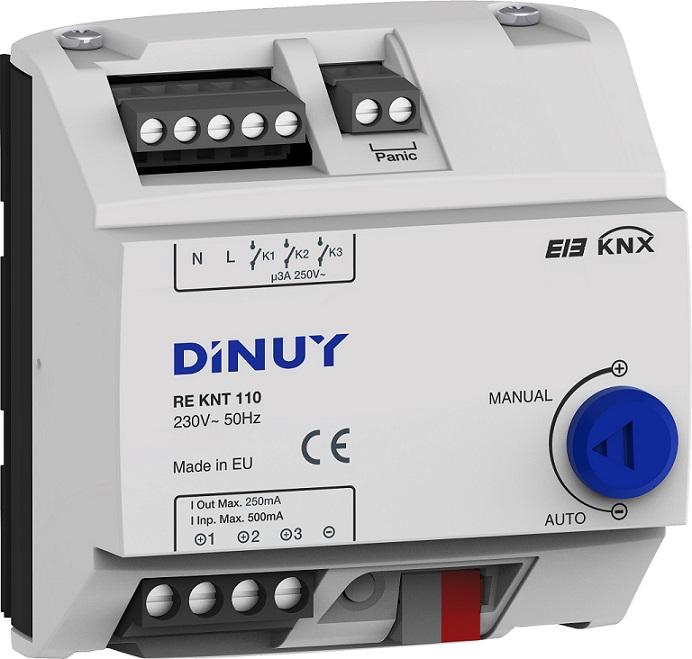
3-channel DALI or 1-10V Interface REKNT DALI 1-10V
 Dinuy · Order number REKNT DALI 1-10V · KNX-TP Devices › Actuators › Dimming Actuators
3-channel DALI or 1-10V Interface
Download .knxprod DINUY REKNT DALI & 1-10 0.0 · 98 KB
Product
| Manufacturer | Dinuy |
|---|---|
| Product name | 3-channel DALI or 1-10V Interface |
| Order number | REKNT DALI 1-10V |
| Hardware | Modulo TP para caja 5 modulos |
| Medium | Twisted Pair |
| Bus current (mA) | 10 |
| Rail mounted | No |
| Registration | Certified · 2018-04-16 |
| Languages | es-ES, en-GB, en-US |
| Catalog entry | M-009A_H-009AREKNT110-0_HP-00C0-00-CB3A_CI-REKNT.20DALI.201.2D10V-1 |
| Fingerprint | CB3A |
| SHA-256 | c6a5306ce3c5fed12a771b395f36604d0dcbff45ec696d599ff828652c7945a1 |
| First seen | 2026-11-25 |
| Markets | 68 markets |
Application program: DINUY REKNT DALI & 1-10 0.0
| Application number | $00C0 |
|---|---|
| Version | 0.0 |
| Mask version | MV-0705 (7.5) |
| KNX Data Secure | No |
| Minimum ETS version | 4.0 |
| Parameters | 302 |
| Group objects | 37 |
Group objects (37)
| No | Name | Function | Size | DPT | Flags |
|---|---|---|---|---|---|
| 0 | Channel 1, SwitchOnOff Input | Switch | 1 Bit | 1.1 switch | CW |
| 1 | Channel 1, Relative Set value control Input | Relative Set value control | 4 Bit | 3.7 dimming control | CW |
| 2 | Channel 1, Absolute Set value control Input | Dimming Value | 1 Byte | 5.1 percentage (0..100%) | CW |
| 3 | Channel 1, Timed Start/Stop Input | Timed Start/Stop | 1 Bit | 1.10 start/stop | CW |
| 4 | Channel 1, Forced Input | Forced | 2 Bit | 2.3 enable control | CW |
| 5 | Channel 1, Scene Number Input | Scene Number | 1 Byte | 18.1 scene control | CW |
| 6 | Channel 1, Info Switch On-Off Output | Info Switch On-Off | 1 Bit | 1.1 switch | CRT |
| 7 | Channel 1, Info Actual Dimming Value Output | Info Dimming Value | 1 Byte | 5.1 percentage (0..100%) | CRT |
| 8 | Channel 1, Dimming Speed (from 1% to 100%) | Object 8_Dimming Speed | 1 Byte | 5.1 percentage (0..100%) | CW |
| 16 | Channel 2, SwitchOnOff Input | Switch | 1 Bit | 1.1 switch | CW |
| 17 | Channel 2, Relative Set value control Input | Relative Set value control | 4 Bit | 3.7 dimming control | CW |
| 18 | Channel 2, Absolute Set value control Input | Dimming Value | 1 Byte | 5.1 percentage (0..100%) | CW |
| 19 | Channel 2, Timed Start/Stop Input | Timed Start/Stop | 1 Bit | 1.10 start/stop | CW |
| 20 | Channel 2, Forced Input | Forced | 2 Bit | 2.3 enable control | CW |
| 21 | Channel 2, Scene Number Input | Scene Number | 1 Byte | 18.1 scene control | CW |
| 22 | Channel 2, Info Switch On-Off Output | Info Switch On-Off | 1 Bit | 1.1 switch | CRT |
| 23 | Channel 2, Info Actual Dimming Value Output | Info Dimming Value | 1 Byte | 5.1 percentage (0..100%) | CRT |
| 24 | Channel 2, Dimming Speed (from 1% to 100%) | Objetc 8_Dimming Speed | 1 Byte | 5.1 percentage (0..100%) | CW |
| 32 | Channel 3, SwitchOnOff Input | Switch | 1 Bit | 1.1 switch | CW |
| 33 | Channel 3, Relative Set value control Input | Relative Set value control | 4 Bit | 3.7 dimming control | CW |
| 34 | Channel 3, Absolute Set value control Input | Dimming Value | 1 Byte | 5.1 percentage (0..100%) | CW |
| 35 | Channel 3, Timed Start Stop Input | Timed Start/Stop | 1 Bit | 1.10 start/stop | CW |
| 36 | Channel 3, Forced Input | Forced | 2 Bit | 2.3 enable control | CW |
| 37 | Channel 3, Scene Number Input | Scene Number | 1 Byte | 18.1 scene control | CW |
| 38 | Channel 3, Info Switch On-Off Output | Info Switch On-Off | 1 Bit | 1.1 switch | CRT |
| 39 | Channel 3, Info Actual Dimming Value Output | Info Dimming Value | 1 Byte | 5.1 percentage (0..100%) | CRT |
| 40 | Channel 3, Dimming Speed (from 1% to 100%) | Objetc 8_Dimming Speed | 1 Byte | 5.1 percentage (0..100%) | CW |
| 48 | Sequence 1 Start/Stop | Start/Stop | 1 Bit | 1.1 switch | CW |
| 49 | Sequence 2 Start/Stop | Start/Stop | 1 Bit | 1.1 switch | CW |
| 50 | Sequence 3 Start/Stop | Start/Stop | 1 Bit | 1.1 switch | CW |
| 51 | Sequence 4 Start/Stop | Start/Stop | 1 Bit | 1.1 switch | CW |
| 52 | Sequence 5 Start/Stop | Start/Stop | 1 Bit | 1.1 switch | CW |
| 53 | Info Secuence 1 Start/Stop Output | Start/Stop | 1 Bit | 1.1 switch | CRWTI |
| 54 | Info Sequence 2 Start/Stop Output | Start/Stop | 1 Bit | 1.1 switch | CRWTI |
| 55 | Info Secuence 3 Start/Stop Output | Start/Stop | 1 Bit | 1.1 switch | CRWTI |
| 56 | Info Secuence 4 Start/Stop Output | Start/Stop | 1 Bit | 1.1 switch | CRWTI |
| 57 | Info Secuence 5 Start/Stop Output | Start/Stop | 1 Bit | 1.1 switch | CRWTI |
Parameters (55)
| Parameter | Type | Default |
|---|---|---|
| Timer time delay (sec) | list | 60 |
| Prewarning in Timer function (sec) | list | 0 |
| Minimum Brightness (%) | unsignedInt 0…100 | 3 |
| Maximum Brightness (%) | unsignedInt 0…100 | 99 |
| Soft Turn-on time ( x 0,1sec) | unsignedInt 1…65535 | 1 |
| Soft Turn-off time ( x 0,1sec) | unsignedInt 1…65535 | 3 |
| Switch-on mode | list | Switch-on at last turn-off brightness |
| Switch-on Brightness value (%) | unsignedInt 0…100 | 3 |
| Action after Power Supply fault | list | OFF |
| Brightness after Power Supply fault (%) | unsignedInt 0…100 | 100 |
| Switch-on Ramp Time (sec) | unsignedInt 1…65535 | 1 |
| ON time (sec) | unsignedInt 1…65535 | 1 |
| Switch-off Ramp Time (sec) | unsignedInt 1…65535 | 1 |
| OFF time (sec) | unsignedInt 1…65535 | 1 |
| Number of Scenes attended | list | All Scenes |
| Scene Number 1 | list | Scene 1 |
| Scene Number 2 | list | Scene 2 |
| Scene Number 3 | list | Scene 3 |
| Scene Number 4 | list | Scene 4 |
| Scene Number 5 | list | Scene 5 |
| Default Brightness (%) Scene 1 | unsignedInt 0…100 | 100 |
| Default Brightness (%) Scene 2 | unsignedInt 0…100 | 100 |
| Default Brightness (%) Scene 3 | unsignedInt 0…100 | 100 |
| Default Brightness (%) Scene 4 | unsignedInt 0…100 | 100 |
| Default Brightness (%) Scene 5 | unsignedInt 0…100 | 100 |
| Dimming speed (from 0% to 100% x 0,1sec) | unsignedInt 1…4864 | 20 |
| Behavior on incoming Dimming Value | list | Go across dimming speed |
| OFF state Brightness (%) | unsignedInt 0…100 | 2 |
| ETS_UPDATE | unsignedInt 0…255 | 16 |
| Enable Sequence 1 | list | No |
| Enable Sequence 2 | list | No |
| Enable Sequence 3 | list | No |
| Enable Sequence 4 | list | No |
| Enable Sequence 5 | list | No |
| Do this Sequence | list | One time |
| Number of Steps | list | One Step |
| Channel 1 | unsignedInt 0…100 | 100 |
| Channel 2 | unsignedInt 0…100 | 100 |
| Channel 3 | unsignedInt 0…100 | 100 |
| Step time ( x 0,1sec) | unsignedInt 1…65535 | 100 |
| Sequence number (1-5) | list | Sequence 1 |
| Operation Mode | list | Sequencer |
| Value of switching K relay | list | 1,1V |
| Type of Device | list | 1-10V Dimmer |
| Dimming speed (from 0% to 100% x 1 sec) | list | 0.7 |
| Soft Turn-on Time (from 0% to 100%) x 1sec | list | 0.7 |
| Soft Turn-off Time (from 100% to 0%) x 1sec | list | 0.7 |
| Switch-on Ramp Time (sec) | list | 0.7 |
| Switch-off Ramp Time (sec) | list | 0.7 |
| Dimming Value Fade Time ( x sec) | list | 0.7 |
| Dimming speed (from 0% to 100% x 1sec) | list | 0.7 |
| Switch-on Ramp Time ( x 1 sec) | list | 0.7 |
| Switch-on Ramp Time (1 sec) | list | 0.7 |
| Dimming Value Fade Time ( x 1 sec) | list | 0.7 |
| Redirect lamps after programming | list | Disable |
Version history
| Application | App no | Fingerprint | First seen | Size | File |
|---|---|---|---|---|---|
| DINUY REKNT DALI & 1-10 0.0 latest | $00C0 | CB3A | 2026-11-25 | 98 KB | Download |
About this file
This is the official ETS product database for the Dinuy 3-channel DALI or 1-10V Interface (REKNT DALI 1-10V), published by the manufacturer in the KNX online catalog. To use it, open ETS, go to Catalogs → Import and choose the downloaded .knxprod file. The device then appears in your catalog and can be added to a project. Older versions are kept so existing projects can be matched to the application program they were commissioned with.
More from Dinuy
- KNX IP Interface Secure CO KNT IPI CO KNT IPI
- KNX IP Router Secure CO KNT IPR CO KNT IPR
- KNX Line Coupler Secure CO KNT LC1 CO KNT LC1
- KNX IP Router Secure CO KNX IPR CO KNX IPR
- KNX Line Coupler Secure CO KNX LC2 CO KNX LC2
- Coin-/Token-operated Timer CT KNT XXX
- Movement Detector DM KNT XXX
- 4-INPUT/OUTPUT BINARY INTERFACE EM KNT 001
- 4-FOLD ANALOG/BINARY INTERFACE EM KNT 002
- 8-channel Binary Input EM KNT 003
- 2-/4-/8- Input/Output Analog/Binary Interface EM KNX 0XX
- FA KNT 001 FA KNT 001