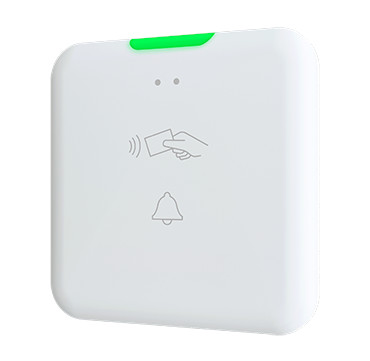
IWAC Out ZVIIWO
 Zennio · Order number ZVIIWO · Access Control › RFID Card Reader
IWAC Out. In-Wall Access Controller for Outdoors installation
Download .knxprod IWAC Out 1.1 1.1 · 256 KB
Product
| Manufacturer | Zennio |
|---|---|
| Product name | IWAC Out |
| Order number | ZVIIWO |
| Hardware | IWAC Out |
| Medium | Twisted Pair |
| Bus current (mA) | 17.5 |
| Rail mounted | No |
| Registration | Certified · 2022-08-19 |
| Languages | en-US, es-ES, de-DE, fr-FR, it-IT, ru-RU, uk-UA |
| Catalog entry | M-0071_H-ZVIIWO-1_HP-5651-11-B9BB_CI-ZVIIWO-1 |
| Fingerprint | B9BB |
| SHA-256 | bbbaa82c4a48a12035e6afafe697c133f241b2f93500b8dc9ceafcac3ef04e39 |
| First seen | 2026-11-25 |
| Markets | 59 markets |
Application program: IWAC Out 1.1 1.1
| Application number | $5651 |
|---|---|
| Version | 1.1 |
| Mask version | MV-07B0 (System B) |
| KNX Data Secure | Yes |
| Minimum ETS version | 5.0 |
| Parameters | 203 |
| Group objects | 71 |
Group objects (71)
| No | Name | Function | Size | DPT | Flags |
|---|---|---|---|---|---|
| 0 | [Access][{{0}}] Floor 1 Trigger | Trigger Sending When Access to Floor {{FloorNum}} | 1 Bit | 1.17 trigger | CT |
| 0 | [Access][{{0}}] Floor 2 Trigger | Trigger Sending When Access to Floor {{FloorNum}} | 1 Bit | 1.17 trigger | CT |
| 0 | [Access][{{0}}] Floor 3 Trigger | Trigger Sending When Access to Floor {{FloorNum}} | 1 Bit | 1.17 trigger | CT |
| 0 | [Access][{{0}}] Floor 4 Trigger | Trigger Sending When Access to Floor {{FloorNum}} | 1 Bit | 1.17 trigger | CT |
| 0 | [Access][{{0}}] Floor 5 Trigger | Trigger Sending When Access to Floor {{FloorNum}} | 1 Bit | 1.17 trigger | CT |
| 0 | [Access][{{0}}] Floor 6 Trigger | Trigger Sending When Access to Floor {{FloorNum}} | 1 Bit | 1.17 trigger | CT |
| 0 | [Access][{{0}}] Floor 7 Trigger | Trigger Sending When Access to Floor {{FloorNum}} | 1 Bit | 1.17 trigger | CT |
| 0 | [Access][{{0}}] Floor 8 Trigger | Trigger Sending When Access to Floor {{FloorNum}} | 1 Bit | 1.17 trigger | CT |
| 0 | [Access][{{0}}] Floor 9 Trigger | Trigger Sending When Access to Floor {{FloorNum}} | 1 Bit | 1.17 trigger | CT |
| 0 | [Access][{{0}}] Floor 10 Trigger | Trigger Sending When Access to Floor {{FloorNum}} | 1 Bit | 1.17 trigger | CT |
| 0 | [Access][{{0}}] Floor 11 Trigger | Trigger Sending When Access to Floor {{FloorNum}} | 1 Bit | 1.17 trigger | CT |
| 0 | [Access][{{0}}] Floor 12 Trigger | Trigger Sending When Access to Floor {{FloorNum}} | 1 Bit | 1.17 trigger | CT |
| 0 | [Access][{{0}}] Floor 13 Trigger | Trigger Sending When Access to Floor {{FloorNum}} | 1 Bit | 1.17 trigger | CT |
| 0 | [Access][{{0}}] Floor 14 Trigger | Trigger Sending When Access to Floor {{FloorNum}} | 1 Bit | 1.17 trigger | CT |
| 0 | [Access][{{0}}] Floor 15 Trigger | Trigger Sending When Access to Floor {{FloorNum}} | 1 Bit | 1.17 trigger | CT |
| 0 | [Access][{{0}}] Floor 16 Trigger | Trigger Sending When Access to Floor {{FloorNum}} | 1 Bit | 1.17 trigger | CT |
| 0 | [Access][{{0}}] Floor 17 Trigger | Trigger Sending When Access to Floor {{FloorNum}} | 1 Bit | 1.17 trigger | CT |
| 0 | [Access][{{0}}] Floor 18 Trigger | Trigger Sending When Access to Floor {{FloorNum}} | 1 Bit | 1.17 trigger | CT |
| 0 | [Access][{{0}}] Floor 19 Trigger | Trigger Sending When Access to Floor {{FloorNum}} | 1 Bit | 1.17 trigger | CT |
| 0 | [Access][{{0}}] Floor 20 Trigger | Trigger Sending When Access to Floor {{FloorNum}} | 1 Bit | 1.17 trigger | CT |
| 1 | [Heartbeat] Object to Send '1' | Sending of '1' Periodically | 1 Bit | 1.17 trigger | CRT |
| 2 | [Heartbeat] Device Recovery | Send 0 | 1 Bit | 1.17 trigger | CRT |
| 3 | [Heartbeat] Device Recovery | Send 1 | 1 Bit | 1.17 trigger | CRT |
| 4 | [General] Scene: Send | Scene Value | 1 Byte | 17.1 scene number | CRT |
| 5 | [General] Scene: Receive | Scene Value | 1 Byte | 17.1 scene number | CW |
| 6 | [General] Sounds - Disabling Sound | 0 = Disable Sound; 1 = Enable Sound | 1 Bit | 1.3 enable | CW |
| 6 | [General] Sounds - Disabling Sound | 0 = Enable Sound; 1 = Disable Sound | 1 Bit | 1.3 enable | CW |
| 7 | [General] Backlight Mode | 0 = Night Mode; 1 = Normal Mode | 1 Bit | 1.24 day/night | CW |
| 7 | [General] Backlight Mode | 0 = Normal Mode; 1 = Night Mode | 1 Bit | 1.24 day/night | CW |
| 8 | [General] Display - Brightness | 0% ... 100% | 1 Byte | 5.1 percentage (0..100%) | CW |
| 9 | [General] Display - Contrast | 0% ... 100% | 1 Byte | 5.1 percentage (0..100%) | CW |
| 10 | [General] Proximity Sensor | 0 = Disable; 1 = Enable | 1 Bit | 1.3 enable | CW |
| 11 | [General] External Proximity Detection | 1 = Detection | 1 Bit | 1.10 start/stop | CW |
| 12 | [General] Proximity Detection | Send 1 when Proximity is Detected | 1 Bit | 1.10 start/stop | CT |
| 13 | [General] Luminosity (1-Bit) | 0 = Over Threshold; 1 = Under Threshold | 1 Bit | 1.2 boolean | CT |
| 13 | [General] Luminosity (1-Bit) | 0 = Under Threshold; 1 = Over Threshold | 1 Bit | 1.2 boolean | CT |
| 14 | [General] Luminosity (Percentage) | 0% ... 100% | 1 Byte | 5.1 percentage (0..100%) | CR |
| 15 | [General] Luminosity (Lux) | 0 Lux ... 670760 Lux | 2 Bytes | 9.4 lux (Lux) | CR |
| 16 | [Button][{{0:}}] Lock | 0 = Lock; 1 = Unlock | 1 Bit | 1.3 enable | CWTU |
| 16 | [Button][{{0:}}] Lock | 0 = Unlock; 1 = Lock | 1 Bit | 1.3 enable | CWTU |
| 17 | [Button][{{0:}}] Switch | Send Selected Value on Short Press | 1 Bit | 1.1 switch | CRT |
| 17 | [Button][{{0:}}] Hold & Release | Send Selected Values on Hold and Release Presses | 1 Bit | 1.1 switch | CRT |
| 17 | [Button][{{0:}}] Two Objects - Short Press | Send Selected Value on Short Press | 1 Bit | 1.1 switch | CRT |
| 17 | [Button][{{0:}}] Two Objects - Short Press | Send Selected Value on Short Press | 1 Byte | 5.10 counter pulses (0..255) | CRT |
| 18 | [Button][{{0:}}] Two Objects - Long Press | Send Selected Value on Long Press | 1 Bit | 1.1 switch | CRT |
| 18 | [Button][{{0:}}] Two Objects - Long Press | Send Selected Value on Long Press | 1 Byte | 5.10 counter pulses (0..255) | CRT |
| 19 | [Access] Open Door | 1 = Open Door | 1 Bit | 1.16 acknowledge | CT |
| 19 | [Access] Open Door | 0 = Open Door | 1 Bit | 1.16 acknowledge | CT |
| 20 | [Access] Room State Indicator | 0 = Normal; 1 = Make Up Room; 2 = Do Not Disturb | 1 Byte | CWTU | |
| 21 | [Access] Room State | 0 = Normal; 1 = Make Up Room; 2 = Do Not Disturb | 1 Byte | CRT | |
| 22 | [Access] Room State: Make Up Room (Status) | 0 = No Active; 1 = Active | 1 Bit | 1.2 boolean | CRT |
| 23 | [Access] Room State: Do Not Disturb (Status) | 0 = No Active; 1 = Active | 1 Bit | 1.2 boolean | CRT |
| 24 | [Access] Room State: "Make Up Room" State Availability | 0 = Not Available; 1 = Available | 1 Bit | 1.3 enable | CWTU |
| 25 | [Access] Presence: Occupancy State | 0 = Not Occupied; 1 = Occupied | 1 Bit | 1.18 occupancy | CWTU |
| 26 | [Access] Request Date and Time | Make Request | 1 Bit | 1.17 trigger | CT |
| 27 | [Access] Date and Time (Status) | Current Date and Time | 8 Bytes | 19.1 date time | CR |
| 28 | [Access] Access Log | Access Log Data | 14 Bytes | 16.1 Character String (ISO 8859-1) | CRT |
| 29 | [Access] Language | User Language | 2 Bytes | 234.1 language code (ASCII) | CRT |
| 30 | [Access] Locale | User Locale (ISO 639-1/ISO 3166-1 Four Letters Code) | 4 Bytes | CRT | |
| 31 | [Access] Offline Access | Notify Offline Access | 1 Bit | 1.16 acknowledge | CT |
| 32 | [Access] Welcome Scenes: Trigger | 0 = Send Welcome Scene | 1 Bit | 1.16 acknowledge | CW |
| 32 | [Access] Welcome Scenes: Trigger | 1 = Send Welcome Scene | 1 Bit | 1.16 acknowledge | CW |
| 33 | [Access] Welcome Scenes: Day/Night | 0 = Day; 1 = Night | 1 Bit | 1.24 day/night | CW |
| 33 | [Access] Welcome Scenes: Day/Night | 1 = Day; 0 = Night | 1 Bit | 1.24 day/night | CW |
| 34 | [Access] Welcome Scenes: Guest First Access | 1 = Guest First Access | 1 Bit | 1.16 acknowledge | CW |
| 35 | [Access] Check-in/Check-out | 0 = Check-out; 1 = Check-in | 1 Bit | 1.2 boolean | CW |
| 36 | [Access] Guest/Employee Access | 0 = Employee; 1 = Guest | 1 Bit | 1.1 switch | CT |
| 36 | [Access] Guest/Employee Access | 0 = Guest; 1 = Employee | 1 Bit | 1.1 switch | CT |
| 37 | [Access] Floor Always Accessible Trigger | Trigger Sending When Granted Access in Elevator | 1 Bit | 1.17 trigger | CT |
| 58 | Test Input | Debug purposes | 14 Bytes | 16.1 Character String (ISO 8859-1) | CW |
| 59 | Test Output | Debug purposes | 14 Bytes | 16.1 Character String (ISO 8859-1) | CRT |
Parameters (123)
| Parameter | Type | Default |
|---|---|---|
| checkHW | list | |
| Update Objects | list | Disabled |
| Delay | unsignedInt 1…65535 | 10 |
| Sound (After Download) | list | Enabled |
| Value | list | 0 = Disable; 1 = Enable |
| Sounds | list | Default |
| Enable Sounds | unsignedInt 0…1 | 1 |
| Enable/Disable Sounds Through a 1-Bit Object | unsignedInt 0…1 | 0 |
| Duration of Notifications | unsignedInt 2…5 | 3 |
| Button | unsignedInt 0…1 | 0 |
| Sound Type | list | Sound 1 |
| Enable First Attempt Sound | unsignedInt 0…1 | 1 |
| Display: Backlight Level - Active | unsignedInt 1…100 | 100 |
| Display: Backlight Attenuation | list | Turn Off the Screen After Turn Off Time |
| Night Mode | unsignedInt 0…1 | 0 |
| Display: Backlight Level - Active | unsignedInt 0…100 | 50 |
| Control Object: 1-Bit | unsignedInt 0…1 | 1 |
| Value | list | 0 = Normal Mode; 1 = Night Mode |
| Control Object: Scene | unsignedInt 0…1 | 0 |
| Normal Mode: Scene Number (0 = Disabled) | unsignedInt 0…64 | 1 |
| Night Mode: Scene Number (0 = Disabled) | unsignedInt 0…64 | 1 |
| Backlight Mode after ETS Download | list | Normal Mode |
| Normal Mode | unsignedInt 0…1 | 1 |
| LEDs: ON, Brightness Level | unsignedInt 0…100 | 100 |
| LEDs: OFF, Brightness Level | unsignedInt 0…100 | 0 |
| LEDs: Inactivity, Brightness Level | unsignedInt 0…100 | 0 |
| Display: Contrast Level after ETS Download | unsignedInt 1…100 | 70 |
| LEDs: ON, Brightness Level | unsignedInt 0…100 | 50 |
| Display: Time to Turn Off | unsignedInt 1…65535 | 3 |
| Display: Backlight Level - Attenuated | unsignedInt 0…100 | 60 |
| Display: Backlight Level - Attenuated | unsignedInt 0…100 | 20 |
| Display: Time to Turn Off | unsignedInt 30…65535 | 30 |
| "Do Not Disturb" & "Make Up Room" Permanent Notifications | unsignedInt 0…1 | 0 |
| Function | list | Disabled |
| Press Detection Delay | unsignedInt 1…255 | 2 |
| Lock Object Polarity | list | 0 = Lock; 1 = Unlock |
| Lock Through Object | unsignedInt 0…1 | 0 |
| Action | list | Send 0 |
| Action on Hold | list | Send 1 |
| Action on Release | list | Send 0 |
| Scene Number | unsignedInt 1…64 | 1 |
| INFO | text | |
| Action on Short Press | list | Send 0 |
| Value | unsignedInt 0…255 | 0 |
| Action on Long Press | list | Send 0 |
| Long Press Threshold Time | unsignedInt 4…255 | 6 |
| Action | list | Run |
| Scene Object Type | list | General Object |
| Opening Object Value | list | 1 |
| Ambient Luminosity Sensor | unsignedInt 0…1 | 0 |
| Proximity Sensor | unsignedInt 0…1 | 1 |
| Threshold | unsignedInt 0…100 | 50 |
| Hysteresis | unsignedInt 0…50 | 10 |
| Binary Object | unsignedInt 0…1 | 0 |
| Value | list | 0 = Over Threshold; 1 = Under Threshold |
| Scene Object | unsignedInt 0…1 | 0 |
| Over Threshold: Scene Number (0 = Disabled) | unsignedInt 0…64 | 1 |
| Under Threshold: Scene Number (0 = Disabled) | unsignedInt 0…64 | 1 |
| Threshold Type | list | Percentage |
| Threshold | unsignedInt 0…65535 | 150 |
| Heartbeat (Periodic Alive Notification) | unsignedInt 0…255 | 0 |
| Period | unsignedInt 1…65535 | 1 |
| Device Recovery Objects (Send 0 and 1) | unsignedInt 0…255 | 0 |
| Delay | unsignedInt 0…255 | 0 |
| Time to Consider Inactivity | unsignedInt 1…65535 | 1 |
| Time to Consider Inactivity | unsignedInt 30…65535 | 30 |
| Device Colour | list | Black |
| Device Placement | list | Outdoors |
| System ID | text | |
| Device ID | unsignedInt 1…65535 | 1 |
| Clear Black List After Download | unsignedInt 0…1 | 0 |
| Action When State Is "Do Not Disturb" | list | Allow Entry |
| Group 1 | list | None |
| Group 2 | list | None |
| Group 3 | list | None |
| Group 4 | list | None |
| Group 5 | list | None |
| White List Entries (Groups) | unsignedInt 0…1 | 0 |
| Period of Date and Time Request | unsignedInt 1…255 | 30 |
| Access Control | unsignedInt 0…1 | 1 |
| Group 6 | list | None |
| Group 7 | list | None |
| Group 8 | list | None |
| Group 9 | list | None |
| Group 10 | list | None |
| ID | unsignedInt 11…65535 | 11 |
| Action When Room Is Occupied | list | Allow Entry |
| Welcome Scenes | unsignedInt 0…1 | 0 |
| Day/Night | unsignedInt 0…1 | 0 |
| First Access | unsignedInt 0…1 | 0 |
| Scene: Night | unsignedInt 0…64 | 0 |
| Scene: Night - First Access | unsignedInt 0…64 | 0 |
| Scene: Day | unsignedInt 0…64 | 0 |
| Scene Value | unsignedInt 1…64 | 1 |
| Object Value | list | 1 |
| Scene | unsignedInt 0…64 | 0 |
| Scene: Day - First Access | unsignedInt 0…64 | 0 |
| Room Guest | unsignedInt 0…1 | 0 |
| Group 1 | unsignedInt 0…1 | 0 |
| Group 2 | unsignedInt 0…1 | 0 |
| Group 3 | unsignedInt 0…1 | 0 |
| Group 4 | unsignedInt 0…1 | 0 |
| Group 5 | unsignedInt 0…1 | 0 |
| Group 6 | unsignedInt 0…1 | 0 |
| Group 7 | unsignedInt 0…1 | 0 |
| Group 8 | unsignedInt 0…1 | 0 |
| Group 9 | unsignedInt 0…1 | 0 |
| Group 10 | unsignedInt 0…1 | 0 |
| Object Polarity | list | 0 = Day; 1 = Night |
| Second Attempt Time | list | 30 |
| "Make Up Room" State not Always Available | unsignedInt 0…1 | 0 |
| Trigger Object: Scene | unsignedInt 0…1 | 0 |
| Trigger Object: 1-Bit | unsignedInt 0…1 | 0 |
| Scene: First Access | unsignedInt 0…64 | 0 |
| Bluetooth Low Energy (BLE) | unsignedInt 0…1 | 0 |
| Guest/Employee Access Polarity | list | 0 = Guest; 1 = Employee |
| Elevator Access Functionality | unsignedInt 0…1 | 0 |
| Number of Floors | unsignedInt 1…20 | 1 |
| Guest/Employee Access Object | unsignedInt 0…1 | 0 |
| elevatorFunctionality (virtual) | unsignedInt 0…1 | 1 |
| Number of Rooms (0 = Disabled) | unsignedInt 0…50 | 0 |
| Number of Groups (0 = Disabled) | unsignedInt 0…10 | 0 |
| Floor Name | text | 0 |
Version history
| Application | App no | Fingerprint | First seen | Size | File |
|---|---|---|---|---|---|
| IWAC Out 1.1 1.1 latest | $5651 | B9BB | 2026-11-25 | 256 KB | Download |
About this file
This is the official ETS product database for the Zennio IWAC Out (ZVIIWO), published by the manufacturer in the KNX online catalog. To use it, open ETS, go to Catalogs → Import and choose the downloaded .knxprod file. The device then appears in your catalog and can be added to a project. Older versions are kept so existing projects can be matched to the application program they were commissioned with.
More from Zennio
- Securel v3 ZIOSECV3
- RingBOX ZSIRBOX
- IWAC Display v3 ZVIIWACDV3
- IWAC Out Keypad ZVIIWOK
- HeatingBOX 24V 4X ZCL-4HT24
- HeatingBOX 24V 8X ZCL-8HT24
- KLIC-FJ ZCL-FJ
- KLIC-LG1 ZCL-LG1
- KLIC-TS ZCL-TS
- ZoningBOX 4 ZCL-ZB4
- ZoningBOX 6 ZCL-ZB6
- HeatingBOX 230V 2X v2 ZCL2H230V2