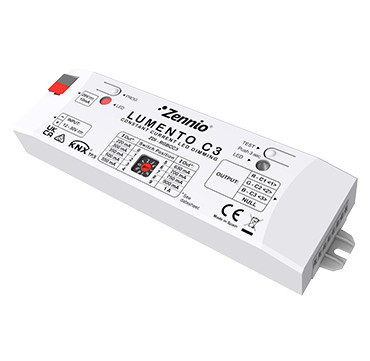
Lumento C3 ZDI-RGBCC3
 Zennio · Order number ZDI-RGBCC3 · Illumination › LED Lighting
3-channel constant current PWM dimmer for DC LED loads
Download .knxprod Lumento C3 1.2 1.2 · 257 KB
Product
| Manufacturer | Zennio |
|---|---|
| Product name | Lumento C3 |
| Order number | ZDI-RGBCC3 |
| Hardware | Lumento C3 |
| Medium | Twisted Pair |
| Bus current (mA) | 10 |
| Rail mounted | No |
| Registration | Certified · 2015-05-12 |
| Languages | es-ES, en-US, it-IT, de-DE, fr-FR, ru-RU, sv-SE, pt-PT |
| Catalog entry | M-0071_H-ZDI.2DRGBCC3-1_HP-3241-12-8F51_CI-ZDI.2DRGBCC3-1 |
| Fingerprint | 8F51 |
| SHA-256 | 0d596b53a0b7069b37f8a1ccdb8922b4e47ac1bfdce3861d3ee476e19e619811 |
| First seen | 2026-11-25 |
| Markets | 59 markets |
Application program: Lumento C3 1.2 1.2
| Application number | $3241 |
|---|---|
| Version | 1.2 |
| Mask version | MV-07B0 (System B) |
| KNX Data Secure | No |
| Minimum ETS version | 4.0 |
| Parameters | 1648 |
| Group objects | 96 |
Group objects (96)
| No | Name | Function | Size | DPT | Flags |
|---|---|---|---|---|---|
| 1 | Error: Overheating | 0=Normal; 1=Overheat | 1 Bit | 1.5 alarm | CRT |
| 2 | Error: Current Selector Mismatch | 0=Match; 1=Mismatch | 1 Bit | 1.5 alarm | CRT |
| 3 | Error: External Voltage | 0=Normal; 1=Low Ext. Voltage | 1 Bit | 1.5 alarm | CRT |
| 4 | [RGB] Switch On/Off | 0=Off; 1=On | 1 Bit | 1.1 switch | CW |
| 5 | [RGB] Relative Dimming | 4-bits Dimmer Control | 4 Bit | 3.7 dimming control | CW |
| 6 | [RGB] Absolute Dimming | 1-byte Dimmer Control | 1 Byte | 5.1 percentage (0..100%) | CW |
| 7 | [RGB] Dimming Time 1 | Time in seconds | 2 Bytes | 7.5 time (s) | CW |
| 8 | [RGB] Dimming Time 2 | Time in seconds | 2 Bytes | 7.5 time (s) | CW |
| 9 | [RGB] Dimming Time 3 | Time in seconds | 2 Bytes | 7.5 time (s) | CW |
| 10 | [RGB] RGB Color | 3-bytes RGB Control | 3 Bytes | 232.600 RGB value 3x(0..255) | CW |
| 11 | [RGB] Direct Color | Color number (Scene 1-22) | 1 Byte | 18.1 scene control | CW |
| 12 | [RGB] Color Shift | 0=Stop; 1=Start | 1 Bit | 1.10 start/stop | CW |
| 13 | [RGB] Color Shift | 4-bits Color Control | 4 Bit | 3.7 dimming control | CW |
| 14 | [RGB] Simple Timer | 0=Deactivate; 1=Activate | 1 Bit | 1.10 start/stop | CW |
| 15 | [RGB] Flashing | 0=Deactivate; 1=Activate | 1 Bit | 1.10 start/stop | CW |
| 16 | [RGB] Scenes/Sequences | Scene/Sequence number | 1 Byte | 18.1 scene control | CW |
| 17 | [RGB] Start/Stop Sequence | 0=Stop; 1=Start | 1 Bit | 1.10 start/stop | CW |
| 18 | [RGB] Custom On/Off 1 | 0=Off; 1=On | 1 Bit | 1.1 switch | CW |
| 19 | [RGB] Custom On/Off 2 | 0=Off; 1=On | 1 Bit | 1.1 switch | CW |
| 20 | [RGB] Custom On/Off 3 | 0=Off; 1=On | 1 Bit | 1.1 switch | CW |
| 21 | [RGB] Custom On/Off 4 | 0=Off; 1=On | 1 Bit | 1.1 switch | CW |
| 22 | [RGB] Lock | 0=Unlock; 1=Lock | 1 Bit | 1.3 enable | CW |
| 22 | [RGB] Lock | 0=Lock; 1=Unlock | 1 Bit | 1.3 enable | CW |
| 23 | [RGB] On/Off (Status) | 0=Off; 1=On | 1 Bit | 1.1 switch | CRT |
| 24 | [RGB] Dimming Value (Status) | 0 - 100% | 1 Byte | 5.1 percentage (0..100%) | CRT |
| 25 | [RGB] RGB Dimming Values (Status) | 3-bytes status | 3 Bytes | 232.600 RGB value 3x(0..255) | CRT |
| 26 | [1] Switch On/Off | 0=Off; 1=On | 1 Bit | 1.1 switch | CW |
| 26 | [R] Switch On/Off | 0=Off; 1=On | 1 Bit | 1.1 switch | CW |
| 27 | [1] Relative Dimming | 4-bits Dimmer Control | 4 Bit | 3.7 dimming control | CW |
| 27 | [R] Relative Dimming | 4-bits Dimmer Control | 4 Bit | 3.7 dimming control | CW |
| 28 | [1] Absolute Dimming | 1-byte Dimmer Control | 1 Byte | 5.1 percentage (0..100%) | CW |
| 28 | [R] Absolute Dimming | 1-byte Dimmer Control | 1 Byte | 5.1 percentage (0..100%) | CW |
| 29 | [1] Dimming Time 1 | Time in seconds | 2 Bytes | 7.5 time (s) | CW |
| 30 | [1] Dimming Time 2 | Time in seconds | 2 Bytes | 7.5 time (s) | CW |
| 31 | [1] Dimming Time 3 | Time in seconds | 2 Bytes | 7.5 time (s) | CW |
| 32 | [1] Simple Timer | 0=Deactivate; 1=Activate | 1 Bit | 1.10 start/stop | CW |
| 33 | [1] Flashing | 0=Deactivate; 1=Activate | 1 Bit | 1.10 start/stop | CW |
| 34 | [1] Scenes/Sequences | Scene/Sequence number | 1 Byte | 18.1 scene control | CW |
| 35 | [1] Start/Stop Sequence | 0=Stop; 1=Start | 1 Bit | 1.10 start/stop | CW |
| 36 | [1] Custom On/Off 1 | 0=Off; 1=On | 1 Bit | 1.1 switch | CW |
| 37 | [1] Custom On/Off 2 | 0=Off; 1=On | 1 Bit | 1.1 switch | CW |
| 38 | [1] Custom On/Off 3 | 0=Off; 1=On | 1 Bit | 1.1 switch | CW |
| 39 | [1] Custom On/Off 4 | 0=Off; 1=On | 1 Bit | 1.1 switch | CW |
| 40 | [1] Lock | 0=Unlock; 1=Lock | 1 Bit | 1.3 enable | CW |
| 40 | [1] Lock | 0=Lock; 1=Unlock | 1 Bit | 1.3 enable | CW |
| 41 | [1] On/Off (Status) | 0=Off; 1=On | 1 Bit | 1.1 switch | CRT |
| 41 | [R] On/Off (Status) | 0=Off; 1=On | 1 Bit | 1.1 switch | CRT |
| 42 | [1] Dimming Value (Status) | 0 - 100% | 1 Byte | 5.1 percentage (0..100%) | CRT |
| 42 | [R] Dimming Value (Status) | 0 - 100% | 1 Byte | 5.1 percentage (0..100%) | CRT |
| 43 | [2] Switch On/Off | 0=Off; 1=On | 1 Bit | 1.1 switch | CW |
| 43 | [G] Switch On/Off | 0=Off; 1=On | 1 Bit | 1.1 switch | CW |
| 44 | [2] Relative Dimming | 4-bits Dimmer Control | 4 Bit | 3.7 dimming control | CW |
| 44 | [G] Relative Dimming | 4-bits Dimmer Control | 4 Bit | 3.7 dimming control | CW |
| 45 | [2] Absolute Dimming | 1-byte Dimmer Control | 1 Byte | 5.1 percentage (0..100%) | CW |
| 45 | [G] Absolute Dimming | 1-byte Dimmer Control | 1 Byte | 5.1 percentage (0..100%) | CW |
| 46 | [2] Dimming Time 1 | Time in seconds | 2 Bytes | 7.5 time (s) | CW |
| 47 | [2] Dimming Time 2 | Time in seconds | 2 Bytes | 7.5 time (s) | CW |
| 48 | [2] Dimming Time 3 | Time in seconds | 2 Bytes | 7.5 time (s) | CW |
| 49 | [2] Simple Timer | 0=Deactivate; 1=Activate | 1 Bit | 1.10 start/stop | CW |
| 50 | [2] Flashing | 0=Deactivate; 1=Activate | 1 Bit | 1.10 start/stop | CW |
| 51 | [2] Scenes/Sequences | Scene/Sequence number | 1 Byte | 18.1 scene control | CW |
| 52 | [2] Start/Stop Sequence | 0=Stop; 1=Start | 1 Bit | 1.10 start/stop | CW |
| 53 | [2] Custom On/Off 1 | 0=Off; 1=On | 1 Bit | 1.1 switch | CW |
| 54 | [2] Custom On/Off 2 | 0=Off; 1=On | 1 Bit | 1.1 switch | CW |
| 55 | [2] Custom On/Off 3 | 0=Off; 1=On | 1 Bit | 1.1 switch | CW |
| 56 | [2] Custom On/Off 4 | 0=Off; 1=On | 1 Bit | 1.1 switch | CW |
| 57 | [2] Lock | 0=Unlock; 1=Lock | 1 Bit | 1.3 enable | CW |
| 57 | [2] Lock | 0=Lock; 1=Unlock | 1 Bit | 1.3 enable | CW |
| 58 | [2] On/Off (Status) | 0=Off; 1=On | 1 Bit | 1.1 switch | CRT |
| 58 | [G] On/Off (Status) | 0=Off; 1=On | 1 Bit | 1.1 switch | CRT |
| 59 | [2] Dimming Value (Status) | 0 - 100% | 1 Byte | 5.1 percentage (0..100%) | CRT |
| 59 | [G] Dimming Value (Status) | 0 - 100% | 1 Byte | 5.1 percentage (0..100%) | CRT |
| 60 | [3] Switch On/Off | 0=Off; 1=On | 1 Bit | 1.1 switch | CW |
| 60 | [B] Switch On/Off | 0=Off; 1=On | 1 Bit | 1.1 switch | CW |
| 61 | [3] Relative Dimming | 4-bits Dimmer Control | 4 Bit | 3.7 dimming control | CW |
| 61 | [B] Relative Dimming | 4-bits Dimmer Control | 4 Bit | 3.7 dimming control | CW |
| 62 | [3] Absolute Dimming | 1-byte Dimmer Control | 1 Byte | 5.1 percentage (0..100%) | CW |
| 62 | [B] Absolute Dimming | 1-byte Dimmer Control | 1 Byte | 5.1 percentage (0..100%) | CW |
| 63 | [3] Dimming Time 1 | Time in seconds | 2 Bytes | 7.5 time (s) | CW |
| 64 | [3] Dimming Time 2 | Time in seconds | 2 Bytes | 7.5 time (s) | CW |
| 65 | [3] Dimming Time 3 | Time in seconds | 2 Bytes | 7.5 time (s) | CW |
| 66 | [3] Simple Timer | 0=Deactivate; 1=Activate | 1 Bit | 1.10 start/stop | CW |
| 67 | [3] Flashing | 0=Deactivate; 1=Activate | 1 Bit | 1.10 start/stop | CW |
| 68 | [3] Scenes/Sequences | Scene/Sequence number | 1 Byte | 18.1 scene control | CW |
| 69 | [3] Start/Stop Sequence | 0=Stop; 1=Start | 1 Bit | 1.10 start/stop | CW |
| 70 | [3] Custom On/Off 1 | 0=Off; 1=On | 1 Bit | 1.1 switch | CW |
| 71 | [3] Custom On/Off 2 | 0=Off; 1=On | 1 Bit | 1.1 switch | CW |
| 72 | [3] Custom On/Off 3 | 0=Off; 1=On | 1 Bit | 1.1 switch | CW |
| 73 | [3] Custom On/Off 4 | 0=Off; 1=On | 1 Bit | 1.1 switch | CW |
| 74 | [3] Lock | 0=Unlock; 1=Lock | 1 Bit | 1.3 enable | CW |
| 74 | [3] Lock | 0=Lock; 1=Unlock | 1 Bit | 1.3 enable | CW |
| 75 | [3] On/Off (Status) | 0=Off; 1=On | 1 Bit | 1.1 switch | CRT |
| 75 | [B] On/Off (Status) | 0=Off; 1=On | 1 Bit | 1.1 switch | CRT |
| 76 | [3] Dimming Value (Status) | 0 - 100% | 1 Byte | 5.1 percentage (0..100%) | CRT |
| 76 | [B] Dimming Value (Status) | 0 - 100% | 1 Byte | 5.1 percentage (0..100%) | CRT |
| 77 | Internal Temperature | º C | 2 Bytes | 9.1 temperature (°C) | CRT |
Parameters (104)
| Parameter | Type | Default |
|---|---|---|
| Check HW Type | list | Disabled |
| Current Selection | list | 220 mA |
| Error Objects | unsignedInt 0…1 | 0 |
| Outputs Configuration | list | 3 Individual Channels |
| Channel 1 | unsignedInt 0…1 | 0 |
| Channel 2 | unsignedInt 0…1 | 0 |
| Channel 3 | unsignedInt 0…1 | 0 |
| Maximum Light Level | unsignedInt 50…100 | 100 |
| Dimming Time 1 | unsignedInt 1…100 | 5 |
| Dimming Time 2 | unsignedInt 1…100 | 10 |
| Dimming Time 3 | unsignedInt 1…100 | 15 |
| Independent Control Objects | unsignedInt 0…1 | 0 |
| Status Objects | unsignedInt 0…1 | 0 |
| Color Selection Objects | unsignedInt 0…1 | 0 |
| Custom On/Off | unsignedInt 0…1 | 0 |
| Timers | unsignedInt 0…1 | 0 |
| Scenes/Sequences | unsignedInt 0…1 | 0 |
| Lock | unsignedInt 0…1 | 0 |
| On/Off Dimming Time | list | At Once |
| Switch On Value | list | Last On Value |
| Defined Value | unsignedInt 0…100 | 100 |
| Relative Dimming Time | list | Dimming Time 1 |
| Maximum Dimming Value | unsignedInt 51…100 | 100 |
| Minimum Dimming Value | unsignedInt 0…50 | 0 |
| Allow Switching On via Relative Dimming | unsignedInt 0…1 | 1 |
| Allow Switching Off via Relative Dimming | unsignedInt 0…1 | 1 |
| Absolute Dimming Time | list | Dimming Time 2 |
| Independent Status Objects | unsignedInt 0…1 | 0 |
| Send Luminosity While Dimming | unsignedInt 0…1 | 0 |
| Sending Period (with Value Change) | unsignedInt 1…100 | 10 |
| On/Off 1 | unsignedInt 0…1 | 0 |
| On/Off 2 | unsignedInt 0…1 | 0 |
| On/Off 3 | unsignedInt 0…1 | 0 |
| On/Off 4 | unsignedInt 0…1 | 0 |
| Action for Bit Value '1' | list | Luminosity |
| Dimming Value for Bit Value '1' | unsignedInt 0…100 | 100 |
| Luminosity | unsignedInt 0…100 | 100 |
| R | unsignedInt 0…255 | 255 |
| Predefined Color | list | WHITE |
| G | unsignedInt 0…255 | 255 |
| B | unsignedInt 0…255 | 255 |
| Dimming Time for Bit Value '1' | list | At Once |
| Action for Bit Value '0' | list | Luminosity |
| Dimming Value for Bit Value '0' | unsignedInt 0…100 | 0 |
| Luminosity | unsignedInt 0…100 | 0 |
| R | unsignedInt 0…255 | 0 |
| G | unsignedInt 0…255 | 0 |
| B | unsignedInt 0…255 | 0 |
| Dimming Time for Bit Value '0' | list | At Once |
| On Delay | unsignedInt 0…100 | 0 |
| Off Delay | unsignedInt 0…100 | 0 |
| On Duration (0 = Endless) | unsignedInt 0…100 | 0 |
| Multiplication | unsignedInt 0…1 | 0 |
| On Action | list | Luminosity |
| On Value | unsignedInt 0…100 | 100 |
| On Duration | unsignedInt 1…100 | 1 |
| Off Duration | unsignedInt 1…100 | 1 |
| Repetitions (0 = Endless) | unsignedInt 0…255 | 0 |
| Final Value | unsignedInt 0…100 | 0 |
| Final Action | list | Luminosity |
| Scene/Sequence Number [1 to 64] | unsignedInt 1…64 | 1 |
| Scene/Sequence Type | list | Fixed Value |
| Scene/Sequence Type | list | Predefined Color |
| Value | unsignedInt 0…100 | 100 |
| Dimming Type | list | At Once |
| Predefined Sequence | list | Colorful |
| Time | unsignedInt 1…100 | 1 |
| Send Luminosity During the Sequence | unsignedInt 0…1 | 0 |
| Cyclic | unsignedInt 0…1 | 0 |
| Next Sequence | list | No Sequence |
| Action 1 | unsignedInt 0…1 | 0 |
| Action 2 | unsignedInt 0…1 | 0 |
| Action 3 | unsignedInt 0…1 | 0 |
| Action 4 | unsignedInt 0…1 | 0 |
| Action 5 | unsignedInt 0…1 | 0 |
| Scene/Sequence 1 | unsignedInt 0…1 | 0 |
| Scene/Sequence 2 | unsignedInt 0…1 | 0 |
| Scene/Sequence 3 | unsignedInt 0…1 | 0 |
| Scene/Sequence 4 | unsignedInt 0…1 | 0 |
| Scene/Sequence 5 | unsignedInt 0…1 | 0 |
| Action | list | Luminosity |
| Color | list | WHITE |
| Dimming Type | list | Equal to Action Time |
| Action Time | unsignedInt 1…100 | 10 |
| Lock Object Polarity | list | 0 = Unlock; 1 = Lock |
| Behaviour at Locking | list | No Change |
| Fixed Value Type | list | Predefined Color |
| Behaviour at Unlocking | list | No Change |
| Initial Status | list | Last |
| Send Status | unsignedInt 0…1 | 0 |
| Delay | unsignedInt 0…255 | 0 |
| Fixed Value Type | list | Luminosity |
| Final Luminosity | unsignedInt 0…100 | 100 |
| Initial Luminosity | unsignedInt 0…100 | 100 |
| SIMPLE TIMER | unsignedInt 0…1 | 0 |
| FLASHING | unsignedInt 0…1 | 0 |
| Dimming Time Objects | unsignedInt 0…1 | 0 |
| Scene/Sequence 6 | unsignedInt 0…1 | 0 |
| Scene/Sequence 7 | unsignedInt 0…1 | 0 |
| Scene/Sequence 8 | unsignedInt 0…1 | 0 |
| Scene/Sequence 9 | unsignedInt 0…1 | 0 |
| Scene/Sequence 10 | unsignedInt 0…1 | 0 |
| Custom Initialization | unsignedInt 0…1 | 0 |
| Economical Mode | unsignedInt 0…1 | 0 |
Version history
| Application | App no | Fingerprint | First seen | Size | File |
|---|---|---|---|---|---|
| Lumento C3 1.2 1.2 latest | $3241 | 8F51 | 2026-11-25 | 257 KB | Download |
About this file
This is the official ETS product database for the Zennio Lumento C3 (ZDI-RGBCC3), published by the manufacturer in the KNX online catalog. To use it, open ETS, go to Catalogs → Import and choose the downloaded .knxprod file. The device then appears in your catalog and can be added to a project. Older versions are kept so existing projects can be matched to the application program they were commissioned with.
More from Zennio
- DIMinBOX DX2 ZDI-DBDX2
- inBOX DIM ZDI-IBD
- Lumento C4 ZDI-RGBCC4
- DIMinBOX DX1 ZDIDBDX1
- DIMinBOX DX4 ZDIDBDX4
- Lumento DX4 v2 ZDILDX4V2
- Lumento X2 v2 ZDILX2V2
- Lumento X3 v2 ZDILX3V2
- Lumento X4 v2 ZDILX4V2
- NarrowDIM X2 ZDINDX2
- NarrowDIM X4 ZDINDX4
- HeatingBOX 24V 4X ZCL-4HT24