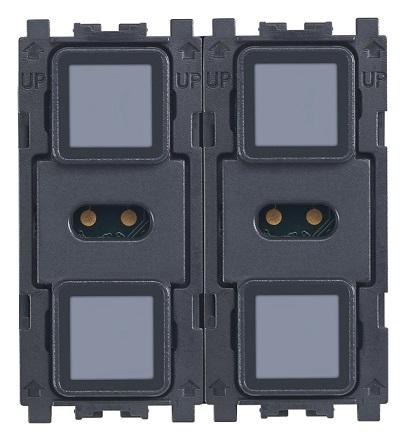
21840 KNX 4 Touch Pushbuttons 21840
VIMAR · Order number 21840 · Pushbuttons › Touch
21840 4 Touch Pushbuttons
Download .knxprod 21840 KNX 4 Touch Pushbuttons 2.0 · 159 KB
Product
| Manufacturer | VIMAR |
|---|---|
| Product name | 21840 KNX 4 Touch Pushbuttons |
| Order number | 21840 |
| Product text | 21840 4 fold touch pushbuttons |
| Hardware | 4 touch pushbuttons |
| Medium | Twisted Pair |
| Bus current (mA) | 35 |
| Rail mounted | No |
| Registration | Certified · 2014-01-31 |
| Languages | de-DE, en-US, it-IT |
| Catalog entry | M-002C_H-21840-0_HP-5550-20-ADD2_CI-21840-1 |
| Fingerprint | ADD2 |
| SHA-256 | 88c847a9def657909713a1403ea51075e6345f8fb183350560fe3691e9eddfac |
| First seen | 2026-11-25 |
| Markets | 69 markets |
Application program: 21840 KNX 4 Touch Pushbuttons 2.0
| Application number | $5550 |
|---|---|
| Version | 2.0 |
| Mask version | MV-0705 (7.5) |
| KNX Data Secure | No |
| Minimum ETS version | 3.0d |
| Parameters | 557 |
| Group objects | 79 |
Group objects (79)
| No | Name | Function | Size | DPT | Flags |
|---|---|---|---|---|---|
| 0 | Left Keys | Shutter Up/Down | 1 Bit | 1.8 up/down | CRT |
| 0 | Left Keys | Dimming On/Off | 1 Bit | 1.1 switch | CRT |
| 0 | Left Keys | On / Off | 1 Bit | 1.1 switch | CRT |
| 0 | Left Upper Key | Send Value - Rising | 1 Bit | 1.1 switch | CRT |
| 0 | Left Upper Key | Scene | 1 Byte | CRT | |
| 0 | Left Upper Key | Send Value | 1 Byte | 5.1 percentage (0..100%) | CRT |
| 0 | Left Upper Key | Dimming On/Off | 1 Bit | 1.1 switch | CRT |
| 0 | Left Upper Key | Send Value | 1 Bit | 1.1 switch | CRT |
| 0 | Left Upper Key | Send Forced | 2 Bit | 2.1 switch control | CRT |
| 1 | Left Keys | Blinds On/Off | 1 Bit | CRT | |
| 1 | Left Keys | Dimming | 4 Bit | 3.7 dimming control | CRT |
| 1 | Left Upper Key | Send Value - Falling | 1 Bit | 1.1 switch | CRT |
| 1 | Left Upper Key | Dimming | 4 Bit | 3.7 dimming control | CRT |
| 2 | Left LED | Status On/Off | 1 Bit | CWTU | |
| 2 | Left Upper Key | Status On/Off | 1 Bit | CWU | |
| 3 | Left Lower Key | Send Value - Rising | 1 Bit | 1.1 switch | CRT |
| 3 | Left Lower Key | Scene | 1 Byte | CRT | |
| 3 | Left Lower Key | Send Value | 1 Byte | 5.1 percentage (0..100%) | CRT |
| 3 | Left Lower Key | Dimming On/Off | 1 Bit | 1.1 switch | CRT |
| 3 | Left Lower Key | Send Value | 1 Bit | 1.1 switch | CRT |
| 3 | Left Lower Key | Send Forced | 2 Bit | 2.1 switch control | CRT |
| 4 | Left Lower Key | Send Value - Falling | 1 Bit | 1.1 switch | CRT |
| 4 | Left Lower Key | Dimming | 4 Bit | 3.7 dimming control | CRT |
| 5 | Left Lower Key | Status On/Off | 1 Bit | CWU | |
| 6 | Right Keys | Shutter Up/Down | 1 Bit | 1.8 up/down | CRT |
| 6 | Right Keys | Dimming On/Off | 1 Bit | 1.1 switch | CRT |
| 6 | Right Keys | On / Off | 1 Bit | 1.1 switch | CRT |
| 6 | Right upper Key | Send Value - Rising | 1 Bit | 1.1 switch | CRT |
| 6 | Right Upper Key | Scene | 1 Byte | CRT | |
| 6 | Right Upper Key | Send Value | 1 Byte | 5.1 percentage (0..100%) | CRT |
| 6 | Right Upper Key | Dimming On/Off | 1 Bit | 1.1 switch | CRT |
| 6 | Right Upper Key | Send Value | 1 Bit | 1.1 switch | CRT |
| 6 | Right Upper Key | Send Forced | 2 Bit | 2.1 switch control | CRT |
| 7 | Right Keys | Blinds On/Off | 1 Bit | CRT | |
| 7 | Right Keys | Dimming | 4 Bit | 3.7 dimming control | CRT |
| 7 | Right Upper Key | Send Value - Falling | 1 Bit | 1.1 switch | CRT |
| 7 | Right Upper Key | Dimming | 4 Bit | 3.7 dimming control | CRT |
| 8 | Right LED | Status On/Off | 1 Bit | CWTU | |
| 8 | Right Upper Key | Status On/Off | 1 Bit | CWU | |
| 9 | Right Lower Key | Send Value - Rising | 1 Bit | 1.1 switch | CRT |
| 9 | Right Lower Key | Scene | 1 Byte | CRT | |
| 9 | Right Lower Key | Send Value | 1 Byte | 5.1 percentage (0..100%) | CRT |
| 9 | Right Lower Key | Dimming On/Off | 1 Bit | 1.1 switch | CRT |
| 9 | Right Lower Key | Send Value | 1 Bit | 1.1 switch | CRT |
| 9 | Right Lower Key | Send Forced | 2 Bit | 2.1 switch control | CRT |
| 10 | Right Lower Key | Send Value - Falling | 1 Bit | 1.1 switch | CRT |
| 10 | Right Lower Key | Dimming | 4 Bit | 3.7 dimming control | CRT |
| 11 | Right Lower Key | Status On/Off | 1 Bit | CWU | |
| 12 | Right Keys | Shutter Up/Down | 1 Bit | 1.8 up/down | CRT |
| 12 | Right Keys | Dimming On/Off | 1 Bit | 1.1 switch | CRT |
| 12 | Right Keys | On / Off | 1 Bit | 1.1 switch | CRT |
| 12 | Right Upper Key | Send Value - Rising | 1 Bit | 1.1 switch | CRT |
| 12 | Right Upper Key | Scene | 1 Byte | CRT | |
| 12 | Right Upper Key | Send Value | 1 Byte | 5.1 percentage (0..100%) | CRT |
| 12 | Right Upper Key | Dimming On/Off | 1 Bit | 1.1 switch | CRT |
| 12 | Right Upper Key | Send Value | 1 Bit | 1.1 switch | CRT |
| 12 | Right Upper Key | Send Forced | 2 Bit | 2.1 switch control | CRT |
| 13 | Right Keys | Blinds On/Off | 1 Bit | CRT | |
| 13 | Right Keys | Dimming | 4 Bit | 3.7 dimming control | CRT |
| 13 | Right Upper Key | Send Value - Falling | 1 Bit | 1.1 switch | CRT |
| 13 | Right Upper Key | Dimming | 4 Bit | 3.7 dimming control | CRT |
| 14 | Right LED | Status On/Off | 1 Bit | CWTU | |
| 14 | Right Upper Key | Status On/Off | 1 Bit | CWU | |
| 15 | Right Lower Key | Send Value - Rising | 1 Bit | 1.1 switch | CRT |
| 15 | Right Lower Key | Scene | 1 Byte | CRT | |
| 15 | Right Lower Key | Send Value | 1 Byte | 5.1 percentage (0..100%) | CRT |
| 15 | Right Lower Key | Dimming On/Off | 1 Bit | 1.1 switch | CRT |
| 15 | Right Lower Key | Send Value | 1 Bit | 1.1 switch | CRT |
| 15 | Right Lower Key | Send Forced | 2 Bit | 2.1 switch control | CRT |
| 16 | Right Lower Key | Send Value - Falling | 1 Bit | 1.1 switch | CRT |
| 16 | Right Lower Key | Dimming | 4 Bit | 3.7 dimming control | CRT |
| 17 | Right Lower Key | Status On/Off | 1 Bit | CWU | |
| 18 | Remove Plate | Switch | 1 Bit | 1.1 switch | CRT |
| 19 | dummy 1 | dummy 1 | 1 Bit | 1.1 switch | CW |
| 20 | dummy 2 | dummy 2 | 1 Bit | 1.1 switch | CW |
| 21 | dummy 3 | dummy 3 | 1 Bit | 1.1 switch | CW |
| 22 | dummy 4 | dummy 4 | 1 Bit | 1.1 switch | CW |
| 23 | dummy 3 | dummy 3 | 1 Bit | 1.1 switch | CW |
| 24 | dummy 4 | dummy 4 | 1 Bit | 1.1 switch | CW |
Parameters (45)
| Parameter | Type | Default |
|---|---|---|
| ### | unsignedInt 0…255 | 0 |
| Debug | list | No |
| Version | text | 12 |
| 11102014 | text | 04022015 |
| Plate timeout | unsignedInt 11…32000 | 20 |
| Cleaning prolongation | unsignedInt 0…5000 | 500 |
| Time for Long Action | list | 2.0 s |
| State request [s] (0=no request) | unsignedInt 0…5000 | 1 |
| Buzzer | list | Not Active |
| Used Keys | list | 4 Keys |
| Proximity timeout | unsignedInt 0…32000 | 10 |
| Cleaning Time | list | 150 ms |
| proximity sensitivity | list | Low |
| Sensitivity | list | Low |
| Basic Function of Left Keys | list | Disabled |
| Function | list | Switching ON/OFF |
| Function Upper Key | list | Disabled |
| Dimming Steps | list | 100% |
| Scene Number | list | 1 |
| Value to Send | unsignedInt 0…255 | 1 |
| Send Value | list | Send On |
| Value on Rising Edge | list | On |
| Value on Falling Edge | list | Off |
| Time in Seconds | unsignedInt 1…32000 | 30 |
| Repeat Dimming Telegrams | list | No |
| Enable Storage Function | list | No |
| Repetition Time | list | 1.0 s |
| Function Lower Key | list | Disabled |
| Basic Function of Right Keys | list | Disabled |
| Basic Function of Right6fold keys | list | Disabled |
| Standby Brightness | list | Off |
| Upper LED: Colour Selection | list | Predefined Colours |
| Colour Upper LED | list | Amber (R 255, G 40, B 0) |
| Colour Red Upper LED | unsignedInt 0…255 | 255 |
| Colour Green Upper LED | unsignedInt 0…255 | 255 |
| Colour Blue Upper LED | unsignedInt 0…255 | 255 |
| Feedback of State Off | list | Deactivated |
| Upper LED - Off: Colour Selection | list | Predefined Colours |
| Blinking Time | list | 1.5 s |
| Lower LED: Colour Selection | list | Predefined Colours |
| Colour Lower LED | list | Amber (R 255, G 40, B 0) |
| Colour Red Lower LED | unsignedInt 0…255 | 255 |
| Colour Green Lower LED | unsignedInt 0…255 | 255 |
| Colour Blue Lower LED | unsignedInt 0…255 | 255 |
| Lower LED - Off: Colour Selection | list | Predefined Colours |
Version history
| Application | App no | Fingerprint | First seen | Size | File |
|---|---|---|---|---|---|
| 21840 KNX 4 Touch Pushbuttons 2.0 latest | $5550 | ADD2 | 2026-11-25 | 159 KB | Download |
About this file
This is the official ETS product database for the VIMAR 21840 KNX 4 Touch Pushbuttons (21840), published by the manufacturer in the KNX online catalog. To use it, open ETS, go to Catalogs → Import and choose the downloaded .knxprod file. The device then appears in your catalog and can be added to a project. Older versions are kept so existing projects can be matched to the application program they were commissioned with.
More from VIMAR
- 01580 Pushbuttons KNX 01580
- 01581 Pushbuttons with actuator KNX 01581
- 01582 Pushbuttons with shutter KNX 01582
- 01583 Pushbuttons KNX secure 01583
- 01585 Pushbuttons KNX 01585
- 01586 Pushbuttons with actuator KNX 01586
- 01587 Pushbuttons with shutter KNX 01587
- 01588 Pushbuttons KNX secure 01588
- 21860 KNX 6 Touch Pushbuttons 21860
- 22581 Pushbuttons Vintage KNX secure 22581
- 22582 Pushbuttons Vintage KNX secure 22582
- 30580 Pushbuttons KNX 30580