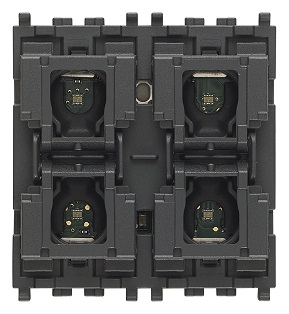
01582 Pushbuttons with shutter KNX 01582
VIMAR · Order number 01582 · Pushbuttons › Input Output
Download .knxprod 4 Pushbuttons with shutter KNX 1.0 · 124 KB
Product
| Manufacturer | VIMAR |
|---|---|
| Product name | 01582 Pushbuttons with shutter KNX |
| Order number | 01582 |
| Hardware | 01582 Pushbuttons with shutter KNX |
| Medium | Twisted Pair |
| Bus current (mA) | 25 |
| Rail mounted | No |
| Registration | Certified · 2019-01-21 |
| Languages | de-DE, en-US, it-IT |
| Catalog entry | M-002C_H-01582-0_HP-062E-10-2EDC_CI-01582-1 |
| Fingerprint | 2EDC |
| SHA-256 | 60cd78d57e776eb8e2da22f3d7fd3ed9bad25f35ef5ce4a455dc7389a3933f8d |
| First seen | 2026-11-25 |
| Markets | 69 markets |
Application program: 4 Pushbuttons with shutter KNX 1.0
| Application number | $062E |
|---|---|
| Version | 1.0 |
| Mask version | MV-0705 (7.5) |
| KNX Data Secure | No |
| Minimum ETS version | 4.0 |
| Parameters | 747 |
| Group objects | 103 |
Group objects (103)
| No | Name | Function | Size | DPT | Flags |
|---|---|---|---|---|---|
| 0 | Left Keys | Shutter Up/Down | 1 Bit | 1.8 up/down | CRT |
| 0 | Left Keys | Dimming On/Off | 1 Bit | 1.1 switch | CRT |
| 0 | Left Keys | On / Off | 1 Bit | 1.1 switch | CRT |
| 0 | Left Upper Key | Send Value - rising | 1 Bit | 1.1 switch | CRT |
| 0 | Left Upper Key | Scene | 1 Byte | 18.1 scene control | CRT |
| 0 | Left Upper Key | Send Value | 1 Byte | 5.1 percentage (0..100%) | CRT |
| 0 | Left Upper Key | Dimming On/Off | 1 Bit | 1.1 switch | CRT |
| 0 | Left Upper Key | Send Value | 1 Bit | 1.1 switch | CRT |
| 0 | Left Upper Key | Send Forced | 2 Bit | 2.1 switch control | CRT |
| 0 | Left Upper Key | Shutter Up | 1 Bit | 1.1 switch | CRT |
| 0 | Left Upper Key | Shutter Down | 1 Bit | 1.1 switch | CRT |
| 0 | Left Upper Key | Shutter Up/Down | 1 Bit | 1.1 switch | CRT |
| 1 | Left Keys | Blinds On/Off | 1 Bit | 1.7 step | CRT |
| 1 | Left Keys | Dimming | 4 Bit | 3.7 dimming control | CRT |
| 1 | Left Upper Key | Send Value - falling | 1 Bit | 1.1 switch | CRT |
| 1 | Left Upper Key | Dimming | 4 Bit | 3.7 dimming control | CRT |
| 1 | Left Upper Key | Blinds / Stop | 1 Bit | 1.1 switch | CRT |
| 2 | Left Upper Key | Status On/Off | 1 Bit | 1.11 state | CWU |
| 2 | Left Upper Key | Shutter State | 1 Bit | 1.1 switch | CW |
| 3 | Left Upper LED | State | 1 Bit | 1.1 switch | CWU |
| 4 | Left Lower Key | Send Value - rising | 1 Bit | 1.1 switch | CRT |
| 4 | Left Lower Key | Scene | 1 Byte | 18.1 scene control | CRT |
| 4 | Left Lower Key | Send Value | 1 Byte | 5.1 percentage (0..100%) | CRT |
| 4 | Left Lower Key | Dimming On/Off | 1 Bit | 1.1 switch | CRT |
| 4 | Left Lower Key | Send Value | 1 Bit | 1.1 switch | CRT |
| 4 | Left Lower Key | Send Forced | 2 Bit | 2.1 switch control | CRT |
| 4 | Left Lower Key | Shutter Up | 1 Bit | 1.1 switch | CRT |
| 4 | Left Lower Key | Shutter Down | 1 Bit | 1.1 switch | CRT |
| 4 | Left Lower Key | Shutter Up/Down | 1 Bit | 1.1 switch | CRT |
| 5 | Left Lower Key | Send Value - falling | 1 Bit | 1.1 switch | CRT |
| 5 | Left Lower Key | Dimming | 4 Bit | 3.7 dimming control | CRT |
| 5 | Left Lower Key | Blinds / Stop | 1 Bit | 1.1 switch | CRT |
| 6 | Left Lower Key | Status On/Off | 1 Bit | 1.11 state | CWU |
| 6 | Left Lower Key | Shutter State | 1 Bit | 1.1 switch | CW |
| 7 | Left Lower LED | State | 1 Bit | 1.1 switch | CWU |
| 8 | Right Keys | Shutter Up/Down | 1 Bit | 1.8 up/down | CRT |
| 8 | Right Keys | Dimming On/Off | 1 Bit | 1.1 switch | CRT |
| 8 | Right Keys | On / Off | 1 Bit | 1.1 switch | CRT |
| 8 | Right Upper Key | Send Value - rising | 1 Bit | 1.1 switch | CRT |
| 8 | Right Upper Key | Scene | 1 Byte | 18.1 scene control | CRT |
| 8 | Right Upper Key | Send Value | 1 Byte | 5.1 percentage (0..100%) | CRT |
| 8 | Right Upper Key | Dimming On/Off | 1 Bit | 1.1 switch | CRT |
| 8 | Right Upper Key | Send Value | 1 Bit | 1.1 switch | CRT |
| 8 | Right Upper Key | Send Forced | 2 Bit | 2.1 switch control | CRT |
| 8 | Right Upper Key | Shutter Up | 1 Bit | 1.1 switch | CRT |
| 8 | Right Upper Key | Shutter Down | 1 Bit | 1.1 switch | CRT |
| 8 | Right Upper Key | Shutter Up/Down | 1 Bit | 1.1 switch | CRT |
| 9 | Right Keys | Blinds On/Off | 1 Bit | 1.7 step | CRT |
| 9 | Right Keys | Dimming | 4 Bit | 3.7 dimming control | CRT |
| 9 | Right Upper Key | Send Value - falling | 1 Bit | 1.1 switch | CRT |
| 9 | Right Upper Key | Dimming | 4 Bit | 3.7 dimming control | CRT |
| 9 | Right Upper Key | Blinds / Stop | 1 Bit | 1.1 switch | CRT |
| 10 | Right Upper Key | Status On/Off | 1 Bit | 1.11 state | CWU |
| 10 | Right Upper Key | Shutter State | 1 Bit | 1.1 switch | CW |
| 11 | Right Upper LED | State | 1 Bit | 1.1 switch | CWU |
| 12 | Right Lower Key | Send Value - rising | 1 Bit | 1.1 switch | CRT |
| 12 | Right Lower Key | Scene | 1 Byte | 18.1 scene control | CRT |
| 12 | Right Lower Key | Send Value | 1 Byte | 5.1 percentage (0..100%) | CRT |
| 12 | Right Lower Key | Dimming On/Off | 1 Bit | 1.1 switch | CRT |
| 12 | Right Lower Key | Send Value | 1 Bit | 1.1 switch | CRT |
| 12 | Right Lower Key | Send Forced | 2 Bit | 2.1 switch control | CRT |
| 12 | Right Lower Key | Shutter Up | 1 Bit | 1.1 switch | CRT |
| 12 | Right Lower Key | Shutter Down | 1 Bit | 1.1 switch | CRT |
| 12 | Right Lower Key | Shutter Up/Down | 1 Bit | 1.1 switch | CRT |
| 13 | Right Lower Key | Send Value - falling | 1 Bit | 1.1 switch | CRT |
| 13 | Right Lower Key | Dimming | 4 Bit | 3.7 dimming control | CRT |
| 13 | Right Lower Key | Blinds / Stop | 1 Bit | 1.1 switch | CRT |
| 14 | Right Lower Key | Status On/Off | 1 Bit | 1.11 state | CWU |
| 14 | Right Lower Key | Shutter State | 1 Bit | 1.1 switch | CW |
| 15 | Right Lower LED | State | 1 Bit | 1.1 switch | CWU |
| 16 | Automatic | Automatic position 1 | 1 Bit | 1.1 switch | CW |
| 17 | Automatic | Automatic position 2 | 1 Bit | 1.1 switch | CW |
| 18 | Automatic | Automatic position 3 | 1 Bit | 1.1 switch | CW |
| 19 | Automatic | Automatic position 4 | 1 Bit | 1.1 switch | CW |
| 20 | Out | Shutter up/down | 1 Bit | 1.8 up/down | CW |
| 21 | Out | Blinds up/down /Stop | 1 Bit | 1.7 step | CW |
| 22 | Out | Stop | 1 Bit | 1.7 step | CW |
| 23 | Out | Scene | 1 Byte | 18.1 scene control | CW |
| 24 | Out | Act. direction | 1 Bit | 1.1 switch | CRT |
| 25 | Out | Move | 1 Bit | 1.1 switch | CRT |
| 26 | Out | Position (Absolute) | 1 Byte | 5.1 percentage (0..100%) | CW |
| 27 | Out | Absolute position of blinds | 1 Byte | 5.1 percentage (0..100%) | CW |
| 28 | Out | Position (Actual) | 1 Byte | 5.1 percentage (0..100%) | CRT |
| 29 | Out | Actual position of blinds | 1 Byte | 5.1 percentage (0..100%) | CRT |
| 30 | Out | Actual valid position | 1 Bit | 1.1 switch | CRT |
| 31 | Out | Drive to reference | 1 Bit | 1.1 switch | CW |
| 32 | Out | Drive to limit | 1 Bit | 1.1 switch | CW |
| 33 | Out | State upper Position | 1 Bit | 1.1 switch | CRT |
| 33 | Out | State upper Position | 1 Bit | 1.1 switch | CRT |
| 34 | Out | State lower Position | 1 Bit | 1.1 switch | CRT |
| 34 | Out | State lower Position | 1 Bit | 1.1 switch | CRT |
| 35 | Out | Block automatic mode | 1 Bit | 1.1 switch | CW |
| 36 | Out | Block manual mode | 1 Bit | 1.1 switch | CW |
| 37 | Out | Alert (Wind) | 1 Bit | 1.5 alarm | CW |
| 38 | Out | Alert (Rain) | 1 Bit | 1.5 alarm | CW |
| 39 | Out | Alert (Frost) | 1 Bit | 1.5 alarm | CW |
| 40 | Out | Block | 1 Bit | 1.5 alarm | CW |
| 41 | dummy 1 | dummy 1 | 1 Bit | 1.1 switch | CW |
| 42 | dummy 2 | dummy 2 | 1 Bit | 1.1 switch | CW |
| 43 | dummy 3 | dummy 3 | 1 Bit | 1.1 switch | CW |
| 44 | dummy 4 | dummy 4 | 1 Bit | 1.1 switch | CW |
| 45 | dummy 5 | dummy 5 | 1 Bit | 1.1 switch | CW |
| 46 | dummy 6 | dummy 6 | 1 Bit | 1.1 switch | CW |
Parameters (156)
| Parameter | Type | Default |
|---|---|---|
| Lower Limit | list | 0% |
| Upper Limit | list | 100% |
| Save scenes | list | not active |
| Scene A - Position | list | 0% |
| Scene Number A | list | 1 |
| Scene B - Position | list | 0% |
| Scene Number B | list | 2 |
| Scene C - Position | list | 0% |
| Scene Number C | list | 3 |
| Scene D - Position | list | 0% |
| Scene Number D | list | 4 |
| Scene E - Position | list | 0% |
| Scene Number E | list | 5 |
| Scene F - Position | list | 0% |
| Scene Number F | list | 6 |
| Scene G - Position | list | 0% |
| Scene Number G | list | 7 |
| Scene H - Position | list | 0% |
| Scene Number H | list | 8 |
| Automatic objects | unsignedInt 255…255 | 255 |
| Automatic objects | list | Block A |
| Automatic function 1 - Position | list | 0% |
| Automatic function 1 -position of blinds | list | 0% |
| Automatic function 2 - Position | list | 0% |
| Automatic function 2 -position of blinds | list | 0% |
| Automatic function 3 - Position | list | 0% |
| Automatic function 3 -position of blinds | list | 0% |
| Automatic function 4 - Position | list | 0% |
| Automatic function 4 -position of blinds | list | 0% |
| Action at reset of alerts/blocking | list | no Action |
| Alarmobjekte | unsignedInt 255…255 | 255 |
| Alarmobjekte | unsignedInt 0…7 | 0 |
| bitMask of input | unsignedInt 0…65535 | 8 |
| bitMask of input | unsignedInt 0…65535 | 4 |
| bitMask of input | unsignedInt 0…65535 | 2 |
| bitMask of input | unsignedInt 0…65535 | 1 |
| off Action Mask | unsignedInt 0…65535 | 14 |
| off Action Mask | unsignedInt 0…65535 | 13 |
| off Action Mask | unsignedInt 0…65535 | 11 |
| off Action Mask | unsignedInt 0…65535 | 7 |
| Cycle Time (min) | list | not active |
| Objektype | unsignedInt 0…255 | 255 |
| Objektype | unsignedInt 0…255 | 0 |
| Action bei aus | list | no Action |
| Action | list | no Action |
| Send stop on Release | list | No |
| Send stop on Release | list | Yes |
| Send Value | list | send On |
| Dimming steps | list | 100% |
| Scene No | list | 1 |
| Value to send | unsignedInt 0…255 | 1 |
| Function short press | list | Off |
| Function long press | list | Off |
| Repetition time | list | 1.0 s |
| Time in seconds | unsignedInt 1…32000 | 30 |
| Value on Falling Edge | list | Off |
| Function short press | list | Toggle |
| Value on Rising Edge | list | 0 off/Auf |
| Value on Rising Edge | list | 1 on/ab |
| Value on Rising Edge | list | 2 Toggle |
| Function long press | list | No reaction |
| Scene No long | list | 2 |
| Value on Rising Edge | list | On |
| Value on Falling Edge | list | 0 off/Auf |
| Value on Falling Edge | list | 1 on/ab |
| Colour of Left upper LED | list | Amber (R 255, G 69, B 0) |
| Colour red Left upper LED | unsignedInt 0…255 | 128 |
| Colour green Left upper LED | unsignedInt 0…255 | 128 |
| Colour blue Left upper LED | unsignedInt 0…255 | 128 |
| Colour of Left lower LED | list | Amber (R 255, G 69, B 0) |
| Colour red Left lower LED | unsignedInt 0…255 | 128 |
| Colour green Left lower LED | unsignedInt 0…255 | 128 |
| Colour blue Left lower LED | unsignedInt 0…255 | 128 |
| Colour of Right upper LED | list | Amber (R 255, G 69, B 0) |
| Colour red Right upper LED | unsignedInt 0…255 | 128 |
| Colour green Right upper LED | unsignedInt 0…255 | 128 |
| Colour blue Right upper LED | unsignedInt 0…255 | 128 |
| Colour of Right lower LED | list | Amber (R 255, G 69, B 0) |
| Colour red Right lower LED | unsignedInt 0…255 | 128 |
| Colour green Right lower LED | unsignedInt 0…255 | 128 |
| Colour blue Right lower LED | unsignedInt 0…255 | 128 |
| Debug | unsignedInt 0…1 | 1 |
| Debug | list | No |
| Version | text | 13 |
| 16102017 | text | 16102017 |
| ### | unsignedInt 0…255 | 0 |
| ### | unsignedInt 0…1 | 1 |
| Debounce Time | unsignedInt 50…500 | 50 |
| Time for long action | list | 2,0 s |
| State request [s] (0=no request) | unsignedInt 1…500 | 1 |
| Mode | list | Blinds |
| x | unsignedInt 1…10000 | 50 |
| x | unsignedInt 0…100 | 5 |
| x | unsignedInt 0…100 | 10 |
| Automatic 0 | unsignedInt 0…255 | 0 |
| Manual 0 | unsignedInt 0…255 | 0 |
| Automatic 1 | unsignedInt 0…255 | 8 |
| Manual 1 | unsignedInt 0…255 | 1 |
| ebm | list | Blinds |
| Running time (sec) | unsignedInt 1…10000 | 45 |
| Step time for blinds (ms) | unsignedInt 50…1000 | 200 |
| Duration of blinds adjustment (ms) | unsignedInt 10…10000 | 1200 |
| Pause at change of direction (ms) | unsignedInt 1…1000 | 500 |
| switch-on delay motor (ms) | unsignedInt 0…255 | 0 |
| switch-off delay motor (ms) | unsignedInt 0…255 | 0 |
| Position of blinds at end of driving | list | 50% |
| Select objects for absolute position | list | not active |
| Reaction after driving to reference | list | no Reaction |
| Driving area: Limitation | list | not active |
| Action Sperren | list | no Action |
| Scene | list | not active |
| Automatic function | list | not active |
| Alerts | list | not active |
| Scene A -position of blinds | list | 0% |
| Scene B -position of blinds | list | 0% |
| Scene C -position of blinds | list | 0% |
| Scene D -position of blinds | list | 0% |
| Scene E -position of blinds | list | 0% |
| Scene F -position of blinds | list | 0% |
| Scene G -position of blinds | list | 0% |
| Scene H -position of blinds | list | 0% |
| Order of Alerts | list | Wind, Rain, Block, Frost |
| Kogikcoperation | unsignedInt 2…2 | 2 |
| invertMask | unsignedInt 0…65535 | 0 |
| inputMask | unsignedInt 0…65535 | 15 |
| Wind alert | list | not active |
| Alert 0 | unsignedInt 0…1 | 1 |
| Rain alert | list | not active |
| Frost alert | list | not active |
| Block | list | not active |
| Basic Function of Left keys | list | disabled |
| Function | list | Switching ON/OFF |
| Repeat Dimming Telegrams | list | No |
| Direction | list | Switching ON/OFF |
| Direction | list | Brighter/Darker |
| Functionality for rocker press | list | Shutter Movement (long), Stop/Step(short) |
| Direction | list | Shutter_UP pressing up, Shutter_DOWN pressing down |
| Basic Function of Right keys | list | disabled |
| Function Upper Key | list | Disabled |
| Long press Function | list | Nothing |
| Long press Function | list | Yes |
| Long press second Value | list | No |
| Shutter Behaviour | list | Shutter Movement UP (long), Stop/Step(short) |
| Function Lower Key | list | Disabled |
| Select colour of Left upper LED | list | predefined colours |
| Reaction on Left upper LED | list | Maximum brightness |
| Reaction off Left upper LED | list | Off |
| Select colour of Left lower LED | list | predefined colours |
| Reaction on Left lower LED | list | Maximum brightness |
| Reaction off Left lower LED | list | Off |
| Select colour of Right upper LED | list | predefined colours |
| Reaction on Right upper LED | list | Maximum brightness |
| Reaction off Right upper LED | list | Off |
| Select colour of Right lower LED | list | predefined colours |
| Reaction on Right lower LED | list | Maximum brightness |
| Reaction off Right lower LED | list | Off |
Version history
| Application | App no | Fingerprint | First seen | Size | File |
|---|---|---|---|---|---|
| 4 Pushbuttons with shutter KNX 3.0 latest | $062E | 219D | 2026-11-25 | 150 KB | Download |
| 4 Pushbuttons with shutter KNX 2.0 | $062E | E91C | 2026-11-25 | 147 KB | Download |
| 4 Pushbuttons with shutter KNX 1.0 | $062E | 2EDC | 2026-11-25 | 124 KB | Download |
About this file
This is the official ETS product database for the VIMAR 01582 Pushbuttons with shutter KNX (01582), published by the manufacturer in the KNX online catalog. To use it, open ETS, go to Catalogs → Import and choose the downloaded .knxprod file. The device then appears in your catalog and can be added to a project. Older versions are kept so existing projects can be matched to the application program they were commissioned with.
More from VIMAR
- 01580 Pushbuttons KNX 01580
- 01581 Pushbuttons with actuator KNX 01581
- 01583 Pushbuttons KNX secure 01583
- 01585 Pushbuttons KNX 01585
- 01586 Pushbuttons with actuator KNX 01586
- 01587 Pushbuttons with shutter KNX 01587
- 01588 Pushbuttons KNX secure 01588
- 21840 KNX 4 Touch Pushbuttons 21840
- 21860 KNX 6 Touch Pushbuttons 21860
- 22581 Pushbuttons Vintage KNX secure 22581
- 22582 Pushbuttons Vintage KNX secure 22582
- 30580 Pushbuttons KNX 30580