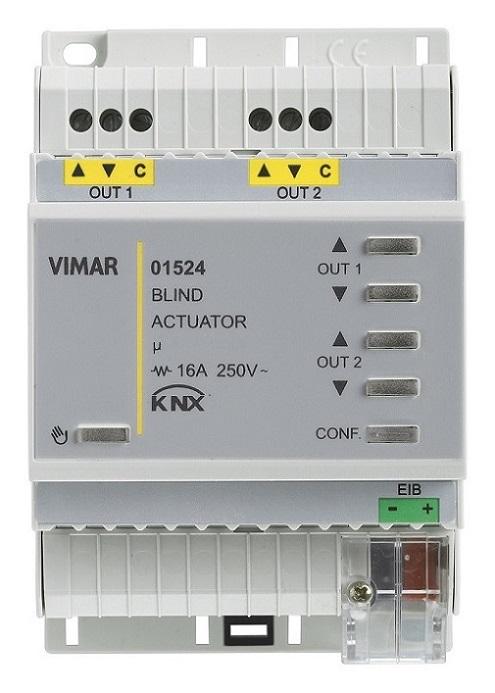
01524 2 Fold Shutter 01524
VIMAR · Order number 01524 · Automation › Shutter
Shutter
Download .knxprod 2fold shutter 1.1 · 148 KB
Product
| Manufacturer | VIMAR |
|---|---|
| Product name | 01524 2 Fold Shutter |
| Order number | 01524 |
| Hardware | 01524 2fold shutter |
| Medium | Twisted Pair |
| Bus current (mA) | 10 |
| Rail mounted | Yes |
| Registration | Certified |
| Languages | de-DE, en-US, it-IT |
| Catalog entry | M-002C_H-.2405F4-1_HP-05F4-11-F452_CI-01524.20-0 |
| Fingerprint | F452 |
| SHA-256 | ab59c6eb024d994cac5be54bf4441b3364e0caa1135e91ba8549274cd01ce90d |
| First seen | 2026-11-25 |
| Markets | 69 markets |
Application program: 2fold shutter 1.1
| Application number | $05F4 |
|---|---|
| Version | 1.1 |
| Mask version | MV-0701 (7.1) |
| KNX Data Secure | No |
| Minimum ETS version | 3.0d |
| Parameters | 396 |
| Group objects | 50 |
Group objects (50)
| No | Name | Function | Size | DPT | Flags |
|---|---|---|---|---|---|
| 0 | Automatic 1 | Automatic position 1 | 1 Bit | CW | |
| 1 | Automatic 1 | Automatic position 2 | 1 Bit | CW | |
| 2 | Automatic 1 | Automatic position 3 | 1 Bit | CW | |
| 3 | Automatic 1 | Automatic position 4 | 1 Bit | CW | |
| 4 | Automatic 2 | Automatic position 1 | 1 Bit | CW | |
| 5 | Automatic 2 | Automatic position 2 | 1 Bit | CW | |
| 6 | Automatic 2 | Automatic position 3 | 1 Bit | CW | |
| 7 | Automatic 2 | Automatic position 4 | 1 Bit | CW | |
| 8 | Out 1 | Shutter up/down | 1 Bit | CW | |
| 9 | Out 1 | Blinds up/down /stop | 1 Bit | CW | |
| 10 | Out 1 | Stop | 1 Bit | CW | |
| 11 | Out 1 | Scene | 1 Byte | CW | |
| 12 | Out 1 | Act. direction | 1 Bit | CRT | |
| 13 | Out 1 | Move | 1 Bit | CRWT | |
| 14 | Out 1 | Position (Absolute) | 1 Byte | CW | |
| 15 | Out 1 | abs. position of blinds | 1 Byte | CW | |
| 16 | Out 1 | Position (Actual) | 1 Byte | CRT | |
| 17 | Out 1 | Actual position of blinds | 1 Byte | CRT | |
| 18 | Out 1 | Act. position valid | 1 Bit | CRT | |
| 19 | Out 1 | Drive to reference | 1 Bit | CW | |
| 20 | Out 1 | Drive to limit | 1 Bit | CW | |
| 21 | Out 1 | State upper Position | 1 Bit | CRT | |
| 22 | Out 1 | State lower Position | 1 Bit | CRT | |
| 23 | Out 1 | Block automatic mode | 1 Bit | CW | |
| 24 | Out 1 | Block manual mode | 1 Bit | CW | |
| 25 | Out 1 | Alert (Wind) | 1 Bit | CW | |
| 26 | Out 1 | Alert (Rain) | 1 Bit | CW | |
| 27 | Out 1 | Alert (Frost) | 1 Bit | CW | |
| 28 | Out 1 | Block | 1 Bit | CW | |
| 29 | Out 2 | Shutter up/down | 1 Bit | CW | |
| 30 | Out 2 | Blinds up/down /stop | 1 Bit | CW | |
| 31 | Out 2 | Stop | 1 Bit | CW | |
| 32 | Out 2 | Scene | 1 Byte | CW | |
| 33 | Out 2 | Act. direction | 1 Bit | CRT | |
| 34 | Out 2 | Move | 1 Bit | CRWT | |
| 35 | Out 2 | Position (Absolute) | 1 Byte | CW | |
| 36 | Out 2 | abs. position of blinds | 1 Byte | CW | |
| 37 | Out 2 | Position (Actual) | 1 Byte | CRT | |
| 38 | Out 2 | Actual position of blinds | 1 Byte | CRT | |
| 39 | Out 2 | Act. position valid | 1 Bit | CRT | |
| 40 | Out 2 | Drive to reference | 1 Bit | CW | |
| 41 | Out 2 | Drive to limit | 1 Bit | CW | |
| 42 | Out 2 | State upper Position | 1 Bit | CRT | |
| 43 | Out 2 | State lower Position | 1 Bit | CRT | |
| 44 | Out 2 | Block automatic mode | 1 Bit | CW | |
| 45 | Out 2 | Block manual mode | 1 Bit | CW | |
| 46 | Out 2 | Alert (Wind) | 1 Bit | CW | |
| 47 | Out 2 | Alert (Rain) | 1 Bit | CW | |
| 48 | Out 2 | Alert (Frost) | 1 Bit | CW | |
| 49 | Out 2 | Block | 1 Bit | CW |
Parameters (95)
| Parameter | Type | Default |
|---|---|---|
| Out 1 | list | not activ |
| Out 2 | list | not activ |
| Action block | list | no Action |
| minimum Movetime (ms) | unsignedInt 1…10000 | 100 |
| ebm | list | Shutter |
| Running time (sec) | unsignedInt 1…10000 | 1000 |
| Step time for blinds (ms) | unsignedInt 1…1 | 1 |
| Step time for blinds (ms) | unsignedInt 100…1000 | 200 |
| Duration of blinds adjustment (ms) | unsignedInt 1…1 | 1 |
| Duration of blinds adjustment (ms) | unsignedInt 10…10000 | 1200 |
| Pause at change of direction (ms) | unsignedInt 1…1000 | 1000 |
| switch-on delay motor (ms) | unsignedInt 0…255 | 0 |
| switch-off delay motor (ms) | unsignedInt 0…255 | 0 |
| Alarm objects | unsignedInt 255…255 | 255 |
| Position of blinds at end of driving | list | 50% |
| Automatic enable 0 | unsignedInt 0…255 | 8 |
| Automatic enable 1 | unsignedInt 0…255 | 0 |
| Manuell enable 0 | unsignedInt 0…255 | 1 |
| Manuell enable 0 | unsignedInt 0…255 | 0 |
| Select objects for absolute position | list | not active |
| Reaction after driving to reference | list | no Reaction |
| Driving area: Limitation | list | not active |
| Lower Limit | list | 0% |
| Upper Limit | list | 100% |
| Scene | list | not active |
| Automatic function | list | not active |
| Alert function | list | not active |
| Objects for alerts | unsignedInt 255…255 | 255 |
| Objects for alerts | unsignedInt 0…7 | 0 |
| Alarm objects | unsignedInt 0…7 | 0 |
| Logic operation | unsignedInt 2…2 | 2 |
| invertMask | unsignedInt 0…65535 | 0 |
| inputMask | unsignedInt 0…65535 | 15 |
| Order of Alerts | list | Wind, Rain, Frost, Block |
| 0=Weather alert 1, Weather alert 2, Weather alert 3, Block | list | Wind, Rain, Frost, Block |
| 1=Weather alert 1, Weather alert 2, Block, Weather alert 3 | list | Wind, Rain, Frost, Block |
| 2=Weather alert 1, Block, Weather alert 2, Weather alert 3 | list | Wind, Rain, Frost, Block |
| 3=Block, Weather alert 1, Weather alert 2, Weather alert 3 | list | Wind, Rain, Frost, Block |
| bitMask of input | unsignedInt 0…65535 | 8 |
| bitMask of input | unsignedInt 0…65535 | 4 |
| bitMask of input | unsignedInt 0…65535 | 2 |
| bitMask of input | unsignedInt 0…65535 | 1 |
| off Action Mask | unsignedInt 0…65535 | 14 |
| Action at reset of alerts/blocking | list | no Action |
| Wind alert | list | not active |
| Cycle Time (min, 0 = off) | unsignedInt 0…120 | 0 |
| Object type | unsignedInt 0…255 | 255 |
| Action when off | list | no Action |
| Action | list | no Action |
| Rain alert | list | not active |
| Frost alert | list | not active |
| Block | list | not active |
| Reaction when bus power down | list | no Action |
| Reaction when bus power up | list | no Action |
| Save scenes | list | not activ |
| Scene A - Position | list | 0% |
| Scene Number A | list | not active |
| Scene A - Position of blinds | list | 0% |
| Scene B - Position | list | 0% |
| Scene Number B | list | not active |
| Scene C - Position | list | 0% |
| Scene B - Position of blinds | list | 0% |
| Scene Number C | list | not active |
| Scene D - Position | list | 0% |
| Scene Number D | list | not active |
| Scene C - Position of blinds | list | 0% |
| Scene E - Position | list | 0% |
| Scene Number E | list | not active |
| Scene F - Position | list | 0% |
| Scene D - Position of blinds | list | 0% |
| Scene Number F | list | not active |
| Scene G - Position | list | 0% |
| Scene Number G | list | not active |
| Scene E - Position of blinds | list | 0% |
| Scene H - Position | list | 0% |
| Scene Number H | list | not active |
| Scene F - Position of blinds | list | 0% |
| Scene G - Position of blinds | list | 0% |
| Scene H - Position of blinds | list | 0% |
| Automatic objects | unsignedInt 255…255 | 255 |
| Automatic objects | list | Block A |
| Automatic function 1 - Position | list | 0% |
| Automatic function 2 - Position | list | 0% |
| Automatic function 1 - Position of blinds | list | 0% |
| Automatic function 3 - Position | list | 0% |
| Automatic function 4 - Position | list | 0% |
| Automatic function 2 - Position of blinds | list | 0% |
| Automatic function 3 - Position of blinds | list | 0% |
| Automatic function 4 - Position of blinds | list | 0% |
| Alarm objects | unsignedInt 0…7 | 1 |
| Objects for alerts | unsignedInt 0…7 | 1 |
| Block A | list | not active |
| Block B | list | not active |
| Alerts A | list | not active |
| Alerts B | list | not active |
Version history
| Application | App no | Fingerprint | First seen | Size | File |
|---|---|---|---|---|---|
| 2fold shutter 1.1 latest | $05F4 | F452 | 2026-11-25 | 148 KB | Download |
About this file
This is the official ETS product database for the VIMAR 01524 2 Fold Shutter (01524), published by the manufacturer in the KNX online catalog. To use it, open ETS, go to Catalogs → Import and choose the downloaded .knxprod file. The device then appears in your catalog and can be added to a project. Older versions are kept so existing projects can be matched to the application program they were commissioned with.
More from VIMAR
- 01510 4 Fold Input 01510
- 01522 4 Fold Input/Output 01522
- 01522.1 4 Fold Input/Output KNX secure 01522.1
- 01523 4 Fold Output 01523
- 01523.1 4 Fold Output KNX secure 01523.1
- 01500.1 Power supply,320mA,MDRC 01500.1
- 01500.2 Power supply unit 320mA KNX 01500.2
- 01501.1 Power supply,640mA,MDRC 01501.1
- 01501.2 Power supply unit 640mA KNX 01501.2
- 01504.1 Line-/Area Coupler, MDRC 01504.1
- 01504.2 Line coupler 01504.2
- 01506 By-me Plus KNX Secure TP router 01506