| 0 | Safety | Safety | 1 Bit | 1.3 enable | CWT |
| 1 | Shutter / roller blind central, Channel A-D | Up / Down | 1 Bit | 1.8 up/down | CWT |
| 2 | Manual mode / automatic mode, central | Off / On | 1 Bit | 1.3 enable | CWT |
| 2 | Roller blind, Channel A | Up / Down | 1 Bit | 1.8 up/down | CWT |
| 2 | Shutter, Channel A | Up / Down | 1 Bit | 1.8 up/down | CWT |
| 3 | Shutter/roller blind position, automatic mode, A/B | 8-bit Value | 1 Byte | 5.1 percentage (0..100%) | CWT |
| 3 | Roller blind, Channel A | Stop | 1 Bit | 1.9 open/close | CWT |
| 3 | Louvres, Channel A | Open / Closed | 1 Bit | 1.9 open/close | CWT |
| 4 | Louvres position automatic mode, Channel A/B | 8-bit Value | 1 Byte | 5.1 percentage (0..100%) | CWT |
| 4 | Shutter position, Channel A | 8-bit Value | 1 Byte | 5.1 percentage (0..100%) | CWT |
| 4 | Roller blind position, Channel A | 8-bit Value | 1 Byte | 5.1 percentage (0..100%) | CWT |
| 5 | Shutter/roller blind position, automatic mode, C/D | 8-bit Value | 1 Byte | 5.1 percentage (0..100%) | CWT |
| 5 | Louvres position, Channel A | 8-bit Value | 1 Byte | 5.1 percentage (0..100%) | CWT |
| 6 | Louvres position automatic mode, Channel C/D | 8-bit Value | 1 Byte | 5.1 percentage (0..100%) | CWT |
| 6 | Status shutter position, Channel A | 8-bit Value | 1 Byte | 5.1 percentage (0..100%) | CRT |
| 6 | Status roller blind position, Channel A | 8-bit Value | 1 Byte | 5.1 percentage (0..100%) | CRT |
| 7 | Manual mode / automatic mode, Channel A | Off / On | 1 Bit | 1.3 enable | CRWT |
| 7 | Status louvres position, Channel A | 8-bit Value | 1 Byte | 5.1 percentage (0..100%) | CRT |
| 8 | Shutter manual mode, Channel A | Up / Down | 1 Bit | 1.8 up/down | CWT |
| 8 | Roller blind, Channel B | Up / Down | 1 Bit | 1.8 up/down | CWT |
| 8 | Roller blind manual mode, Channel A | Up / Down | 1 Bit | 1.8 up/down | CWT |
| 8 | Shutter, Channel B | Up / Down | 1 Bit | 1.8 up/down | CWT |
| 9 | Roller blind manual mode, Channel A | Stop | 1 Bit | 1.9 open/close | CWT |
| 9 | Roller blind, Channel B | Stop | 1 Bit | 1.9 open/close | CWT |
| 9 | Louvres manual mode, Channel A | Open / Closed | 1 Bit | 1.9 open/close | CWT |
| 9 | Louvres, Channel B | Open / Closed | 1 Bit | 1.9 open/close | CWT |
| 10 | Status shutter position, Channel A | 8-bit Value | 1 Byte | 5.1 percentage (0..100%) | CRT |
| 10 | Roller blind position, Channel B | 8-bit Value | 1 Byte | 5.1 percentage (0..100%) | CWT |
| 10 | Status roller blind position, Channel A | 8-bit Value | 1 Byte | 5.1 percentage (0..100%) | CRT |
| 10 | Shutter position, Channel B | 8-bit Value | 1 Byte | 5.1 percentage (0..100%) | CWT |
| 11 | Status louvres position, Channel A | 8-bit Value | 1 Byte | 5.1 percentage (0..100%) | CRT |
| 11 | Louvres position, Channel B | 8-bit Value | 1 Byte | 5.1 percentage (0..100%) | CWT |
| 12 | Manual mode / automatic mode, Channel B | Off / On | 1 Bit | 1.3 enable | CRWT |
| 12 | Status shutter position, Channel B | 8-bit Value | 1 Byte | 5.1 percentage (0..100%) | CRT |
| 12 | Status roller blind position, Channel B | 8-bit Value | 1 Byte | 5.1 percentage (0..100%) | CRT |
| 13 | Shutter manual mode, Channel B | Up / Down | 1 Bit | 1.8 up/down | CWT |
| 13 | Status louvres position, Channel B | 8-bit Value | 1 Byte | 5.1 percentage (0..100%) | CRT |
| 13 | Roller blind manual mode, Channel B | Up / Down | 1 Bit | 1.8 up/down | CWT |
| 14 | Roller blind manual mode, Channel B | Stop | 1 Bit | 1.9 open/close | CWT |
| 14 | Shutter, Channel C | Up / Down | 1 Bit | 1.8 up/down | CWT |
| 14 | Roller blind, Channel C | Up / Down | 1 Bit | 1.8 up/down | CWT |
| 14 | Louvres manual mode, Channel B | Open / Closed | 1 Bit | 1.9 open/close | CWT |
| 15 | Status shutter position, Channel B | 8-bit Value | 1 Byte | 5.1 percentage (0..100%) | CRT |
| 15 | Roller blind, Channel C | Stop | 1 Bit | 1.9 open/close | CWT |
| 15 | Status roller blind position, Channel B | 8-bit Value | 1 Byte | 5.1 percentage (0..100%) | CRT |
| 15 | Louvres, Channel C | Open / Closed | 1 Bit | 1.9 open/close | CWT |
| 16 | Status louvres position, Channel B | 8-bit Value | 1 Byte | 5.1 percentage (0..100%) | CRT |
| 16 | Shutter position, Channel C | 8-bit Value | 1 Byte | 5.1 percentage (0..100%) | CWT |
| 16 | Roller blind position, Channel C | 8-bit Value | 1 Byte | 5.1 percentage (0..100%) | CWT |
| 17 | Manual mode / automatic mode, Channel C | Off / On | 1 Bit | 1.3 enable | CRWT |
| 17 | Louvres position, Channel C | 8-bit Value | 1 Byte | 5.1 percentage (0..100%) | CWT |
| 18 | Shutter manual mode, Channel C | Up / Down | 1 Bit | 1.8 up/down | CWT |
| 18 | Status roller blind position, Channel C | 8-bit Value | 1 Byte | 5.1 percentage (0..100%) | CRT |
| 18 | Roller blind manual mode, Channel C | Up / Down | 1 Bit | 1.8 up/down | CWT |
| 18 | Status shutter position, Channel C | 8-bit Value | 1 Byte | 5.1 percentage (0..100%) | CRT |
| 19 | Roller blind manual mode, Channel C | Stop | 1 Bit | 1.9 open/close | CWT |
| 19 | Status louvres position, Channel C | 8-bit Value | 1 Byte | 5.1 percentage (0..100%) | CRT |
| 19 | Louvres manual mode, Channel C | Open / Closed | 1 Bit | 1.9 open/close | CWT |
| 20 | Status shutter position, Channel C | 8-bit Value | 1 Byte | 5.1 percentage (0..100%) | CRT |
| 20 | Shutter, Channel D | Up / Down | 1 Bit | 1.8 up/down | CWT |
| 20 | Status roller blind position, Channel C | 8-bit Value | 1 Byte | 5.1 percentage (0..100%) | CRT |
| 20 | Roller blind, Channel D | Up / Down | 1 Bit | 1.8 up/down | CWT |
| 21 | Status louvres position, Channel C | 8-bit Value | 1 Byte | 5.1 percentage (0..100%) | CRT |
| 21 | Roller blind, Channel D | Stop | 1 Bit | 1.9 open/close | CWT |
| 21 | Louvres, Channel D | Open / Closed | 1 Bit | 1.9 open/close | CWT |
| 22 | Manual mode / automatic mode, Channel D | Off / On | 1 Bit | 1.3 enable | CRWT |
| 22 | Roller blind position, Channel D | 8-bit Value | 1 Byte | 5.1 percentage (0..100%) | CWT |
| 22 | Shutter position, Channel D | 8-bit Value | 1 Byte | 5.1 percentage (0..100%) | CWT |
| 23 | Shutter manual mode, Channel D | Up / Down | 1 Bit | 1.8 up/down | CWT |
| 23 | Louvres position, Channel D | 8-bit Value | 1 Byte | 5.1 percentage (0..100%) | CWT |
| 23 | Roller blind manual mode, Channel D | Up / Down | 1 Bit | 1.8 up/down | CWT |
| 24 | Roller blind manual mode, Channel D | Stop | 1 Bit | 1.9 open/close | CWT |
| 24 | Status shutter position, Channel D | 8-bit Value | 1 Byte | 5.1 percentage (0..100%) | CRT |
| 24 | Status roller blind position, Channel D | 8-bit Value | 1 Byte | 5.1 percentage (0..100%) | CRT |
| 24 | Louvres manual mode, Channel D | Open / Closed | 1 Bit | 1.9 open/close | CWT |
| 25 | Status roller blind position, Channel D | 8-bit Value | 1 Byte | 5.1 percentage (0..100%) | CRT |
| 25 | Status louvres position, Channel D | 8-bit Value | 1 Byte | 5.1 percentage (0..100%) | CRT |
| 25 | Status shutter position, Channel D | 8-bit Value | 1 Byte | 5.1 percentage (0..100%) | CRT |
| 26 | Status louvres position, Channel D | 8-bit Value | 1 Byte | 5.1 percentage (0..100%) | CRT |
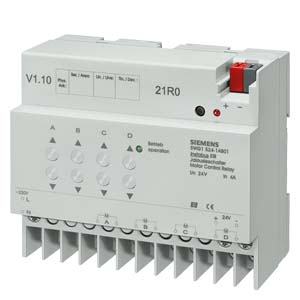
 Siemens · Order number 5WG1 524-1AB01 · Sun protection › Switch › N-Devices › N 524