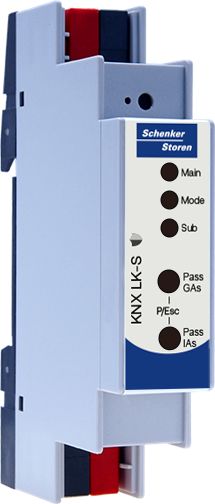
KNX Line coupler Secure 19417520
 Schenker Storen AG · Order number 19417520 · System devices › TP
Compact KNX line coupler with support of KNX Data Security
Download .knxprod KNX LK-S 1.0 · 133 KB
Product
| Manufacturer | Schenker Storen AG |
|---|---|
| Product name | KNX Line coupler Secure |
| Order number | 19417520 |
| Product text | KNX LK-S |
| Hardware | KNX LineCoupler 650.1 secure |
| Medium | Twisted Pair |
| Bus current (mA) | 10 |
| Rail mounted | Yes |
| Width (mm) | 18 |
| Device kind | Coupler |
| Registration | Registered · 2025-09-12 |
| Languages | de-DE, en-US |
| Catalog entry | M-00BE_H-KNX.20LineCoupler.20650.2E1.20secure-256-O00C5_HP-0610-10-B0EE-O00C5_CI-19417520-2 |
| Fingerprint | B0EE |
| SHA-256 | 19feff170d1ab5838c1338fa6b3554a0ff49482b948cbb6dac0399596b4d635a |
| First seen | 2026-11-25 |
| Markets | Switzerland |
Application program: KNX LK-S 1.0
| Application number | $0610 |
|---|---|
| Version | 1.0 |
| Mask version | MV-0912 (Coupler 0912) |
| KNX Data Secure | Yes |
| Minimum ETS version | 6.0 |
| Parameters | 23 |
| Group objects | 0 |
Group objects (0)
| No | Name | Function | Size | DPT | Flags |
|---|
Parameters (14)
| Parameter | Type | Default |
|---|---|---|
| Group telegrams (main groups 0 to 13) | list | Filter |
| Group telegrams (main groups 14 to 31) | list | Filter |
| Individual addressed telegrams | list | Filter |
| Broadcast telegrams | list | Route |
| Acknowledge (ACK) of group telegrams | list | Only if routed |
| Acknowledge (ACK) of individual addressed telegrams | list | Only if routed |
| Repetition of group telegrams | list | Enabled |
| Repetition of individual addressed telegrams | list | Enabled |
| Repetition of broadcast telegrams | list | Enabled |
| Prog. mode on device front | list | Enabled |
| Manual operation on device | list | Enabled with time limit 1 min |
| Device name | text | KNX LK-S |
| KNX Line coupler Secure Compact KNX line coupler with support of KNX Data Security, Security Proxy and Segment Coupler | picture | |
| Wiring scheme: | picture |
Version history
| Application | App no | Fingerprint | First seen | Size | File |
|---|---|---|---|---|---|
| KNX LK-S (ETS 5) 1.0 latest | $0611 | 8084 | 2026-11-25 | 129 KB | Download |
| KNX LK-S 1.0 | $0610 | B0EE | 2026-11-25 | 133 KB | Download |
About this file
This is the official ETS product database for the Schenker Storen AG KNX Line coupler Secure (19417520), published by the manufacturer in the KNX online catalog. To use it, open ETS, go to Catalogs → Import and choose the downloaded .knxprod file. The device then appears in your catalog and can be added to a project. Older versions are kept so existing projects can be matched to the application program they were commissioned with.
More from Schenker Storen AG
- KNX Power Supply 640 19417502
- KNX USB-C interface 19417510
- KNX Touch 10 19416010
- KNX shading control centre 19416030
- Wetterstation KNX-LW-24VDC 19416551
- Wetterstation KNX-GPS-24VDC 19416581
- MSG-4H KNX EES T5 19417042
- MSG-1H KNX EES T1 19417043
- MSG-2H KNX EES T3 19417044
- MSG-4H KNX DES T6 19417052
- MSG-4H KNX 24V T6 19417062
- MSG-2H KNX EES T3 19417072