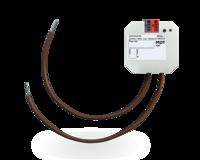
AKK-01UP.03 Switch Actuator 1fold, flush mounted, 16A AKK-01UP.03
 MDT technologies GmbH · Order number AKK-01UP.03 · Actuators › Switch Actuator, compact version
Compact version, 230VAC, 10A, 14µF
Download .knxprod Switching 1-fold AKK UP 2.3 · 139 KB
Product
| Manufacturer | MDT technologies GmbH |
|---|---|
| Product name | AKK-01UP.03 Switch Actuator 1fold, flush mounted, 16A |
| Order number | AKK-01UP.03 |
| Hardware | Schaltaktor 1-fach UP |
| Medium | Twisted Pair |
| Bus current (mA) | 5 |
| Rail mounted | No |
| Registration | Certified · 2018-02-06 |
| Languages | de-DE, en-US, es-ES, fr-FR, it-IT |
| Catalog entry | M-0083_H-3.2E18-2_HP-000E-23-2274_CI-AKK.2D01UP.2E03-1 |
| Fingerprint | 2274 |
| SHA-256 | 4663678e1ca7fe15155af85fe7d353e203ded9a479b7de90c384576ae522c235 |
| First seen | 2026-11-25 |
| Markets | 69 markets |
Application program: Switching 1-fold AKK UP 2.3
| Application number | $000E |
|---|---|
| Version | 2.3 |
| Mask version | MV-0705 (7.5) |
| KNX Data Secure | No |
| Minimum ETS version | 5.0 |
| Parameters | 146 |
| Group objects | 23 |
Group objects (23)
| No | Name | Function | Size | DPT | Flags |
|---|---|---|---|---|---|
| 0 | Channel {{ChNo}}: {{0}} | Switch | 1 Bit | 1.1 switch | CW |
| 1 | Channel {{ChNo}}: {{0}} | Staircase light | 1 Bit | 1.1 switch | CW |
| 1 | Channel {{ChNo}}: {{0}} | Switch pulse | 1 Bit | 1.1 switch | CW |
| 2 | Dummy | 1 Byte | |||
| 3 | Channel {{ChNo}}: {{0}} | Prewarning | 1 Bit | 1.1 switch | CT |
| 4 | Channel {{ChNo}}: {{0}} | Lock | 1 Bit | 1.3 enable | CW |
| 5 | Dummy | 2 Bit | |||
| 6 | Channel {{ChNo}}: {{0}} | Scene | 1 Byte | 17.1 scene number | CW |
| 6 | Channel {{ChNo}}: {{0}} | Scene | 1 Byte | 18.1 scene control | CW |
| 7 | Channel {{ChNo}}: {{0}} | Status | 1 Bit | 1.11 state | CRT |
| 8 | Channel {{ChNo}}: {{0}} | Inverted status | 1 Bit | 1.11 state | CRT |
| 9 | Channel {{ChNo}}: {{0}} | Logic 1 | 1 Bit | 1.2 boolean | CW |
| 10 | Channel {{ChNo}}: {{0}} | Logic 2 | 1 Bit | 1.2 boolean | CW |
| 11 | Dummy | 1 Byte | |||
| 12 | Central function | Switch | 1 Bit | 1.1 switch | CW |
| 14 | Central function | In operation | 1 Bit | 1.11 state | CRT |
| 15 | Dummy | 1 Bit | |||
| 16 | Dummy | 1 Bit | |||
| 17 | Dummy | 1 Bit | |||
| 18 | Dummy | 1 Bit | |||
| 19 | Dummy | 1 Bit | |||
| 20 | Dummy | 1 Bit | |||
| 21 | Dummy | 1 Bit |
Parameters (60)
| Parameter | Type | Default |
|---|---|---|
| Startup time | list | 1 s |
| Channel A | list | switch |
| Send "In operation" cyclically (0 = not active) | unsignedInt 0…30000 | 0 |
| Central function | list | not active |
| Behavior at bus power return | list | no change |
| Mode | list | normally open |
| Switch-on delay | unsignedInt 0…30000 | 0 |
| Switch-off delay | unsignedInt 0…30000 | 0 |
| Send status | list | on change |
| Send status cyclically (0 = not active) | unsignedInt 0…30000 | 0 |
| Additional inverted status | list | not active |
| Behaviour on locking | list | no change |
| Behaviour on unlocking | list | no change |
| Behaviour on bus power return | list | no change |
| Behaviour on bus power failure (Function is available as of Hardware Version R6.0A) | list | no change |
| Logic function | list | not active |
| Scenes | list | not active |
| Prewarning time | unsignedInt 0…30000 | 0 |
| Inverte Lock object | list | not active |
| Manual switching-off | list | active |
| Extend staircase light time | list | restart time |
| Delay time for status after bus power up | list | 1 s |
| Logic operation | list | OR |
| Logic function | list | with Switch object and one Logic object |
| Invert inputs | list | not active |
| Invert output | list | not active |
| Learn scene | list | not active |
| Scene A | list | not active |
| Scene number | list | 1 |
| Scene behaviour | list | ON |
| Scene B | list | not active |
| Scene number | list | 2 |
| Scene C | list | not active |
| Scene number | list | 3 |
| Scene D | list | not active |
| Scene number | list | 4 |
| Scene E | list | not active |
| Scene number | list | 5 |
| Scene F | list | not active |
| Scene number | list | 6 |
| Scene G | list | not active |
| Scene number | list | 7 |
| Scene H | list | not active |
| Scene number | list | 8 |
| Description of channel/objects | text | |
| Additional text | text | |
| Additional object Switching | list | not active |
| Staircase light timer | unsignedInt 1…30000 | 1 |
| Prewarning | list | not active |
| Prewarning duration | unsignedInt 0…30000 | 1 |
| Manual switch-off | list | active |
| Behaviour on unlocking | list | OFF |
| Behaviour on bus power return | list | State before bus power failure |
| Logic operations | list | OR |
| Off delay | unsignedInt 0…30000 | 0 |
| On delay | unsignedInt 0…30000 | 0 |
| Priority / Forced control | list | not active |
| Pulse time | list | 500 ms |
| Repeat pulse signal once | list | not active |
| Time until the next pulse | list | 0,5 s |
Version history
| Application | App no | Fingerprint | First seen | Size | File |
|---|---|---|---|---|---|
| Switching 1-fold AKK UP 2.3 latest | $000E | 2274 | 2026-11-25 | 139 KB | Download |
About this file
This is the official ETS product database for the MDT technologies GmbH AKK-01UP.03 Switch Actuator 1fold, flush mounted, 16A (AKK-01UP.03), published by the manufacturer in the KNX online catalog. To use it, open ETS, go to Catalogs → Import and choose the downloaded .knxprod file. The device then appears in your catalog and can be added to a project. Older versions are kept so existing projects can be matched to the application program they were commissioned with.
More from MDT technologies GmbH
- Analog I/O 2fold, flush mounted AIO-0210V.01
- Analog I/O 4fold, MDRC AIO-0410V.01
- AKD-0103.01 Dimming actuator 1-f, 4TE, 230VAC,600W AKD-0103.01
- AKD-0201.01 Dimming actuator 2-f, 4TE, 230VAC,250W AKD-0201.01
- AKD-0201.02 Dimming Actuator 2-fold AKD-0201.02
- AKD-0203.01 Dimming actuator 2-f, 8TE, 230VAC,600W AKD-0203.01
- AKD-0224V.02 LED Controler 2 Ch AKD-0224V.02
- AKD-0230CC.02 LED Controller CC/CV 30 W / 230 V 2-channel AKD-0230CC.02
- AKD-0260CC.02 LED Controller CC/CV 60 W / 230 V 2-channel AKD-0260CC.02
- AKD-0324V.02 LED Controler 3 Ch/RGB AKD-0324V.02
- AKD-0401.01 Dimming actuator 4-f, 8TE, 230VAC,250W AKD-0401.01
- AKD-0401.02 Dimming Actuator 4-fold AKD-0401.02