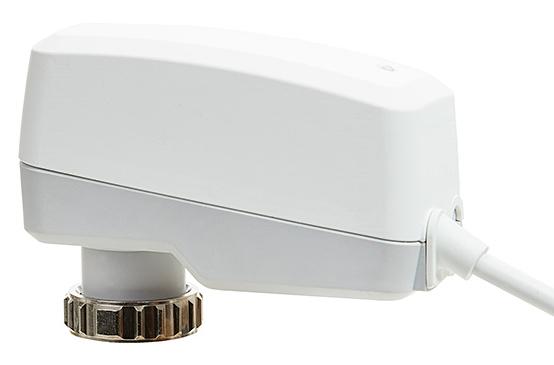
TA-Slider 160 KNX 3222240100X
IMI Hydronic Engineering · Order number 3222240100X · HVAC › Valves
160N Valve actuator
Download .knxprod 160N Valve actuator v262 1.3 · 114 KB
Product
| Manufacturer | IMI Hydronic Engineering |
|---|---|
| Product name | TA-Slider 160 KNX |
| Order number | 3222240100X |
| Hardware | SLD160_HW |
| Medium | Twisted Pair |
| Bus current (mA) | 9 |
| Rail mounted | No |
| Registration | Certified · 2016-03-08 |
| Languages | en-US |
| Catalog entry | M-0052_H-0-0_HP-FF40-13-5AED_CI-3222240100X-1 |
| Fingerprint | 5AED |
| SHA-256 | 0e7ba02448e67239cba37c801a24836303b69433b4478a3321f225c871d268d8 |
| First seen | 2026-11-25 |
| Markets | 59 markets |
Application program: 160N Valve actuator v262 1.3
| Application number | $FF40 |
|---|---|
| Version | 1.3 |
| Mask version | MV-07B0 (System B) |
| KNX Data Secure | No |
| Minimum ETS version | 5.0 |
| Parameters | 46 |
| Group objects | 16 |
Group objects (16)
| No | Name | Function | Size | DPT | Flags |
|---|---|---|---|---|---|
| 1 | Control value | Drive to position | 1 Byte | DPT.5 | CW |
| 1 | Control value | Drive to position | 2 Bytes | DPT.7 | CW |
| 1 | Control value | Drive to position | 1 Bit | DPT.1 | CW |
| 2 | Actual value | Indicate actual position | 1 Byte | DPT.5 | CRT |
| 2 | Actual value | Indicate actual position | 2 Bytes | DPT.7 | CRT |
| 3 | Detected stroke | Valve stroke detected by calibration | 2 Bytes | DPT.7 | CRT |
| 4 | Force calibration | Relaunch a calibration (0:full; 1:fast) | 1 Bit | DPT.1 | CW |
| 5 | Maximum valve stroke | Upper limit for detected stroke | 2 Bytes | DPT.7 | CRW |
| 6 | Minimum stroke position | Lower threshold for position | 2 Bytes | DPT.7 | CRW |
| 7 | Limited stroke | Max stroke limitation | 2 Bytes | DPT.7 | CRW |
| 8 | 2nd limited stroke for change-over | 2nd max stroke limitation for change-over | 2 Bytes | DPT.7 | CRW |
| 9 | Change-over | Change-over flag | 1 Bit | DPT.1 | CW |
| 10 | Drive to forced position 1 | Go to pre-defined forced position 1 | 1 Bit | DPT.1 | CW |
| 11 | Drive to forced position 2 | Go to pre-defined forced position 2 | 1 Bit | DPT.1 | CW |
| 12 | Binary input | Binary input value | 1 Bit | DPT.1 | CRT |
| 13 | Error code | Error code | 2 Bytes | DPT.7 | CRT |
Parameters (44)
| Parameter | Type | Default |
|---|---|---|
| Control type | list | Proportional - Rough positioning (8 bit telegram) |
| Characteristic | list | Linear |
| Hysteresis | list | 2 % |
| Target position for control value 0 | unsignedInt 0…10000 | 0 |
| Target position for control value 1 | unsignedInt 0…10000 | 10000 |
| Control direction | list | Direct (0% = fully extended actuator; for push-to-close valves) |
| Initial control value * | unsignedInt 0…10000 | 10000 |
| Cyclic timeout | list | No |
| Periodic transmission of actual pos. | list | None |
| On-change transmission of actual pos. | list | None |
| Maximum valve stroke | unsignedInt 250…8500 | 6900 |
| Activate LED ? | list | Yes |
| One side approach ? (motor usage will increase) | list | No |
| Minimum stroke position | unsignedInt 0…8500 | 0 |
| Enable maximum stroke limitation ? | list | Disabled |
| Limited stroke | unsignedInt 250…8500 | 6900 |
| Enable change-over ? | list | Disabled |
| Change-over trigger | list | KNX telegram |
| Limited stroke when change-over is triggered | unsignedInt 250…8500 | 6900 |
| Mode when change-over is triggered | list | Cooling |
| Calibration at power on | list | Full |
| Automatic calibration refresh | list | Never |
| Enable forced position 1 ? | list | Disabled |
| Forced position 1 | unsignedInt 0…10000 | 0 |
| Forced position 1 applies to | list | Limited stroke |
| Enable forced position 2 ? | list | Disabled |
| Forced position 2 | unsignedInt 0…10000 | 10000 |
| Forced position 2 applies to | list | Limited stroke |
| Highest priority | list | Forced position 1 |
| Valve blockage protection | list | Never |
| Activate binary input ? | list | No |
| Binary input trigger | list | Open |
| Binary input action * | list | None |
| Binary input position | unsignedInt 0…10000 | 0 |
| Periodic transmission of input state | list | None |
| On-change transmission of input state | list | No |
| Send status in case of error ? | list | No |
| Perform unblocking attempts | list | Yes |
| Move to fully open valve position | list | No |
| Forced error position | unsignedInt 0…10000 | 0 |
| … on stroke detection failure | list | No |
| … on cyclic instruction timeout | list | No |
| … on control value out of range | list | No |
| PID_HARDWARE_TYPE_PARAMETER | list |
Version history
| Application | App no | Fingerprint | First seen | Size | File |
|---|---|---|---|---|---|
| 160N Valve actuator v262 1.3 latest | $FF40 | 5AED | 2026-11-25 | 114 KB | Download |
About this file
This is the official ETS product database for the IMI Hydronic Engineering TA-Slider 160 KNX (3222240100X), published by the manufacturer in the KNX online catalog. To use it, open ETS, go to Catalogs → Import and choose the downloaded .knxprod file. The device then appears in your catalog and can be added to a project. Older versions are kept so existing projects can be matched to the application program they were commissioned with.
More from IMI Hydronic Engineering
- TA-Slider 160 KNX R24 3222240130X