| Telegram rate | list | No limit |
| Error report | list | Disable |
| Sending cycle time in s[1..65535] | unsignedInt 1…65535 | 60 |
| Send object In operation" | list | no |
| Channel function | list | Deactive |
| Staircase lighting | list | Deactive |
| Brightness value OBJ transmit
after dimming | list | Nothing |
| Switch status report | list | Nothing |
| Time duration of dimming
Time = entry * 2 | unsignedInt 0…255 | 2 |
| Switch on via OBJ switch with | list | Preset brightness value |
| Preset switch on brightness
(1%~100%) | unsignedInt 1…100 | 100 |
| Reaction on receipt of switch on value | list | Switch on softly |
| Reaction on receipt brightness value | list | Dimming on |
| Switch-OFF mode | list | Switch off softly |
| After bus recover switch on with | list | Last brightness |
| Bus recover preset brightness value
(0%~100%) | unsignedInt 0…100 | 0 |
| Status report after telegram to OBJ "switch" | list | Transmit only after change |
| Relative dimming | list | |
| Low dimming threshold 1~127(0.4%~49.9%) | unsignedInt 1…127 | 1 |
| Upper dimming threshold 128~255(50.2%~100%) | unsignedInt 128…255 | 255 |
| If dimming down and value <= low dimming threhold output switch | list | Off |
| Output switch on after receipt
of dimming up telegram | list | Yes |
| Brightness value | list | |
| Upper dimming threshold
128~255(50.2%~100%) | unsignedInt 128…255 | 255 |
| If output on: receipt of Brightness
value = 0 output switch | list | Off |
| On receipt Brightness Value>=1 output switch on | list | Yes |
| Scene function is | list | Disable |
| Scene select | list | 1st Scene |
| Reaction on receipt scene 1 | list | Dimming on |
| Scene 1 duration (Time = entry *2S) | unsignedInt 0…255 | 1 |
| Scene 1 brightness value(0%~100%) | unsignedInt 0…100 | 100 |
| Assignment to Scene number 1......64 | list | not assignment |
| Reaction on receipt scene 2 | list | Dimming on |
| Scene 2 duration (Time = entry *2S) | unsignedInt 0…255 | 1 |
| Scene 2 brightness value(0%~100%) | unsignedInt 0…100 | 100 |
| Reaction on receipt scene 3 | list | Dimming on |
| Scene 3 duration (Time = entry *2S) | unsignedInt 0…255 | 1 |
| Scene 3 brightness value(0%~100%) | unsignedInt 0…100 | 100 |
| Reaction on receipt scene 4 | list | Dimming on |
| Scene 4 duration (Time = entry *2S) | unsignedInt 0…255 | 1 |
| Scene 4 brightness value(0%~100%) | unsignedInt 0…100 | 100 |
| Reaction on receipt scene 5 | list | Dimming on |
| Scene 5 duration (Time = entry *2S) | unsignedInt 0…255 | 1 |
| Scene 5 brightness value(0%~100%) | unsignedInt 0…100 | 100 |
| Reaction on receipt scene 6 | list | Dimming on |
| Scene 6 duration (Time = entry *2S) | unsignedInt 0…255 | 1 |
| Scene 6 brightness value(0%~100%) | unsignedInt 0…100 | 100 |
| Reaction on receipt scene 7 | list | Dimming on |
| Scene 7 duration (Time = entry *2S) | unsignedInt 0…255 | 1 |
| Scene 7 brightness value(0%~100%) | unsignedInt 0…100 | 100 |
| Reaction on receipt scene 8 | list | Dimming on |
| Scene 8 duration (Time = entry *2S) | unsignedInt 0…255 | 1 |
| Scene 8 brightness value(0%~100%) | unsignedInt 0…100 | 100 |
| Reaction on receipt scene 9 | list | Dimming on |
| Scene 9 duration (Time = entry *2S) | unsignedInt 0…255 | 1 |
| Scene 9 brightness value(0%~100%) | unsignedInt 0…100 | 100 |
| Reaction on receipt scene 10 | list | Dimming on |
| Scene 10 duration (Time = entry *2S) | unsignedInt 0…255 | 1 |
| Scene 10 brightness value(0%~100%) | unsignedInt 0…100 | 100 |
| Reaction on receipt scene 11 | list | Dimming on |
| Scene 11 duration (Time = entry *2S) | unsignedInt 0…255 | 1 |
| Scene 11 brightness value(0%~100%) | unsignedInt 0…100 | 100 |
| Reaction on receipt scene 12 | list | Dimming on |
| Scene 12 duration (Time = entry *2S) | unsignedInt 0…255 | 1 |
| Scene 12 brightness value(0%~100%) | unsignedInt 0…100 | 100 |
| Reaction on receipt scene 13 | list | Dimming on |
| Scene 13 duration (Time = entry *2S) | unsignedInt 0…255 | 1 |
| Scene 13 brightness value(0%~100%) | unsignedInt 0…100 | 100 |
| Reaction on receipt scene 14 | list | Dimming on |
| Scene 14 duration (Time = entry *2S) | unsignedInt 0…255 | 1 |
| Scene 14 brightness value(0%~100%) | unsignedInt 0…100 | 100 |
| Reaction on receipt scene 15 | list | Dimming on |
| Scene 15 duration (Time = entry *2S) | unsignedInt 0…255 | 1 |
| Scene 15 brightness value(0%~100%) | unsignedInt 0…100 | 100 |
| Active preset 1 via bus telegram | list | Deactive |
| Brightness value is | list | Dimming on |
| Brightness value at obj=0 (1%~100%) | unsignedInt 1…100 | 100 |
| Brightness value at obj=1 (1%~100%) | unsignedInt 1…100 | 100 |
| Preset 1 can be set via the bus | list | Disable |
| Active preset 2 via bus telegram | list | Deactive |
| Preset 2 can be set via the bus | list | Disable |
| Duration of staircase lighting: Base | list | 1.0s |
| Duration of staircase lighting:Factor
Factor(1~127) Duration = Base*Factor | unsignedInt 1…127 | 1 |
| Time for dimming down to 20%
(Duration = Entry*2 S) | unsignedInt 0…255 | 1 |
| Brightness value for staircase lighting
(20%~100%) | unsignedInt 20…100 | 100 |
| Staircase lighting after
bus voltage recovery | list | Switch off |
| Staircase value at permanent-on
(20%~100%) | unsignedInt 20…100 | 100 |
| On receiption switch OBJ = 0
switch off enable | list | Disable |
| Duration of staircase lighting:Factor
Factor(1~127) Duration = Base*Factor | unsignedInt 1…127 | 1 |
| If output on: receipt of Brightness value = 0 output switch | list | Off |
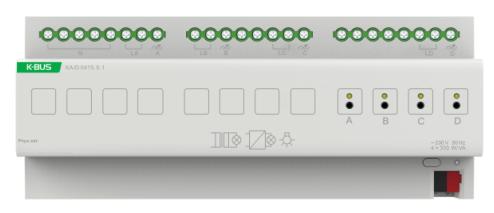
 GVS · Order number 1A04XXB03D · Actuator › Dimmer