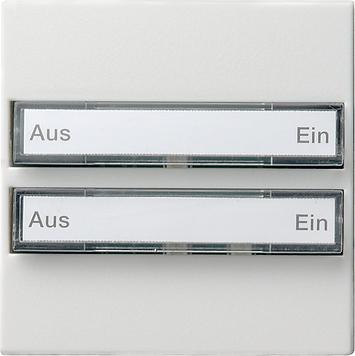
GIRA Giersiepen · Order number 882 xx · Taster › Push button, 2fold
label space
Product family: Push-button
Product type: Push-button 2-way
Mountable on FM bus-coupler Order No.
570 00, therefore programmable for
software variations like,
- switching with status indication
(red LED)
- switching with telegram receipt
acknowledgement (red LED)
- push-button function e.g. toggle
- dimming
- venetian blind and shutter control
- dimming value indicator
- call-up of four lighting scenes stored
in the lighting scene push-button
sensor Order No. 888 ..
- dimming and venetian blind/shutter
control (buttons freely programmable)
- switching and venetian blind/shutter
control (buttons freely programmable)
- switching and dimming (buttons freely
programmable)
- in-operation indication via green LED
(may be illuminated as per the
workplace regulations)
Pre-printed labels with commonly used
symbols included in delivery.
Transparent labels Order No. 014 01 or
tinted Order No. 014 06 for S-Color
System and Trias Range as spare or for
replacement.
Fabricate: Gira
Order No. 882 54 F-Line cream white
Order No. 882 55 F-Line pure white
Order No. 882 56 F-Line brown metallic
Order No. 882 57 F-Line anthracite
metallic
Order No. 882 40 S-Color System pure
white
Order No. 882 41 S-Color System brown
Order No. 882 42 S-Color System grey
Order No. 882 43 S-Color System red
Order No. 882 44 S-Color System yellow
Order No. 882 45 S-Color System green
Order No. 882 46 S-Color System blue
Order No. 882 47 S-Color System black
Order No. 882 49 S-Color System dark
grey
Order No. 882 20 High-grade Steel Range
Order No. 882 15 Trias Range cream
white
Order No. 882 61 Trias Range brown/
metallic
Order No. 882 16 Trias Range pure white
Order No. 882 63 Trias Range grey/
metallic
This is the official ETS product database for the GIRA Giersiepen push button 2fold with label FM (882 xx), published by the manufacturer in the KNX online catalog. To use it, open ETS, go to Catalogs → Import and choose the downloaded .knxprod file. The device then appears in your catalog and can be added to a project. Older versions are kept so existing projects can be matched to the application program they were commissioned with.
 GIRA Giersiepen · Order number 882 xx · Taster › Push button, 2fold