KNX Database
GIRA Giersiepen 597 00 logical link unit DRA

logical link unit DRA 597 00

GIRA Giersiepen · Order number 597 00 · Controller › Kontroller

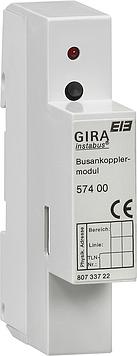
Instabus interconnection element DRA (DIN rail apparatus) Product family: System equipment unit Product type: Bus-coupler The DRA bus-coupler is the interface between the Instabus and the user modules like, for example, time switch DRA Order No. 621 00, 622 00, 624 00, switch actuator module DRA Order No. 620 00, 891 00, brightness sensor module DRA Order No. 629 00 and the function module Order No. 513 00. By use as an interconnection element: Product family: Controller Product type: Controller DRA equipment for the programming of extensive interconnections, e.g. interlocking, releasing, acknowledging etc. according to switching algebra. Available in detail are: - transfer gate 1 bit - transfer gate 4 bit - transfer gate 8 bit - 1 to 8 bit converter (conversion from 1 bit telegram to 8 bit) - filter/time (telegram transformation and time function) - 1 x 8-input (logical interconnection 1 gate) - 2 x 2-input (logical interconnection 3-gate) - 2 x 4-input (logical interconnection 2-gate) - C-controller (logical interconnection 4-gate) The bus-coupler can receive, transmit and evaluate telegrams. It stores the addresses, system program and user-specific programs. Programming of physical address is enabled by operation of programming button. Condition indicator is red programming LED. Power consumption: max. 150 mW Connectors: Instabus through pressure contact through snap-opening on data rail and hat-profile track User module via 2 x 5 pole plug and socket connectors Protection class: IP 20 Dimensions: DRA with 1 partial unit Fabricate: Gira Order No.: 574 00

Download .knxprod 2x2 inputs 600402 0.2 · 70 KB

Product

ManufacturerGIRA Giersiepen
Product namelogical link unit DRA
Order number597 00
Product textVerknüpfungsgerät REG
HardwareVerknüpfungsgerät REG
MediumTwisted Pair
Bus current (mA)0
Rail mountedYes
Width (mm)17.5
RegistrationRegistered
Languagesde-DE, en-US, es-ES, fr-FR, nb-NO, sv-SE, nl-NL
Catalog entryM-0008_H-8.20.2F.2F.20597.2000-1_HP-6004-02-0EBA_CI-597.2000-1
Fingerprint0EBA
SHA-25620e33d200dfb863d7df60c5c92fda4e615cd3266a1d86feab66a065583fa7e62
First seen2026-11-25
Markets39 markets

Application program: 2x2 Eingänge 600402 0.2

Application number$6004
Version0.2
Mask versionMV-0011 (1.1)
KNX Data SecureNo
Parameters19
Group objects5
Group objects (5)
NoNameFunctionSizeDPTFlags
0Gatter 1Eingabe 11 BitCW
1Gatter 1Eingabe 21 BitCW
2Gatter 2Eingabe 11 BitCW
3Gatter 2Eingabe 21 BitCW
4Gatter 3Ausgabe1 BitCT
Parameters (17)
ParameterTypeDefault
Allgemeinlist30 Telegramme pro 17s
Telegrammratelist60 Telegramme pro 17s
Verknüpfung Eingangsgatter 1listUND
Verknüpfung Eingangsgatter 2listUND
Verknüpfung für das AusgangsgatterlistUND
Eingänge von Gatter 1listEingang = Objektwert
Verhalten vom Eingang 1listEingang = Objektwert
Verhalten vom Eingang 2listEingang = Objektwert
Eingänge von Gatter 2listEingang = Objektwert
Verhalten des AusgangslistAusgangsänderung
SendekriteriumlistAusgangsänderung
Zyklisches Senden ?listNEIN
Zyklisches Senden Basislist130 ms
Zyklisches Senden Faktor (3...127)unsignedInt 3…12740
Sendezeitpunkt bei zyklischem Sendenlistnach Zyklus
Verhalten des AusgangslistUND
Funktion der EingangsgatterlistUND

Version history

ApplicationApp noFingerprintFirst seenSizeFile
4x2 inputs 600312 1.2 latest$600356BD2026-11-2567 KBDownload
1x8 inputs 600602 0.2$6006C67E2026-11-2570 KBDownload
2x4 inputs 600502 0.2$60058D082026-11-2571 KBDownload
2x2 inputs 600402 0.2$60040EBA2026-11-2570 KBDownload
transfer 8 bit 600C01 0.1$600C69892026-11-2568 KBDownload
1»8 Bit transformer 600B01 0.1$600BB1412026-11-2573 KBDownload
transfer 4 bit 600901 0.1$600978F12026-11-2568 KBDownload
transfer 1 bit 600801 0.1$6008D5E82026-11-2568 KBDownload
filter/time 600701 0.1$6007C0D62026-11-2570 KBDownload

About this file

This is the official ETS product database for the GIRA Giersiepen logical link unit DRA (597 00), published by the manufacturer in the KNX online catalog. To use it, open ETS, go to Catalogs → Import and choose the downloaded .knxprod file. The device then appears in your catalog and can be added to a project. Older versions are kept so existing projects can be matched to the application program they were commissioned with.
More from GIRA Giersiepen

All GIRA Giersiepen products