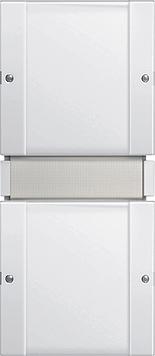
push sensor 2 2fold with labeling field 1012 xx
 GIRA Giersiepen · Order number 1012 xx · Taster › Push button, 2fold
1012 xx, Jalousie 102B03
Download .knxprod shutter 102B03 0.3 · 64 KB
Product
| Manufacturer | GIRA Giersiepen |
|---|---|
| Product name | push sensor 2 2fold with labeling field |
| Order number | 1012 xx |
| Product text | Tastsensor 2 2fach mit Beschriftungsfeld |
| Hardware | Tastsensor 2 2fach mit Beschriftungsfeld |
| Medium | Twisted Pair, PowerLine |
| Rail mounted | No |
| Registration | Registered |
| Languages | de-DE, en-US, es-ES, fr-FR, nb-NO, sv-SE, nl-NL |
| Catalog entry | M-0008_H-8.20.2F.2F.201012.20xx-1_HP-102B-03-111B-O000A_CI-1012.20xx-1 |
| Fingerprint | 111B |
| SHA-256 | b602d8f9fbf20bd6d1f1d4291507ebe2cb6457b7d226fcf369816a0dec04ba34 |
| First seen | 2026-11-25 |
| Markets | 39 markets |
Application program: Jalousie 102B03 0.3
| Application number | $102B |
|---|---|
| Version | 0.3 |
| Mask version | MV-0010 (1.0) |
| KNX Data Secure | No |
| Parameters | 2 |
| Group objects | 4 |
Group objects (4)
| No | Name | Function | Size | DPT | Flags |
|---|---|---|---|---|---|
| 0 | Wippe 1 | Kurzzeitbetrieb | 1 Bit | CWT | |
| 1 | Wippe 2 | Kurzzeitbetrieb | 1 Bit | CWT | |
| 2 | Wippe 1 | Langzeitbetrieb | 1 Bit | CWT | |
| 3 | Wippe 2 | Langzeitbetrieb | 1 Bit | CWT |
Parameters (2)
| Parameter | Type | Default |
|---|---|---|
| Allgemein | list | AUS |
| Beschriftungsfeldbeleuchtung | list | EIN |
Version history
| Application | App no | Fingerprint | First seen | Size | File |
|---|---|---|---|---|---|
| shutter 104703 0.3 latest | $1047 | 8DDB | 2026-11-25 | 68 KB | Download |
| switching/dimming 103C03 0.3 | $103C | D0B5 | 2026-11-25 | 72 KB | Download |
| switching/shutter 103B03 0.3 | $103B | C7D3 | 2026-11-25 | 70 KB | Download |
| dimming/shutter 103A03 0.3 | $103A | BB46 | 2026-11-25 | 71 KB | Download |
| switching/push button 103403 0.3 | $1034 | 406E | 2026-11-25 | 68 KB | Download |
| shutter 102B03 0.3 | $102B | 111B | 2026-11-25 | 64 KB | Download |
| dimming 102A03 0.3 | $102A | 7909 | 2026-11-25 | 64 KB | Download |
| value transmitter 101C03 0.3 | $101C | CE3A | 2026-11-25 | 65 KB | Download |
| switching, acknowledge 100A03 0.3 | $100A | D27B | 2026-11-25 | 65 KB | Download |
| switching, status 100303 0.3 | $1003 | B1E6 | 2026-11-25 | 65 KB | Download |
About this file
This is the official ETS product database for the GIRA Giersiepen push sensor 2 2fold with labeling field (1012 xx), published by the manufacturer in the KNX online catalog. To use it, open ETS, go to Catalogs → Import and choose the downloaded .knxprod file. The device then appears in your catalog and can be added to a project. Older versions are kept so existing projects can be matched to the application program they were commissioned with.
More from GIRA Giersiepen
- push sensor 2 1fold with labeling field 1011 00
- push sensor 2 3fold with labeling field 1013 00
- Pushbutton sensor 4.95 Komfort, 1-gang 1041 ..
- Pushbutton sensor 4.95 Komfort, 2-gang 1042 ..
- Pushbutton sensor 4.95 Komfort, 4-gang 1044 ..
- push sensor 2 1fold with controller 1061 00
- push sensor 2 2fold with controller 1062 00
- push sensor 2 3fold with controller 1063 00
- push sensor 2 4fold with controller 1064 2x
- push sensor 2 6fold with controller 1066 2x
- push sensor ITS 1fold with controller 1240 xxx
- push sensor ITS 2fold with controller 1243 xxx