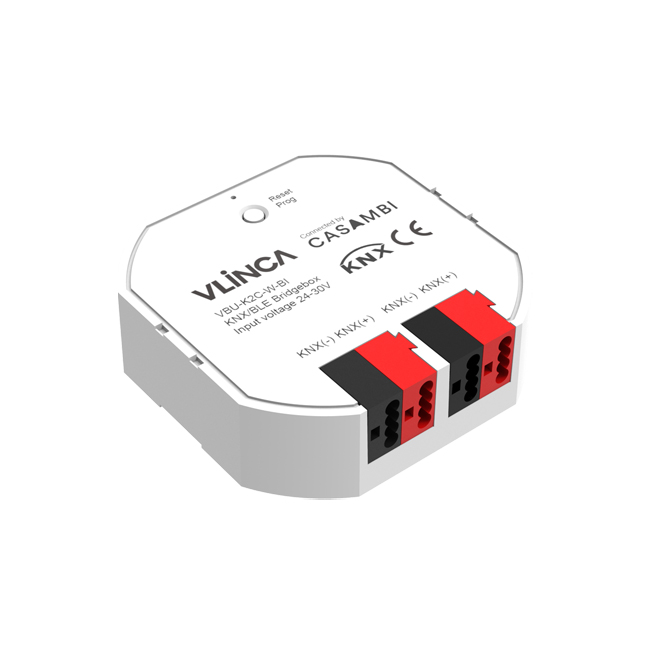
| 0 | Global scene input | Sence (1 - 64) | 1 Byte | 17.1 scene number | CRWT |
| 1 | [knx -> casambi] channel 1 | switch(on/off) | 1 Bit | 1.1 switch | CWT |
| 2 | [knx -> casambi] channel 1 | percent(0-100%) | 1 Byte | 5.1 percentage (0..100%) | CWT |
| 3 | [knx -> casambi] channel 2 | switch(on/off) | 1 Bit | 1.1 switch | CWT |
| 4 | [knx -> casambi] channel 2 | percent(0-100%) | 1 Byte | 5.1 percentage (0..100%) | CWT |
| 5 | [knx -> casambi] channel 3 | switch(on/off) | 1 Bit | 1.1 switch | CWT |
| 6 | [knx -> casambi] channel 3 | percent(0-100%) | 1 Byte | 5.1 percentage (0..100%) | CWT |
| 7 | [knx -> casambi] channel 4 | switch(on/off) | 1 Bit | 1.1 switch | CWT |
| 8 | [knx -> casambi] channel 4 | percent(0-100%) | 1 Byte | 5.1 percentage (0..100%) | CWT |
| 9 | [knx -> casambi] channel 5 | switch(on/off) | 1 Bit | 1.1 switch | CWT |
| 10 | [knx -> casambi] channel 5 | percent(0-100%) | 1 Byte | 5.1 percentage (0..100%) | CWT |
| 11 | [knx -> casambi] channel 6 | switch(on/off) | 1 Bit | 1.1 switch | CWT |
| 12 | [knx -> casambi] channel 6 | percent(0-100%) | 1 Byte | 5.1 percentage (0..100%) | CWT |
| 13 | [knx -> casambi] channel 7 | switch(on/off) | 1 Bit | 1.1 switch | CWT |
| 14 | [knx -> casambi] channel 7 | percent(0-100%) | 1 Byte | 5.1 percentage (0..100%) | CWT |
| 15 | [knx -> casambi] channel 8 | switch(on/off) | 1 Bit | 1.1 switch | CWT |
| 16 | [knx -> casambi] channel 8 | percent(0-100%) | 1 Byte | 5.1 percentage (0..100%) | CWT |
| 17 | [knx -> casambi] channel 9 | switch(on/off) | 1 Bit | 1.1 switch | CWT |
| 18 | [knx -> casambi] channel 9 | percent(0-100%) | 1 Byte | 5.1 percentage (0..100%) | CWT |
| 19 | [knx -> casambi] channel 10 | switch(on/off) | 1 Bit | 1.1 switch | CWT |
| 20 | [knx -> casambi] channel 10 | percent(0-100%) | 1 Byte | 5.1 percentage (0..100%) | CWT |
| 21 | [knx -> casambi] channel 11 | switch(on/off) | 1 Bit | 1.1 switch | CWT |
| 22 | [knx -> casambi] channel 11 | percent(0-100%) | 1 Byte | 5.1 percentage (0..100%) | CWT |
| 23 | [knx -> casambi] channel 12 | switch(on/off) | 1 Bit | 1.1 switch | CWT |
| 24 | [knx -> casambi] channel 12 | percent(0-100%) | 1 Byte | 5.1 percentage (0..100%) | CWT |
| 25 | [knx -> casambi] channel 13 | switch(on/off) | 1 Bit | 1.1 switch | CWT |
| 26 | [knx -> casambi] channel 13 | percent(0-100%) | 1 Byte | 5.1 percentage (0..100%) | CWT |
| 27 | [knx -> casambi] channel 14 | switch(on/off) | 1 Bit | 1.1 switch | CWT |
| 28 | [knx -> casambi] channel 14 | percent(0-100%) | 1 Byte | 5.1 percentage (0..100%) | CWT |
| 29 | [knx -> casambi] channel 15 | switch(on/off) | 1 Bit | 1.1 switch | CWT |
| 30 | [knx -> casambi] channel 15 | percent(0-100%) | 1 Byte | 5.1 percentage (0..100%) | CWT |
| 31 | [knx -> casambi] channel 16 | switch(on/off) | 1 Bit | 1.1 switch | CWT |
| 32 | [knx -> casambi] channel 16 | percent(0-100%) | 1 Byte | 5.1 percentage (0..100%) | CWT |
| 33 | [casambi -> knx] channel 17 | Scene channel.report | 1 Bit | 1.1 switch | CRT |
| 34 | [casambi -> knx] channel 17 | percent(0-100%) | 1 Byte | 5.1 percentage (0..100%) | CRT |
| 35 | [casambi -> knx] channel 18 | Scene channel.report | 1 Bit | 1.1 switch | CRT |
| 36 | [casambi -> knx] channel 18 | percent(0-100%) | 1 Byte | 5.1 percentage (0..100%) | CRT |
| 37 | [casambi -> knx] channel 19 | Scene channel.report | 1 Bit | 1.1 switch | CRT |
| 38 | [casambi -> knx] channel 19 | percent(0-100%) | 1 Byte | 5.1 percentage (0..100%) | CRT |
| 39 | [casambi -> knx] channel 20 | Scene channel.report | 1 Bit | 1.1 switch | CRT |
| 40 | [casambi -> knx] channel 20 | percent(0-100%) | 1 Byte | 5.1 percentage (0..100%) | CRT |
| 41 | [casambi -> knx] channel 21 | Scene channel.report | 1 Bit | 1.1 switch | CRT |
| 42 | [casambi -> knx] channel 21 | percent(0-100%) | 1 Byte | 5.1 percentage (0..100%) | CRT |
| 43 | [casambi -> knx] channel 22 | Scene channel.report | 1 Bit | 1.1 switch | CRT |
| 44 | [casambi -> knx] channel 22 | percent(0-100%) | 1 Byte | 5.1 percentage (0..100%) | CRT |
| 45 | [casambi -> knx] channel 23 | Scene channel.report | 1 Bit | 1.1 switch | CRT |
| 46 | [casambi -> knx] channel 23 | percent(0-100%) | 1 Byte | 5.1 percentage (0..100%) | CRT |
| 47 | [casambi -> knx] channel 24 | Scene channel.report | 1 Bit | 1.1 switch | CRT |
| 48 | [casambi -> knx] channel 24 | percent(0-100%) | 1 Byte | 5.1 percentage (0..100%) | CRT |
| 49 | [casambi -> knx] channel 25 | Scene channel.report | 1 Bit | 1.1 switch | CRT |
| 50 | [casambi -> knx] channel 25 | percent(0-100%) | 1 Byte | 5.1 percentage (0..100%) | CRT |
| 51 | [casambi -> knx] channel 26 | Scene channel.report | 1 Bit | 1.1 switch | CRT |
| 52 | [casambi -> knx] channel 26 | percent(0-100%) | 1 Byte | 5.1 percentage (0..100%) | CRT |
| 53 | [casambi -> knx] channel 27 | Scene channel.report | 1 Bit | 1.1 switch | CRT |
| 54 | [casambi -> knx] channel 27 | percent(0-100%) | 1 Byte | 5.1 percentage (0..100%) | CRT |
| 55 | [casambi -> knx] channel 28 | Scene channel.report | 1 Bit | 1.1 switch | CRT |
| 56 | [casambi -> knx] channel 28 | percent(0-100%) | 1 Byte | 5.1 percentage (0..100%) | CRT |
| 57 | [casambi -> knx] channel 29 | Scene channel.report | 1 Bit | 1.1 switch | CRT |
| 58 | [casambi -> knx] channel 29 | percent(0-100%) | 1 Byte | 5.1 percentage (0..100%) | CRT |
| 59 | [casambi -> knx] channel 30 | Scene channel.report | 1 Bit | 1.1 switch | CRT |
| 60 | [casambi -> knx] channel 30 | percent(0-100%) | 1 Byte | 5.1 percentage (0..100%) | CRT |
| 61 | [casambi -> knx] channel 31 | Scene channel.report | 1 Bit | 1.1 switch | CRT |
| 62 | [casambi -> knx] channel 31 | percent(0-100%) | 1 Byte | 5.1 percentage (0..100%) | CRT |
| 63 | [casambi -> knx] channel 32 | Scene channel.report | 1 Bit | 1.1 switch | CRT |
| 64 | [casambi -> knx] channel 32 | percent(0-100%) | 1 Byte | 5.1 percentage (0..100%) | CRT |
| 65 | Global scene output | Sence (1 - 64) | 1 Byte | 17.1 scene number | CRWT |