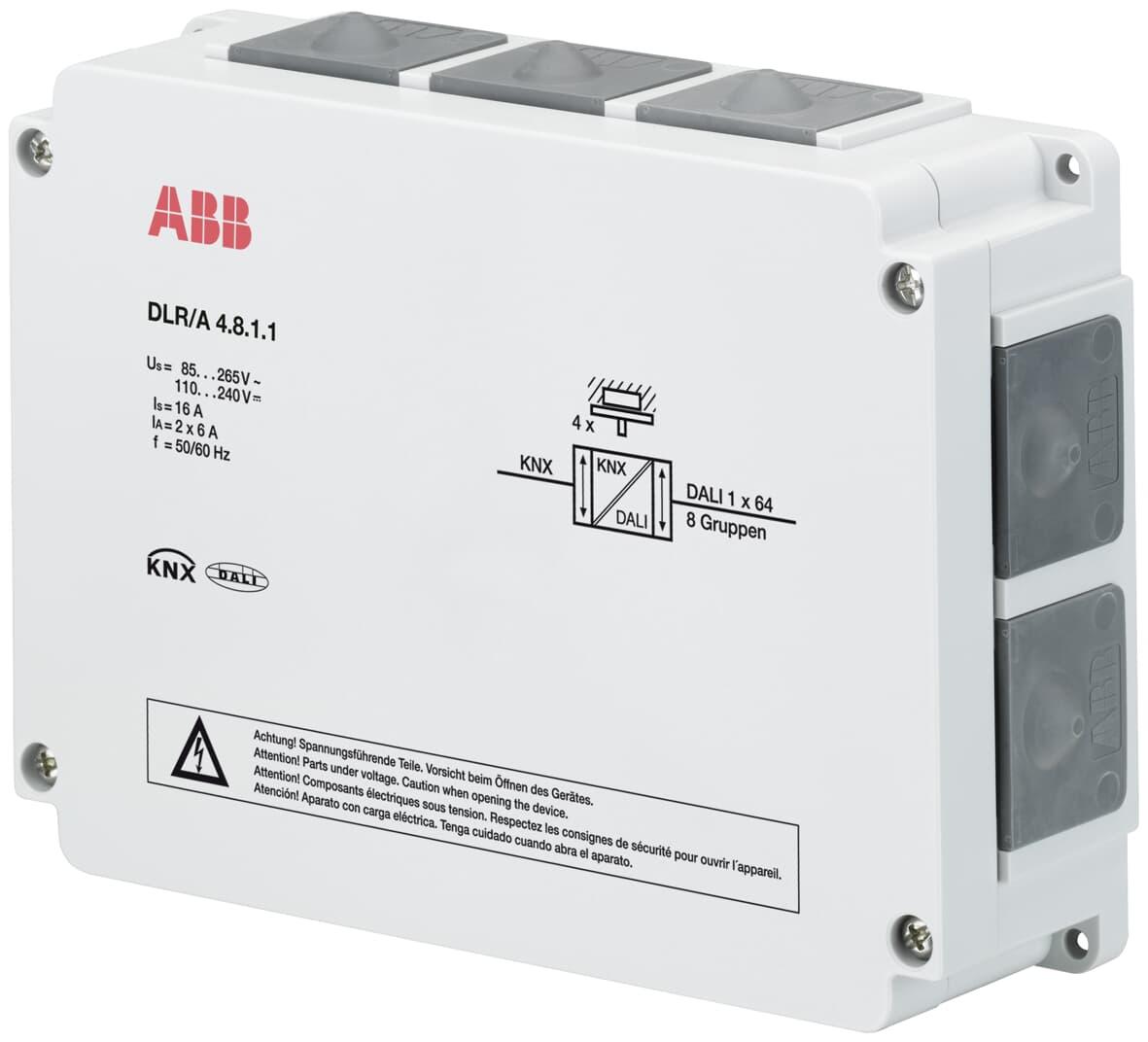
DLR/A4.8.1.1 DALI Light Controller,4-fold,SM 2CDG 110 172 R0011
 ABB AG - STOTZ-KONTAKT · Order number 2CDG 110 172 R0011 · Lighting Control › DALI Gateways and Light Controllers
Control Dim Groups 4f DALI/1.4c
Download .knxprod Control Dim Groups 4f DALI/1.4c 1.4 · 722 KB
Product
| Manufacturer | ABB AG - STOTZ-KONTAKT |
|---|---|
| Product name | DLR/A4.8.1.1 DALI Light Controller,4-fold,SM |
| Order number | 2CDG 110 172 R0011 |
| Hardware | DLR/A4.8.1.1 DALI-Lichtregler,4f,AP |
| Medium | Twisted Pair |
| Bus current (mA) | 10 |
| Rail mounted | No |
| Registration | Registered |
| Languages | en-US, de-DE, es-ES, fr-FR, it-IT, nl-NL, pl-PL, ru-RU |
| Catalog entry | M-0002_H-2CDG.20110.20172.20R0011-1_HP-A071-14-015A_CI-2CDG.20110.20172.20R0011-1 |
| Fingerprint | 015A |
| SHA-256 | bf00d2b3d6207bc8569c20b400f2a3cba59a72e4966b1380c8c8a3493728b58d |
| First seen | 2026-11-25 |
| Markets | 59 markets |
Application program: Control Dim Groups 4f DALI/1.4c 1.4
| Application number | $A071 |
|---|---|
| Version | 1.4 |
| Mask version | MV-0701 (7.1) |
| KNX Data Secure | No |
| Parameters | 1352 |
| Group objects | 273 |
Group objects (273)
| No | Name | Function | Size | DPT | Flags |
|---|---|---|---|---|---|
| 0 | General | In Operation | 1 Bit | CT | |
| 1 | General | Block manual operation/Status | 1 Bit | CRWT | |
| 2 | General | Trigger DALI addressing | 1 Bit | CW | |
| 3 | General | Status Additional functions | 2 Bytes | CRT | |
| 4 | General | Fault controller supply | 1 Bit | CRT | |
| 5 | General | Acknowledge fault messages | 1 Bit | CW | |
| 6 | General | Diagnostics | 2 Bytes | CRT | |
| 7 | General | Request Diagnostics | 1 Byte | CW | |
| 8 | General | Fade time (DALI format) | 1 Byte | CRWT | |
| 8 | General | Fade time (KNX format) | 2 Bytes | CRWT | |
| 9 | General | Status Sensors | 1 Byte | CRT | |
| 10 | General | Request status values | 1 Bit | CW | |
| 11 | DALI output | Switch | 1 Bit | CW | |
| 11 | DALI output | Switch/Status | 1 Bit | CRWT | |
| 12 | DALI output | Status Switch | 1 Bit | CRT | |
| 13 | DALI output | Brightness value | 1 Byte | CW | |
| 13 | DALI output | Brightness value/Status | 1 Byte | CRWT | |
| 14 | DALI output | Status Brightness value | 1 Byte | CRT | |
| 15 | DALI output | Relative dimming | 4 Bit | CW | |
| 16 | DALI output | Lamp fault | 1 Bit | CRT | |
| 17 | DALI output | Ballast fault | 1 Bit | CRT | |
| 18 | DALI output | Fault DALI | 1 Bit | CRT | |
| 19 | DALI output | Fault group/device code | 1 Byte | CRT | |
| 20 | DALI output | Number of faults | 1 Byte | CRT | |
| 21 | DALI output | No. Group/device fault | 1 Byte | CRT | |
| 22 | DALI output | Switch up next fault message | 1 Bit | CW | |
| 23 | DALI output | Disabel send. of fault message | 1 Bit | CW | |
| 24 | DALI output | Conflict DALI | 1 Bit | CRT | |
| 25 | DALI output | Detect devices | 1 Bit | CW | |
| 26 | DALI output | Burn-in lamp/Status | 1 Bit | CRWT | |
| 26 | DALI output | Burn-in lamp | 1 Bit | CRWT | |
| 27 | DALI output | Enable controller calibration | 1 Byte | CW | |
| 28 | DALI output | Calibration artificial light | 1 Bit | CW | |
| 29 | DALI output | Calibration daylight | 1 Bit | CW | |
| 30 | Group 1 | Switch/Status | 1 Bit | CRWT | |
| 30 | Group 1 | Switch | 1 Bit | CW | |
| 31 | Group 1 | Activate function Slave | 1 Bit | CW | |
| 31 | Group 1 | Activate fct Slave/Status | 1 Bit | CRWT | |
| 31 | Group 1 | Status Switch | 1 Bit | CRT | |
| 31 | Group 1 | Activate function Controller | 1 Bit | CW | |
| 31 | Group 1 | Activate fct Controller/Status | 1 Bit | CRWT | |
| 32 | Group 1 | Brightness value | 1 Byte | CW | |
| 32 | Group 1 | Brightness value/Status | 1 Byte | CRWT | |
| 33 | Group 1 | Master: Brightness value | 1 Byte | CRT | |
| 33 | Group 1 | Brightness value of slave | 1 Byte | CW | |
| 33 | Group 1 | Status Brightness value | 1 Byte | CRT | |
| 34 | Group 1 | Relative dimming | 4 Bit | CW | |
| 35 | Group 1 | Ballast fault | 1 Bit | CWT | |
| 35 | Group 1 | Lamp fault | 1 Bit | CRT | |
| 35 | Group 1 | Lamp fault or ballast | 1 Bit | CRT | |
| 36 | Group 1 | Forced operation | 2 Bit | CRW | |
| 36 | Group 1 | Forced operation | 1 Bit | CRW | |
| 37 | Group 1 | Burn-in lamp/Status | 1 Bit | CRWT | |
| 37 | Group 1 | Block | 1 Bit | CRW | |
| 37 | Group 1 | Staircase light. permanent ON | 1 Bit | CRWT | |
| 37 | Group 1 | Warning staircase lighting | 1 Bit | CRT | |
| 37 | Group 1 | Activate stairc. light./Status | 1 Bit | CRWT | |
| 38 | Group 1 | Burn-in lamp/Status | 1 Bit | CRWT | |
| 38 | Group 1 | Block | 1 Bit | CRW | |
| 38 | Group 1 | Staircase light. permanent ON | 1 Bit | CRWT | |
| 38 | Group 1 | Warning staircase lighting | 1 Bit | CRT | |
| 38 | Group 1 | Activate stairc. light./Status | 1 Bit | CRWT | |
| 39 | Group 1 | Master: Brightness offset | 1 Byte | CRT | |
| 40 | Group 1 | Master: Offset activate | 1 Bit | CRW | |
| 41 | Group 1 | Control parameter | 1 Byte | CRW | |
| 42 | Group 2 | Switch | 1 Bit | CW | |
| 42 | Group 2 | Switch/Status | 1 Bit | CRWT | |
| 43 | Group 2 | Activate function Slave | 1 Bit | CW | |
| 43 | Group 2 | Activate fct Slave/Status | 1 Bit | CRWT | |
| 43 | Group 2 | Status Switch | 1 Bit | CRT | |
| 43 | Group 2 | Activate function Controller | 1 Bit | CW | |
| 43 | Group 2 | Activate fct Controller/Status | 1 Bit | CRWT | |
| 44 | Group 2 | Brightness value | 1 Byte | CW | |
| 44 | Group 2 | Brightness value/Status | 1 Byte | CRWT | |
| 45 | Group 2 | Brightness value of slave | 1 Byte | CW | |
| 45 | Group 2 | Status Brightness value | 1 Byte | CRT | |
| 45 | Group 2 | Master: Brightness value | 1 Byte | CRT | |
| 46 | Group 2 | Relative dimming | 4 Bit | CW | |
| 47 | Group 2 | Ballast fault | 1 Bit | CWT | |
| 47 | Group 2 | Lamp fault | 1 Bit | CRT | |
| 47 | Group 2 | Lamp fault or ballast | 1 Bit | CRT | |
| 48 | Group 2 | Forced operation | 2 Bit | CRW | |
| 48 | Group 2 | Forced operation | 1 Bit | CRW | |
| 49 | Group 2 | Burn-in lamp/Status | 1 Bit | CRWT | |
| 49 | Group 2 | Block | 1 Bit | CRW | |
| 49 | Group 2 | Staircase light. permanent ON | 1 Bit | CRWT | |
| 49 | Group 2 | Warning staircase lighting | 1 Bit | CRT | |
| 49 | Group 2 | Activate stairc. light./Status | 1 Bit | CRWT | |
| 50 | Group 2 | Burn-in lamp/Status | 1 Bit | CRWT | |
| 50 | Group 2 | Block | 1 Bit | CRW | |
| 50 | Group 2 | Staircase light. permanent ON | 1 Bit | CRWT | |
| 50 | Group 2 | Warning staircase lighting | 1 Bit | CRT | |
| 50 | Group 2 | Activate stairc. light./Status | 1 Bit | CRWT | |
| 51 | Group 2 | Master: Brightness offset | 1 Byte | CRT | |
| 52 | Group 2 | Master: Offset activate | 1 Bit | CRW | |
| 53 | Group 2 | Control parameter | 1 Byte | CRW | |
| 54 | Group 3 | Switch | 1 Bit | CW | |
| 54 | Group 3 | Switch/Status | 1 Bit | CRWT | |
| 55 | Group 3 | Activate function Slave | 1 Bit | CW | |
| 55 | Group 3 | Activate fct Slave/Status | 1 Bit | CRWT | |
| 55 | Group 3 | Status Switch | 1 Bit | CRT | |
| 55 | Group 3 | Activate function Controller | 1 Bit | CW | |
| 55 | Group 3 | Activate fct Controller/Status | 1 Bit | CRWT | |
| 56 | Group 3 | Brightness value | 1 Byte | CW | |
| 56 | Group 3 | Brightness value/Status | 1 Byte | CRWT | |
| 57 | Group 3 | Brightness value of slave | 1 Byte | CW | |
| 57 | Group 3 | Status Brightness value | 1 Byte | CRT | |
| 57 | Group 3 | Master: Brightness value | 1 Byte | CRT | |
| 58 | Group 3 | Relative dimming | 4 Bit | CW | |
| 59 | Group 3 | Ballast fault | 1 Bit | CWT | |
| 59 | Group 3 | Lamp fault | 1 Bit | CRT | |
| 59 | Group 3 | Lamp fault or ballast | 1 Bit | CRT | |
| 60 | Group 3 | Forced operation | 2 Bit | CRW | |
| 60 | Group 3 | Forced operation | 1 Bit | CRW | |
| 61 | Group 3 | Burn-in lamp/Status | 1 Bit | CRWT | |
| 61 | Group 3 | Block | 1 Bit | CRW | |
| 61 | Group 3 | Staircase light. permanent ON | 1 Bit | CRWT | |
| 61 | Group 3 | Warning staircase lighting | 1 Bit | CRT | |
| 61 | Group 3 | Activate stairc. light./Status | 1 Bit | CRWT | |
| 62 | Group 3 | Burn-in lamp/Status | 1 Bit | CRWT | |
| 62 | Group 3 | Block | 1 Bit | CRW | |
| 62 | Group 3 | Staircase light. permanent ON | 1 Bit | CRWT | |
| 62 | Group 3 | Warning staircase lighting | 1 Bit | CRT | |
| 62 | Group 3 | Activate stairc. light./Status | 1 Bit | CRWT | |
| 63 | Group 3 | Master: Brightness offset | 1 Byte | CRT | |
| 64 | Group 3 | Master: Offset activate | 1 Bit | CRW | |
| 65 | Group 3 | Control parameter | 1 Byte | CRW | |
| 66 | Group 4 | Switch | 1 Bit | CW | |
| 66 | Group 4 | Switch/Status | 1 Bit | CRWT | |
| 67 | Group 4 | Activate function Slave | 1 Bit | CW | |
| 67 | Group 4 | Activate fct Slave/Status | 1 Bit | CRWT | |
| 67 | Group 4 | Status Switch | 1 Bit | CRT | |
| 67 | Group 4 | Activate function Controller | 1 Bit | CW | |
| 67 | Group 4 | Activate fct Controller/Status | 1 Bit | CRWT | |
| 68 | Group 4 | Brightness value | 1 Byte | CW | |
| 68 | Group 4 | Brightness value/Status | 1 Byte | CRWT | |
| 69 | Group 4 | Brightness value of slave | 1 Byte | CW | |
| 69 | Group 4 | Status Brightness value | 1 Byte | CRT | |
| 69 | Group 4 | Master: Brightness value | 1 Byte | CRT | |
| 70 | Group 4 | Relative dimming | 4 Bit | CW | |
| 71 | Group 4 | Ballast fault | 1 Bit | CWT | |
| 71 | Group 4 | Lamp fault | 1 Bit | CRT | |
| 71 | Group 4 | Lamp fault or ballast | 1 Bit | CRT | |
| 72 | Group 4 | Forced operation | 2 Bit | CRW | |
| 72 | Group 4 | Forced operation | 1 Bit | CRW | |
| 73 | Group 4 | Burn-in lamp/Status | 1 Bit | CRWT | |
| 73 | Group 4 | Block | 1 Bit | CRW | |
| 73 | Group 4 | Staircase light. permanent ON | 1 Bit | CRWT | |
| 73 | Group 4 | Warning staircase lighting | 1 Bit | CRT | |
| 73 | Group 4 | Activate stairc. light./Status | 1 Bit | CRWT | |
| 74 | Group 4 | Burn-in lamp/Status | 1 Bit | CRWT | |
| 74 | Group 4 | Block | 1 Bit | CRW | |
| 74 | Group 4 | Staircase light. permanent ON | 1 Bit | CRWT | |
| 74 | Group 4 | Warning staircase lighting | 1 Bit | CRT | |
| 74 | Group 4 | Activate stairc. light./Status | 1 Bit | CRWT | |
| 75 | Group 4 | Master: Brightness offset | 1 Byte | CRT | |
| 76 | Group 4 | Master: Offset activate | 1 Bit | CRW | |
| 77 | Group 4 | Control parameter | 1 Byte | CRW | |
| 78 | Group 5 | Switch | 1 Bit | CW | |
| 78 | Group 5 | Switch/Status | 1 Bit | CRWT | |
| 79 | Group 5 | Activate function Slave | 1 Bit | CW | |
| 79 | Group 5 | Activate fct Slave/Status | 1 Bit | CRWT | |
| 79 | Group 5 | Status Switch | 1 Bit | CRT | |
| 80 | Group 5 | Brightness value | 1 Byte | CW | |
| 80 | Group 5 | Brightness value/Status | 1 Byte | CRWT | |
| 81 | Group 5 | Brightness value of slave | 1 Byte | CW | |
| 81 | Group 5 | Status Brightness value | 1 Byte | CRT | |
| 82 | Group 5 | Relative dimming | 4 Bit | CW | |
| 83 | Group 5 | Ballast fault | 1 Bit | CWT | |
| 83 | Group 5 | Lamp fault | 1 Bit | CRT | |
| 83 | Group 5 | Lamp fault or ballast | 1 Bit | CRT | |
| 84 | Group 5 | Forced operation | 2 Bit | CRW | |
| 84 | Group 5 | Forced operation | 1 Bit | CRW | |
| 85 | Group 5 | Burn-in lamp/Status | 1 Bit | CRWT | |
| 85 | Group 5 | Block | 1 Bit | CRW | |
| 85 | Group 5 | Staircase light. permanent ON | 1 Bit | CRWT | |
| 85 | Group 5 | Warning staircase lighting | 1 Bit | CRT | |
| 85 | Group 5 | Activate stairc. light./Status | 1 Bit | CRWT | |
| 86 | Group 5 | Burn-in lamp/Status | 1 Bit | CRWT | |
| 86 | Group 5 | Block | 1 Bit | CRW | |
| 86 | Group 5 | Staircase light. permanent ON | 1 Bit | CRWT | |
| 86 | Group 5 | Warning staircase lighting | 1 Bit | CT | |
| 86 | Group 5 | Activate stairc. light./Status | 1 Bit | CRW | |
| 87 | Group 6 | Switch/Status | 1 Bit | CRWT | |
| 87 | Group 6 | Switch | 1 Bit | CW | |
| 88 | Group 6 | Status Switch | 1 Bit | CRT | |
| 88 | Group 6 | Activate function Slave | 1 Bit | CW | |
| 88 | Group 6 | Activate fct Slave/Status | 1 Bit | CRWT | |
| 89 | Group 6 | Brightness value | 1 Byte | CW | |
| 89 | Group 6 | Brightness value/Status | 1 Byte | CRWT | |
| 90 | Group 6 | Status Brightness value | 1 Byte | CRT | |
| 90 | Group 6 | Brightness value of slave | 1 Byte | CW | |
| 91 | Group 6 | Relative dimming | 4 Bit | CW | |
| 92 | Group 6 | Ballast fault | 1 Bit | CWT | |
| 92 | Group 6 | Lamp fault | 1 Bit | CRT | |
| 92 | Group 6 | Lamp fault or ballast | 1 Bit | CRT | |
| 93 | Group 6 | Forced operation | 2 Bit | CRW | |
| 93 | Group 6 | Forced operation | 1 Bit | CRW | |
| 94 | Group 6 | Burn-in lamp/Status | 1 Bit | CRWT | |
| 94 | Group 6 | Block | 1 Bit | CRW | |
| 94 | Group 6 | Staircase light. permanent ON | 1 Bit | CRWT | |
| 94 | Group 6 | Warning staircase lighting | 1 Bit | CRT | |
| 94 | Group 6 | Activate stairc. light./Status | 1 Bit | CRWT | |
| 95 | Group 6 | Burn-in lamp/Status | 1 Bit | CRWT | |
| 95 | Group 6 | Block | 1 Bit | CRW | |
| 95 | Group 6 | Staircase light. permanent ON | 1 Bit | CRWT | |
| 95 | Group 6 | Warning staircase lighting | 1 Bit | CRT | |
| 95 | Group 6 | Activate stairc. light./Status | 1 Bit | CRWT | |
| 96 | Group 7 | Switch/Status | 1 Bit | CRWT | |
| 96 | Group 7 | Switch | 1 Bit | CW | |
| 97 | Group 7 | Status Switch | 1 Bit | CRT | |
| 97 | Group 7 | Activate function Slave | 1 Bit | CW | |
| 97 | Group 7 | Activate fct Slave/Status | 1 Bit | CRWT | |
| 98 | Group 7 | Brightness value | 1 Byte | CW | |
| 98 | Group 7 | Brightness value/Status | 1 Byte | CRWT | |
| 99 | Group 7 | Status Brightness value | 1 Byte | CRT | |
| 99 | Group 7 | Brightness value of slave | 1 Byte | CW | |
| 100 | Group 7 | Relative dimming | 4 Bit | CW | |
| 101 | Group 7 | Ballast fault | 1 Bit | CWT | |
| 101 | Group 7 | Lamp fault | 1 Bit | CRT | |
| 101 | Group 7 | Lamp fault or ballast | 1 Bit | CRT | |
| 102 | Group 7 | Forced operation | 2 Bit | CRW | |
| 102 | Group 7 | Forced operation | 1 Bit | CRW | |
| 103 | Group 7 | Burn-in lamp/Status | 1 Bit | CRWT | |
| 103 | Group 7 | Block | 1 Bit | CRW | |
| 103 | Group 7 | Staircase light. permanent ON | 1 Bit | CRWT | |
| 103 | Group 7 | Warning staircase lighting | 1 Bit | CRT | |
| 103 | Group 7 | Activate stairc. light./Status | 1 Bit | CRWT | |
| 104 | Group 7 | Burn-in lamp/Status | 1 Bit | CRWT | |
| 104 | Group 7 | Block | 1 Bit | CRW | |
| 104 | Group 7 | Staircase light. permanent ON | 1 Bit | CRWT | |
| 104 | Group 7 | Warning staircase lighting | 1 Bit | CRT | |
| 104 | Group 7 | Activate stairc. light./Status | 1 Bit | CRWT | |
| 105 | Group 8 | Switch/Status | 1 Bit | CRWT | |
| 105 | Group 8 | Switch | 1 Bit | CW | |
| 106 | Group 8 | Status Switch | 1 Bit | CRT | |
| 106 | Group 8 | Activate function Slave | 1 Bit | CW | |
| 106 | Group 8 | Activate fct Slave/Status | 1 Bit | CRWT | |
| 107 | Group 8 | Brightness value | 1 Byte | CW | |
| 107 | Group 8 | Brightness value/Status | 1 Byte | CRWT | |
| 108 | Group 8 | Status Brightness value | 1 Byte | CRT | |
| 108 | Group 8 | Brightness value of slave | 1 Byte | CW | |
| 109 | Group 8 | Relative dimming | 4 Bit | CW | |
| 110 | Group 8 | Ballast fault | 1 Bit | CWT | |
| 110 | Group 8 | Lamp fault | 1 Bit | CRT | |
| 110 | Group 8 | Lamp fault or ballast | 1 Bit | CRT | |
| 111 | Group 8 | Forced operation | 2 Bit | CRW | |
| 111 | Group 8 | Forced operation | 1 Bit | CRW | |
| 112 | Group 8 | Burn-in lamp/Status | 1 Bit | CRWT | |
| 112 | Group 8 | Block | 1 Bit | CRW | |
| 112 | Group 8 | Staircase light. permanent ON | 1 Bit | CRWT | |
| 112 | Group 8 | Warning staircase lighting | 1 Bit | CRT | |
| 112 | Group 8 | Activate stairc. light./Status | 1 Bit | CRWT | |
| 113 | Group 8 | Burn-in lamp/Status | 1 Bit | CRWT | |
| 113 | Group 8 | Block | 1 Bit | CRW | |
| 113 | Group 8 | Staircase light. permanent ON | 1 Bit | CRWT | |
| 113 | Group 8 | Warning staircase lighting | 1 Bit | CRT | |
| 113 | Group 8 | Activate stairc. light./Status | 1 Bit | CRWT | |
| 114 | Scene 1/2 | Recall scene | 1 Bit | CW | |
| 115 | Scene 3/4 | Recall scene | 1 Bit | CW | |
| 116 | Scene 5/6 | Recall scene | 1 Bit | CW | |
| 117 | Scene 7/8 | Recall scene | 1 Bit | CW | |
| 118 | Scene 9/10 | Recall scene | 1 Bit | CW | |
| 119 | Scene 11/12 | Recall scene | 1 Bit | CW | |
| 120 | Scene 13/14 | Recall scene | 1 Bit | CW | |
| 121 | Scene 1/2 | Store scene | 1 Bit | CW | |
| 122 | Scene 3/4 | Store scene | 1 Bit | CW | |
| 123 | Scene 5/6 | Store scene | 1 Bit | CW | |
| 124 | Scene 7/8 | Store scene | 1 Bit | CW | |
| 125 | Scene 9/10 | Store scene | 1 Bit | CW | |
| 126 | Scene 11/12 | Store scene | 1 Bit | CW | |
| 127 | Scene 13/14 | Store scene | 1 Bit | CW | |
| 128 | Scenes 1..14 | 8 bit scene | 1 Byte | CW |
Parameters (155)
| Parameter | Type | Default |
|---|---|---|
| Use copy function to copy or exchange light groups | list | <--- NOTE |
| Enable manual operation Object "Block manual operation/status" | list | No |
| Time for automatic reset of manual operation in s [100...6000] | unsignedInt 100…6000 | 300 |
| Enable automatic DALI addressing | list | Yes |
| Send object "In Operation" cyclically | list | No |
| Send object value | unsignedInt 0…1 | 1 |
| Telegram will be repeated all in s [1...65,535] | unsignedInt 1…65535 | 60 |
| Limit number of telegrams | list | No |
| Time between two response telegrams in s [1...255] | unsignedInt 1…255 | 20 |
| In period | list | 1 s |
| "Acknowledge fault messages" | list | No - acknowledgement is not required |
| "Fault controller supply voltage" | list | No |
| Send | list | After a change |
| "Request status values" | list | No |
| Request with object value | list | 1 |
| Enable staircase lighting time curve (one curve for entire device) | list | No |
| Scene 13 and 14 are used for function Staircase lighting! | list | <--- IMPORTANT |
| Time for dimming up (soft start) | list | 2.0 s |
| Staircase lighting time | list | 2 min |
| Time for dimming down after light (warning) | list | 5.7 s |
| Run time for basic brightness | list | No limitation |
| Converted from version 0.1 | unsignedInt 0…255 | 1 |
| Free light sensor assignment to lighting group 1...4 | list | No |
| Light sensor A is allocated to | list | Group 1 |
| Please only use real settings. | list | <--- NOTE |
| Light sensor B is allocated to | list | Group 2 |
| Light sensor C is allocated to | list | Group 3 |
| Light sensor D is allocated to | list | Group 4 |
| Switch-on value | list | 100 % (255) |
| Permit switch-on via dimming | list | Yes |
| Permit channel to be turned OFF via dim telegram | list | No |
| Allow switching ON via brightness values | list | Yes |
| Allow switching OFF via brightness value | list | Yes |
| Dim period to reach switching value (function Switch) | list | 2.0 s |
| Dimming speed, time for 0...100 % (function Relative dimming) | list | 5.7 s |
| Dim period to reach set brightness value (function Brightness value) | list | 2.0 s |
| Object format of flexible time for dimming (Fade Time) | list | DALI format [value 0...15 / 0...90.5s) |
| Enable central function Burn-in object "Burn-in lamp / status" | list | No |
| Status of burn-in | list | No |
| DALI device will be automatically assigned to group 8, | list | No |
| Status response of switching state of the DALI output | list | No |
| Switch value for different values in the output | list | ON |
| Status response of brightness value of the DALI output | list | No |
| Brightness value for different values in the output | list | Average brightness of all lamps in the output |
| "Conflict DALI" | list | No |
| "Fault DALI" | list | No |
| "Lamp fault" | list | No |
| "Ballast fault" | list | No |
| "Fault group/device Code" enable encoded fault message | list | No |
| Send number of the failed group or failed device | list | Group oriented |
| Name | text | G1 |
| Select additional function | list | None |
| Switch-on value (only if additional funct. is not activated) | list | 100 % (255) |
| Minimal dimming value | list | 1 % (3) |
| Maximum brightness value | list | 100 % (255) |
| Permit channel to be turned OFF via dim telegram | list | Yes |
| Dimming speed, time for 0...100 % (function relative dimming) | list | 5.7 s |
| Dimming speed, time for 0...100 % is the same as set for Central | list | <--- NOTE |
| Enable function Lamp burn-in object "Burn-in lamp" | list | No |
| Additonal object "Burn-in lamp" (enable on page "Gx Functions") | list | <--- NOTE |
| Lamp burn-in period in hrs [1..254] | unsignedInt 1…254 | 100 |
| Send (Object is an additional object) | list | After a change |
| Status response of switching state | list | No |
| Status response of brightness value | list | No |
| Status response of lamp/ballast fault | list | No |
| Content of communication object | list | Lamp fault or ballast |
| Reaction on KNX bus, DALI or light controller voltage failure | list | No change |
| Reaction on download, KNX bus or light controller voltage recovery | list | No change |
| Reaction on ballast recovery, DALI- voltage- or light controller supply | list | Max. brightness value (100 %) |
| Reaction on ballast power on (ballast supply voltage recovery) | list | 100 % (255) |
| Slave is controlled via | list | Object "slave brightness value" |
| Dim period to reach slave brightness (function Slave brightness) | list | 2.0 s |
| Actual control value (input) only for more than one light sensor | list | Smallest sensor value |
| Switch on | list | No reaction |
| Relative dimming | list | No reaction |
| Brightness value | list | No reaction |
| Recall scene | list | No reaction |
| Reaction on DALI voltage or light controller supply voltage recovery | list | No reaction |
| Function Slave after download or KNX bus voltage recovery | list | Activate standby |
| Status response of function Slave | list | No |
| Upper control limit during lighting control | list | 100 % (255) |
| Lower control limit during lighting control | list | 20 % (51) |
| Allow switching on/off during lighting control | list | No, illumination is always on |
| Switch off if control deviation is greater than [0...30] | unsignedInt 0…30 | 5 |
| Calculate compensation factor for daylight calibration automatically | list | Yes |
| Factor for daylight compensation in % [0...99] | unsignedInt 0…99 | 35 |
| Apply factor for daylight compensation after download | list | No |
| Light controller controls other dimmer actuators as "master" | list | No |
| Blocking time after sending between two brightness telegrams [0...10 s] | unsignedInt 0…10 | 0 |
| Use fct "Master offset brightness" | list | No |
| Offset value to increase/decrease master brightness value | list | - 20 % |
| Changing brightness during lighting control ("Correction speed") | list | Fast |
| Adjustable control dynamics | list | No |
| Step time for slow approach | list | 2 s |
| Setpoint/actual diff., up to which control is with min. step width | unsignedInt 0…50 | 20 |
| Max. step width | unsignedInt 1…10 | 1 |
| Setpoint/actual diff., up to which control is with max. step width | unsignedInt 10…255 | 30 |
| Control deviation for high increments | unsignedInt 0…30 | 1 |
| Step time for fast approach | list | As fast as possible |
| These parameters have an effect on the lighting control function. | list | <--- NOTE |
| Setpoint/actual difference, for changeover of fast/slow approach | unsignedInt 0…50 | 20 |
| Setpoint/actual diff., up to which control is with max. step width | unsignedInt 10…255 | 30 |
| Deviation actual value from nominal value for starting controlling | unsignedInt 0…30 | 1 |
| Brightness value when lighting control is activated | list | Previous brightness value |
| Follow-up time of the inactive control in s [0...65,535] | unsignedInt 0…65535 | 60 |
| Switch on | list | Deactivate lighting control |
| Relative dimming | list | Deactivate lighting control |
| Reaction on DALI voltage or light controller supply voltage recovery | list | No reaction |
| Function light control after download or KNX bus voltage recovery | list | Activate standby |
| Status response of function Light controller | list | No |
| Enable additional object 1 | list | No function |
| Enable additional object 2 | list | No function |
| Enable function Forced operation | list | No |
| Brightness while object value = 1 (forced operation = active, ON) | list | 100 % (255) |
| Setting forced operation after bus voltage recovery | list | Inactive |
| Brightness on object value = 3 forced operation = active, ON) | list | 100 % (255) |
| Enable fct Characteristic adjustment | list | No |
| Enable function Staircase lighting | list | No |
| Scene 13 and 14 are used for function Staircase lighting! | list | <--- NOTE |
| One staircase time curve per gateway. Enable funct. on para. site "General" | list | <--- NOTE |
| Enable obj "Activate stairc. light./ Status" via additional object | list | <--- NOTE |
| Enable warning on additional object "Warning staircase lighting" | list | <--- NOTE |
| Brightness value after switching on | list | 100 % (255) |
| Dimming to basis brightness | list | 30 % (77) |
| switch | list | No reaction |
| Reaction on DALI voltage or light controller supply voltage recovery | list | Activate standby |
| Function Staircase lighting after load or KNX bus voltage recovery | list | Activate standby |
| Status response of function Staircase | list | No |
| Send additional object, see Note above | list | After a change |
| Name | text | G2 |
| Function Staircase lighting after download or KNX bus voltage recovery | list | Activate standby |
| Name | text | G3 |
| Name | text | G4 |
| Name | text | G5 |
| Name | text | G6 |
| Enable obj "Stairc. light activate/ Status" via additional object | list | <--- NOTE |
| Name | text | G7 |
| Name | text | G8 |
| Enable scene 1/2 | list | No |
| Enable scene 3/4 | list | No |
| Enable scene 5/6 | list | No |
| Enable scene 7/8 | list | No |
| Enable scene 9/10 | list | No |
| Enable scene 11/12 | list | No |
| Enable scene 13/14 | list | No |
| Transition time for scene | list | 2.0 s |
| Overwrite scene on download | list | Yes |
| Group 1 brightness value of scene | list | No change (not a member in this scene) |
| Group 2 brightness value of scene | list | No change (not a member in this scene) |
| Group 3 brightness value of scene | list | No change (not a member in this scene) |
| Group 4 brightness value of scene | list | No change (not a member in this scene) |
| Group 5 brightness value of scene | list | No change (not a member in this scene) |
| Group 6 brightness value of scene | list | No change (not a member in this scene) |
| Group 7 brightness value of scene | list | No change (not a member in this scene) |
| Group 8 brightness value of scene | list | No change (not a member in this scene) |
Version history
| Application | App no | Fingerprint | First seen | Size | File |
|---|---|---|---|---|---|
| Control Dim Groups 4f DALI/1.4c 1.4 latest | $A071 | 015A | 2026-11-25 | 722 KB | Download |
About this file
This is the official ETS product database for the ABB AG - STOTZ-KONTAKT DLR/A4.8.1.1 DALI Light Controller,4-fold,SM (2CDG 110 172 R0011), published by the manufacturer in the KNX online catalog. To use it, open ETS, go to Catalogs → Import and choose the downloaded .knxprod file. The device then appears in your catalog and can be added to a project. Older versions are kept so existing projects can be matched to the application program they were commissioned with.
More from ABB AG - STOTZ-KONTAKT
- DG/S8.1 DALI Gateway,8-fold,MDRC 2CDG 110 025 R0011
- SD/S2.16.1 Switch/Dim Actuator, 2-fold, MDRC 2CDG 110 079 R0011
- SD/S4.16.1 Switch/Dim Actuator, 4-fold, MDRC 2CDG 110 080 R0011
- SD/S8.16.1 Switch/Dim Actuator, 8-fold, MDRC 2CDG 110 081 R0011
- DLR/S8.16.1M DALI Light Controller,8f,MDRC 2CDG 110 101 R0011
- DG/S1.64.1.1 DALI Gateway,Basic,1f,MDRC 2CDG 110 198 R0011
- DG/S2.64.1.1 DALI Gateway,Basic,2f,MDRC 2CDG 110 199 R0011
- DG/S1.64.5.1 DALI Gateway,Premium,1f,MDRC 2CDG 110 273 R0011
- DG/S2.64.5.1 DALI Gateway,Premium,2f,MDRC 2CDG 110 274 R0011
- HS/S4.2.1 Outside Light Sensor Interface,MDRC 2CDG 120 044 R0011
- LR/S2.16.1 Light Controller,2f,1-10V,16A,MDRC 2CDG110 087 R0011
- LR/S4.16.1 Light Controller,4f,1-10V,16A,MDRC 2CDG110 088 R0011