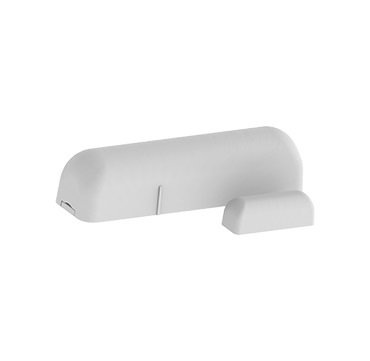
WinDoor RF v2 ZRFWDV2
 Zennio · Order number ZRFWDV2 · Radio › Sensor
KNX-RF magnetic contact for door or window
Download .knxprod WinDoor RF v2 1.0 1.0 · 123 KB
Product
| Manufacturer | Zennio |
|---|---|
| Product name | WinDoor RF v2 |
| Order number | ZRFWDV2 |
| Hardware | WinDoor RF v2 |
| Medium | KNX RF |
| Bus current (mA) | 0 |
| Rail mounted | No |
| Registration | Certified · 2024-12-13 |
| Languages | en-US, es-ES, de-DE, fr-FR, it-IT, ru-RU, uk-UA |
| Catalog entry | M-0071_H-ZRFWDV2-1_HP-4C31-10-5DC0_CI-ZRFWDV2-1 |
| Fingerprint | 5DC0 |
| SHA-256 | abefccd6588f0a3beb802ce65dedc4d614b80e1f56632d2810cdeb468253102b |
| First seen | 2026-11-25 |
| Markets | 59 markets |
Application program: WinDoor RF v2 1.0 1.0
| Application number | $4C31 |
|---|---|
| Version | 1.0 |
| Mask version | MV-27B0 (RF System B) |
| KNX Data Secure | No |
| Minimum ETS version | 5.0 |
| Parameters | 14 |
| Group objects | 8 |
Group objects (8)
| No | Name | Function | Size | DPT | Flags |
|---|---|---|---|---|---|
| 1 | [Heartbeat] Object to Send '1' | Sending of '1' Periodically | 1 Bit | 1.17 trigger | CRT |
| 2 | [Heartbeat] Device Recovery | Send 0 | 1 Bit | 1.17 trigger | CRT |
| 3 | [Heartbeat] Device Recovery | Send 1 | 1 Bit | 1.17 trigger | CRT |
| 4 | Window/Door (Status) | 0 = Closed; 1 = Open | 1 Bit | 1.19 window/door | CT |
| 4 | Window/Door (Status) | 0 = Open; 1 = Closed; | 1 Bit | 1.19 window/door | CT |
| 5 | Alarm: Battery (Status) | 0 = No Alarm; 1 = Alarm | 1 Bit | 1.5 alarm | CT |
| 6 | DEBUG INPUT OBJECT | DEBUG INPUT OBJECT | 14 Bytes | 16.1 Character String (ISO 8859-1) | CW |
| 7 | DEBUG OUTPUT OBJECT | DEBUG OUTPUT OBJECT | 14 Bytes | 16.1 Character String (ISO 8859-1) | CT |
Parameters (12)
| Parameter | Type | Default |
|---|---|---|
| checkHW | list | HW ID |
| Transmission Power | list | Medium |
| Window/Door Status Object | unsignedInt 0…1 | 1 |
| Object Polarity | list | 0 = Closed; 1 = Open |
| Delay | unsignedInt 0…255 | 0 |
| Periodic Send (0 = Disabled) | unsignedInt 0…24 | 0 |
| Hide/show Debug Objects | unsignedInt 0…255 | 0 |
| device_type_virt | list | 868MHz |
| Heartbeat (Periodic Alive Notification) | unsignedInt 0…255 | 0 |
| Period | unsignedInt 1…7 | 1 |
| Device Recovery Objects (Send 0 and 1) | unsignedInt 0…255 | 0 |
| Alarm: Battery | unsignedInt 0…255 | 0 |
Version history
| Application | App no | Fingerprint | First seen | Size | File |
|---|---|---|---|---|---|
| WinDoor RF v2 1.0 1.0 latest | $4C31 | 5DC0 | 2026-11-25 | 123 KB | Download |
About this file
This is the official ETS product database for the Zennio WinDoor RF v2 (ZRFWDV2), published by the manufacturer in the KNX online catalog. To use it, open ETS, go to Catalogs → Import and choose the downloaded .knxprod file. The device then appears in your catalog and can be added to a project. Older versions are kept so existing projects can be matched to the application program they were commissioned with.
More from Zennio
- EyeZen RF 868 ZPDEZRF868
- HeatingBOX 24V 4X ZCL-4HT24
- HeatingBOX 24V 8X ZCL-8HT24
- KLIC-FJ ZCL-FJ
- KLIC-LG1 ZCL-LG1
- KLIC-TS ZCL-TS
- ZoningBOX 4 ZCL-ZB4
- ZoningBOX 6 ZCL-ZB6
- HeatingBOX 230V 2X v2 ZCL2H230V2
- HeatingBOX 230V 4X v2 ZCL4H230V2
- HeatingBOX 230V 6X v2 ZCL6H230V2
- HeatingBOX 230V 8X v2 ZCL8H230V2