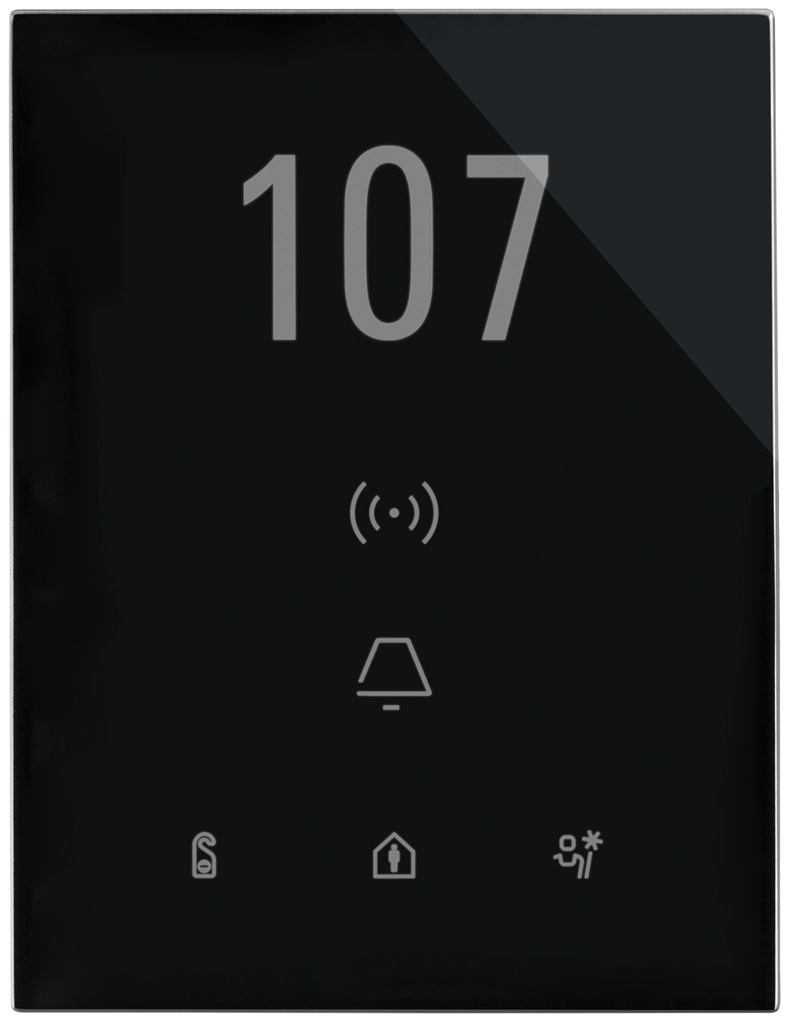
Card Reader Panel 21815
VIMAR · Order number 21815 · Access Control › Card Reader Panel
Download .knxprod Card Reader Panel 1.0 · 146 KB
Product
| Manufacturer | VIMAR |
|---|---|
| Product name | Card Reader Panel |
| Order number | 21815 |
| Hardware | 21815 Card Reader Panel |
| Medium | Twisted Pair |
| Bus current (mA) | 5 |
| Rail mounted | No |
| Registration | Registered · 2026-07-03 |
| Languages | de-DE, en-US, it-IT |
| Catalog entry | M-002C_H-Card.20Reader.20Panel-1_HP-5537-10-CFFF_CI-21815-1 |
| Fingerprint | CFFF |
| SHA-256 | 26357009b3ba71fffd4d1cc113b6982960cb903eb71583e9301346331a9e7d25 |
| First seen | 2026-11-25 |
| Markets | 69 markets |
Application program: Card Reader Panel 1.0
| Application number | $5537 |
|---|---|
| Version | 1.0 |
| Mask version | MV-07B0 (System B) |
| KNX Data Secure | Yes |
| Minimum ETS version | 5.0 |
| Parameters | 168 |
| Group objects | 118 |
Group objects (118)
| No | Name | Function | Size | DPT | Flags |
|---|---|---|---|---|---|
| 1 | Transit | Transit | 4 Bytes | 15.0 entrance access | CRT |
| 1 | Input | Send Value - rising | 1 Bit | 1.1 switch | CRT |
| 1 | Input | Send Value - short press | 1 Bit | 1.1 switch | CRT |
| 1 | Input | Scene - short press | 1 Byte | 18.1 scene control | CRT |
| 1 | Input | Send Value - short press | 1 Byte | 5.10 counter pulses (0..255) | CRT |
| 1 | Input | Send Forced - short press | 2 Bit | 2.1 switch control | CRT |
| 1 | Input | Sequence short - Value 1 | 1 Bit | 1.1 switch | CRT |
| 1 | Input | Sequence short - Value 1 | 1 Byte | 5.10 counter pulses (0..255) | CRT |
| 1 | Input | Multiple pressure - Value 1 | 1 Bit | 1.1 switch | CRT |
| 1 | Input | Multiple pressure - Value 1 | 1 Byte | 5.10 counter pulses (0..255) | CRT |
| 1 | Input | Multiple pressure - Value 1 | 2 Bytes | 7.1 pulses | CRT |
| 1 | Input | Dimming On/Off | 1 Bit | 1.1 switch | CRT |
| 1 | Input | Send Value | 1 Bit | 1.1 switch | CRT |
| 1 | Input | Shutter Up | 1 Bit | 1.8 up/down | CRT |
| 1 | Input | Shutter Down | 1 Bit | 1.8 up/down | CRT |
| 1 | Input | Shutter Up/Down | 1 Bit | 1.8 up/down | CRT |
| 1 | Input | Send value | 1 Bit | 1.17 trigger | CRT |
| 2 | AccessType1 | Access guest | 1 Bit | 1.1 switch | CRT |
| 2 | Input | Send Value - falling | 1 Bit | 1.1 switch | CRT |
| 2 | Input | Send Value - long press | 1 Bit | 1.1 switch | CRT |
| 2 | Input | Scene - long press | 1 Byte | 18.1 scene control | CRT |
| 2 | Input | Send Value - long press | 1 Byte | 5.10 counter pulses (0..255) | CRT |
| 2 | Input | Send Forced - long press | 2 Bit | 2.1 switch control | CRT |
| 2 | Input | Sequence short - Value 2 | 1 Bit | 1.1 switch | CRT |
| 2 | Input | Sequence long - Value 1 | 1 Byte | 5.10 counter pulses (0..255) | CRT |
| 2 | Input | Multiple pressure - Value 2 | 1 Bit | 1.1 switch | CRT |
| 2 | Input | Multiple pressure - Value 2 | 1 Byte | 5.10 counter pulses (0..255) | CRT |
| 2 | Input | Multiple pressure - Value 2 | 2 Bytes | 7.1 pulses | CRT |
| 2 | Input | Dimming | 4 Bit | 3.7 dimming control | CRT |
| 2 | Input | Blinds up down/Shutter stop | 1 Bit | 1.7 step | CRT |
| 2 | Input | Stop | 1 Bit | 1.17 trigger | CRT |
| 3 | AccessType2 | Access service staff | 1 Bit | 1.1 switch | CRT |
| 3 | Input | Sequence short - Value 3 | 1 Bit | 1.1 switch | CRT |
| 3 | Input | Multiple pressure - Value 3 | 1 Bit | 1.1 switch | CRT |
| 3 | Input | Multiple pressure - Value 3 | 1 Byte | 5.10 counter pulses (0..255) | CRT |
| 3 | Input | Multiple pressure - Value 3 | 2 Bytes | 7.1 pulses | CRT |
| 4 | AccessType3 | Access maintenance | 1 Bit | 1.1 switch | CRT |
| 4 | Input | Status on/off - short press | 1 Bit | 1.1 switch | CWU |
| 4 | Input | Sequence short - Value 4 | 1 Bit | 1.1 switch | CRT |
| 4 | Input | Multiple pressure - Value 4 | 1 Bit | 1.1 switch | CRT |
| 4 | Input | Multiple pressure - Value 4 | 1 Byte | 5.10 counter pulses (0..255) | CRT |
| 4 | Input | Multiple pressure - Value 4 | 2 Bytes | 7.1 pulses | CRT |
| 4 | Input | Status On/Off | 1 Bit | 1.11 state | CWU |
| 4 | Input | Shutter State | 1 Bit | 1.8 up/down | CWU |
| 5 | AccessType4 | Access installer | 1 Bit | 1.1 switch | CRT |
| 5 | Input | Status on/off - long press | 1 Bit | 1.1 switch | CWU |
| 5 | Input | Sequence long - Value 1 | 1 Bit | 1.1 switch | CRT |
| 5 | Input | Multiple pressure - Value 5 long press | 1 Bit | 1.1 switch | CRT |
| 5 | Input | Multiple pressure - Scene long press | 1 Byte | 18.1 scene control | CRT |
| 6 | AccessType5 | Access security staff | 1 Bit | 1.1 switch | CRT |
| 6 | Input | Sequence long - Value 2 | 1 Bit | 1.1 switch | CRT |
| 6 | Input | Status on/off - multiple press 1 | 1 Bit | 1.1 switch | CWU |
| 7 | AccessType6 | Access assistance | 1 Bit | 1.1 switch | CRT |
| 7 | Input | Sequence long - Value 3 | 1 Bit | 1.1 switch | CRT |
| 7 | Input | Status on/off - multiple press 2 | 1 Bit | 1.1 switch | CWU |
| 8 | AccessType7 | Access administration | 1 Bit | 1.1 switch | CRT |
| 8 | Input | Sequence long - Value 4 | 1 Bit | 1.1 switch | CRT |
| 8 | Input | Status on/off - multiple press 3 | 1 Bit | 1.1 switch | CWU |
| 9 | Scene control | Scene control | 1 Byte | 18.1 scene control | CT |
| 9 | Input | Status on/off - multiple press 4 | 1 Bit | 1.1 switch | CWU |
| 10 | ###Not used Dummy | Dummy | 1 Bit | 1.1 switch | CWU |
| 10 | Input | Status on/off - multiple press 5 | 1 Bit | 1.1 switch | CWU |
| 11 | ###Not used Dummy | Dummy | 1 Bit | 1.1 switch | CWU |
| 11 | Input | Controls wake-up event###DummyNotUsed | 1 Bit | 1.17 trigger | CRT |
| 12 | Valid access | Valid access | 1 Bit | 1.1 switch | CRT |
| 12 | Input | Block | 1 Bit | 1.1 switch | CWU |
| 13 | Courtesy Light | Courtesy Light | 1 Bit | 1.1 switch | CRT |
| 14 | Alarm 1 | Alarm 1 | 1 Bit | 1.5 alarm | CRT |
| 15 | Alarm 2 | Alarm 2 | 1 Bit | 1.5 alarm | CRT |
| 16 | Alarm 3 | Alarm 3 | 1 Bit | 1.5 alarm | CRT |
| 17 | Clock | Clock | 8 Bytes | 19.1 date time | CWU |
| 18 | Time | Time | 3 Bytes | 10.1 time of day | CWU |
| 19 | Date | Date | 3 Bytes | 11.1 date | CWU |
| 20 | Server confirm | Server confirm | 4 Bytes | 15.0 entrance access | CWU |
| 21 | Plant ID | Plant number | 4 Bytes | 12.1 counter pulses (unsigned) | CWU |
| 22 | Access data | Access data | 10 Bytes | CWU | |
| 23 | DisableAccessType1 | Disable Access Guest | 1 Bit | 1.1 switch | CWU |
| 24 | DisableAccessType2 | Disable Access Service Staff | 1 Bit | 1.1 switch | CWU |
| 25 | DisableAccessType3 | Disable Access Maintenance | 1 Bit | 1.1 switch | CWU |
| 26 | DisableAccessType4 | Disable Access Installer | 1 Bit | 1.1 switch | CWU |
| 27 | DisableAccessType5 | Disable Access Security Staff | 1 Bit | 1.1 switch | CWU |
| 28 | DisableAccessType6 | Disable Access Assistance | 1 Bit | 1.1 switch | CWU |
| 29 | DisableAccessType7 | Disable Access Administration | 1 Bit | 1.1 switch | CWU |
| 30 | Reset | Reset alarm | 1 Bit | 1.1 switch | CWU |
| 31 | ###Not used Dummy | Dummy | 1 Bit | 1.1 switch | CWU |
| 32 | ###Not used Dummy | Dummy | 1 Bit | 1.1 switch | CWU |
| 33 | Do Not Disturb | Do Not Disturb | 1 Bit | 1.1 switch | CW |
| 34 | Do Not Disturb State | Do Not Disturb State | 1 Bit | 1.1 switch | CRT |
| 35 | Room/Laundry Service | Room/Laundry Service | 1 Bit | 1.1 switch | CW |
| 36 | Room/Laundry Service State | Room/Laundry Service State | 1 Bit | 1.1 switch | CRT |
| 37 | Make Up Room | Make Up Room | 1 Bit | 1.1 switch | CW |
| 38 | Make Up Room State | Make Up Room State | 1 Bit | 1.1 switch | CRT |
| 39 | ###Not used Dummy | Dummy | 1 Bit | 1.1 switch | CWU |
| 40 | ###Not used Dummy | Dummy | 1 Bit | 1.1 switch | CWU |
| 41 | ###Not used Dummy | Dummy | 1 Bit | 1.1 switch | CWU |
| 42 | ###Not used Dummy | Dummy | 1 Bit | 1.1 switch | CWU |
| 43 | ###Not used Dummy | Dummy | 1 Bit | 1.1 switch | CWU |
| 44 | ###Not used Dummy | Dummy | 1 Bit | 1.1 switch | CWU |
| 45 | Doorbell | Doorbell | 1 Bit | 1.1 switch | CRT |
| 46 | Presence in the Room | Presence in the Room | 1 Bit | 1.2 boolean | CW |
| 57 | ###Not used Dummy | Dummy | 1 Bit | 1.1 switch | CWU |
| 59 | ###Not used Dummy | Dummy | 1 Bit | 1.1 switch | CWU |
| 60 | Presence function | Check-in | 1 Bit | 1.1 switch | CWU |
| 61 | Presence function | Check-out | 1 Bit | 1.1 switch | CWU |
| 62 | Presence function | Access guest | 1 Bit | 1.1 switch | CWU |
| 63 | Presence function | Access staff | 1 Bit | 1.1 switch | CWU |
| 64 | Presence function | Movement detector | 1 Bit | 1.1 switch | CWU |
| 65 | Presence function | Activity reporting | 1 Bit | 1.1 switch | CWU |
| 66 | Presence function | Resume scene | 1 Byte | 18.1 scene control | CT |
| 67 | Presence function | Night welcome scene | 1 Byte | 17.1 scene number | CT |
| 68 | Presence function | Day welcome scene | 1 Byte | 17.1 scene number | CT |
| 69 | Presence function | Staff scene | 1 Byte | 17.1 scene number | CT |
| 70 | Presence function | Off scene | 1 Byte | 17.1 scene number | CT |
| 71 | Presence function | Absence scene | 1 Byte | 17.1 scene number | CT |
| 72 | Presence function | Door input | 1 Bit | 1.1 switch | CWU |
| 73 | Presence function | Presence in the Room | 1 Bit | 1.1 switch | CRT |
| 74 | Device | Day-Night | 1 Bit | 1.24 day/night | CWU |
| 75 | ###Not used Dummy | Dummy | 1 Bit | 1.1 switch | CWU |
Parameters (137)
| Parameter | Type | Default |
|---|---|---|
| ###invisible | list | ###HW-ID |
| ### | unsignedInt 0…1 | 1 |
| Debounce Time | unsignedInt 50…500 | 50 |
| Time for long action | list | 2,0 s |
| Basic Function of keys | list | Pushbutton |
| PAR_UI_8_0_FBCONTROLLOACCESSI1_AdjustableSelect | unsignedInt 0…255 | 0 |
| Plant | unsignedInt 0…2147483647 | 0 |
| Room | unsignedInt 0…65535 | 0 |
| Repetition of the message | unsignedInt 0…255 | 1 |
| Duration Lock | list | 0.1 |
| Duration Courtesy | unsignedInt 0…65535 | 20 |
| Black List | list | No |
| Single Access | list | No |
| Check date | list | Yes |
| Check day | list | Yes |
| Check timeslot | list | Yes |
| Access Cost | unsignedInt 0…2147483647 | 0 |
| Overwrite Transit | list | No |
| Enable Card Id | list | No |
| Scene Number Guest Access | list | Not active |
| Scene Number Service Staff | list | Not active |
| Scene Number Maintenance Staff | list | Not active |
| Scene Number for Installer Access | list | Not active |
| Scene Number for Security Staff | list | Not active |
| Scene Number for Assistance Staff | list | Not active |
| Scene Number Administration | list | Not active |
| APPKNXDEVICE1_AdjustableSelect | unsignedInt 0…255 | 0 |
| Allow the use of Mifare Classic cards | list | No |
| Presence in the room function | list | Not active |
| Empty room timeout | list | 1 min |
| Closed door timeout | list | Not active |
| Staff entry verify | list | Disable |
| Activity reporting | list | Disable |
| Resume scene | list | Not active |
| Night welcome scene | list | Not active |
| Day welcome scene | list | Not active |
| Staff scene | list | Not active |
| Off scene | list | Not active |
| Absence scene | list | Not active |
| Central Symbol | list | Not active |
| FBFUORIPORTA2_AdjustableSelect | unsignedInt 0…255 | 255 |
| FBFUORIPORTA4_AdjustableSelect | unsignedInt 0…255 | 255 |
| Doorbell symbol | list | Not active |
| Card reader | list | Not active |
| FBFUORIPORTA5_AdjustableSelect | unsignedInt 0…255 | 255 |
| FBFUORIPORTA6_AdjustableSelect | unsignedInt 0…255 | 255 |
| Logo and room number symbol | list | Not active |
| Flashing DND on pressing bell with active DND | list | No |
| Behaviour | list | On when pressed, off when released |
| Colour with presence in the room | list | Predefined colours |
| Colour | list | White |
| Colour red LED | unsignedInt 0…255 | 255 |
| Colour with no presence in the room | list | Predefined colours |
| Day brightness when pressed | list | Off |
| Day brightness when not pressed | list | High |
| Night brightness when pressed | list | Off |
| Night brightness when not pressed | list | Medium |
| FBFUORIPORTA1_AdjustableSelect | unsignedInt 0…255 | 0 |
| FBFUORIPORTA3_AdjustableSelect | unsignedInt 0…255 | 1 |
| Colour green LED | unsignedInt 0…255 | 255 |
| Colour blue LED | unsignedInt 0…255 | 255 |
| FBPRESENCERX1_AdjustableSelect | unsignedInt 0…255 | 0 |
| APPKNXDEVICE1_ETSDownload | unsignedInt 0…255 | 1 |
| FBDAYNIGHT1_AdjustableSelect | unsignedInt 0…255 | 0 |
| Data format | list | 1 Bit |
| Dimmer Behaviour | list | Toggle (short), Dimming Up/Down (long) |
| Operation type | list | On edge |
| Shutter Behaviour | list | Shutter Movement UP (long), Stop/Step(short) |
| FBPULSMATRIX1_AdjustableSelect_Value_9 | unsignedInt 0…255 | 9 |
| FBPULSMATRIX1_AdjustableSelect_Value_12 | unsignedInt 0…255 | 9 |
| FBPULSMATRIX1_AdjustableSelect_Value_255 | unsignedInt 0…255 | 9 |
| FBPULSMATRIX1_AdjustableSelect_Value_16 | unsignedInt 0…255 | 9 |
| FBPULSMATRIX1_AdjustableSelect_Value_15 | unsignedInt 0…255 | 9 |
| FBPULSMATRIX1_AdjustableSelect_Value_14 | unsignedInt 0…255 | 9 |
| FBPULSMATRIX1_AdjustableSelect_Value_13 | unsignedInt 0…255 | 9 |
| FBPULSMATRIX1_AdjustableSelect_Value_11 | unsignedInt 0…255 | 9 |
| FBPULSMATRIX1_AdjustableSelect_Value_3 | unsignedInt 0…255 | 9 |
| FBPULSMATRIX1_AdjustableSelect_Value_10 | unsignedInt 0…255 | 9 |
| FBPULSMATRIX1_AdjustableSelect_Value_7 | unsignedInt 0…255 | 9 |
| FBPULSMATRIX1_AdjustableSelect_Value_6 | unsignedInt 0…255 | 9 |
| FBPULSMATRIX1_AdjustableSelect_Value_8 | unsignedInt 0…255 | 9 |
| FBPULSMATRIX1_AdjustableSelect_Value_5 | unsignedInt 0…255 | 9 |
| FBPULSMATRIX1_AdjustableSelect_Value_4 | unsignedInt 0…255 | 9 |
| FBPULSMATRIX1_AdjustableSelect_Value_2 | unsignedInt 0…255 | 9 |
| FBPULSMATRIX1_AdjustableSelect_Value_1 | unsignedInt 0…255 | 9 |
| Max time between pressures | unsignedInt 100…32000 | 500 |
| Block function | list | Disable |
| Block function at power up | list | No change |
| Block value | list | 1 value |
| Data format | list | 1 bit |
| Long press Function | list | No Reaction |
| Short press function | list | No Reaction |
| Led State Object | list | Status On/off - short press |
| Message sending | list | Only at the end of the pressure |
| Value on Falling Edge | list | Off |
| Value on Rising Edge | list | On |
| Time in seconds | unsignedInt 1…32000 | 30 |
| Second press detection | list | Disable |
| Third press detection | list | Disable |
| Fourth press detection | list | Disable |
| FBPULSMATRIX1_SendValue_Value_0 | unsignedInt 0…255 | 0 |
| FBPULSMATRIX1_SendValue_Value_1 | unsignedInt 0…255 | 0 |
| FBPULSMATRIX1_SendValue_Value_2 | unsignedInt 0…255 | 0 |
| Sequence type | list | Cycling |
| Send stop on Release | list | No |
| Value to send | list | On |
| Send Value | list | Send On |
| Scene | list | 1 |
| Dimming steps | list | 100% |
| Repetition time | list | 1.0 s |
| Value 1 | list | Off |
| Value 1 | unsignedInt 0…255 | 0 |
| Long press Function | unsignedInt 0…255 | 0 |
| Value 2 | list | Off |
| Value 2 | unsignedInt 0…255 | 0 |
| Value 3 | list | Off |
| Value 3 | unsignedInt 0…255 | 0 |
| Value 4 | list | Off |
| Value 4 | unsignedInt 0…255 | 0 |
| Short press function | unsignedInt 0…255 | 0 |
| Value to send | unsignedInt 0…65535 | 1 |
| Value to send | unsignedInt 0…255 | 1 |
| Long press second Value | list | No |
| Long press Function | list | Disable |
| Number of objects | list | 2 |
| Number of values | list | 2 |
| Repeat Dimming Telegrams | list | No |
| Input function | list | Disabled |
| d_setInvisible | unsignedInt 0…1 | 1 |
| Colour {{Description}} | list | Predefined colours |
| d_modulePositions | list | no parameters |
| Activated day function brightness | list | High |
| Deactivated day function brightness | list | Off |
| Activated night function brightness | list | Medium |
| Deactivated night function brightness | list | Off |
| Day brightness | list | High |
| Night brightness | list | Medium |
Version history
| Application | App no | Fingerprint | First seen | Size | File |
|---|---|---|---|---|---|
| Card Reader Panel 1.0 latest | $5537 | CFFF | 2026-11-25 | 146 KB | Download |
About this file
This is the official ETS product database for the VIMAR Card Reader Panel (21815), published by the manufacturer in the KNX online catalog. To use it, open ETS, go to Catalogs → Import and choose the downloaded .knxprod file. The device then appears in your catalog and can be added to a project. Older versions are kept so existing projects can be matched to the application program they were commissioned with.
More from VIMAR
- 14453 CardHolder Plana 14453
- 14457 CardReader Plana 14457
- 14475 Card Reader Plana 14475
- 14476 Card Holder Plana 14476
- 16923 CardHolder Idea 16923
- 16927 CardReader Idea 16927
- 19453 CardHolder Arké 19453
- 19457 CardReader Arké 19457
- 19475 Card Reader Arké 19475
- 19476 Card Holder Arké 19476
- 20453 CardHolder Eikon 20453
- 20457 CardReader Eikon 20457