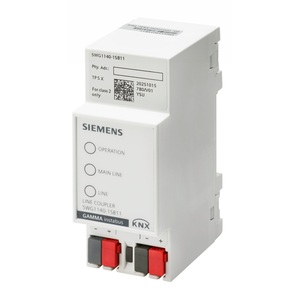
KNX Line coupler secure N 140S11 5WG1140-1SB11
 Siemens · Order number 5WG1140-1SB11 · System devices › KNX Line coupler › N 140S11
Product info - see file: 5WG1_140_1SB11_tpi_en_RS-AA.pdf
Download .knxprod Coupler 000410 1.0 · 118 KB
Product
| Manufacturer | Siemens |
|---|---|
| Product name | KNX Line coupler secure N 140S11 |
| Order number | 5WG1140-1SB11 |
| Hardware | #KNX Line coupler secure N 140S11 |
| Medium | Twisted Pair |
| Bus current (mA) | 7.5 |
| Rail mounted | Yes |
| Device kind | Coupler |
| Registration | Certified · 2026-03-05 |
| Languages | en-US, de-DE, it-IT, fr-FR, es-ES, sv-SE |
| Catalog entry | M-0001_H-hp.5F00368-1_HP-0004-10-B9F0_CI-5WG1140.2D1SB11-1 |
| Fingerprint | B9F0 |
| SHA-256 | 7a1b1dfec9a20e918d2ebe310b29deb994e029f2a52cc0ec61858c63febb1fa4 |
| First seen | 2026-11-25 |
| Markets | 58 markets |
Application program: Coupler 000410 1.0
| Application number | $0004 |
|---|---|
| Version | 1.0 |
| Mask version | MV-0912 (Coupler 0912) |
| KNX Data Secure | Yes |
| Minimum ETS version | 6.0 |
| Parameters | 23 |
| Group objects | 0 |
Group objects (0)
| No | Name | Function | Size | DPT | Flags |
|---|
Parameters (11)
| Parameter | Type | Default |
|---|---|---|
| Support of not configured interfaces (=Interface address doesn't match with line address) | list | enabled |
| Intelligent programming protection | list | no |
| Group telegrams of main groups 0 to 13 | list | filter (normal) |
| Group telegrams of main group 14 to 31 | list | filter (normal) |
| Confirm group oriented telegrams | list | only if routed |
| Repeat group oriented telegrams in case of no ACK | list | yes |
| Individually addressed telegrams | list | filter (depending on target and coupler address) |
| Acknowledge individually addressed telegrams | list | only if routed |
| Repeat individually addressed telegrams in case of transmission faults | list | yes |
| Broadcast telegrams | list | route |
| Repeat broadcast telegrams in case of transmission faults | list | yes |
Version history
| Application | App no | Fingerprint | First seen | Size | File |
|---|---|---|---|---|---|
| Coupler 000410 1.0 latest | $0004 | B9F0 | 2026-11-25 | 118 KB | Download |
About this file
This is the official ETS product database for the Siemens KNX Line coupler secure N 140S11 (5WG1140-1SB11), published by the manufacturer in the KNX online catalog. To use it, open ETS, go to Catalogs → Import and choose the downloaded .knxprod file. The device then appears in your catalog and can be added to a project. Older versions are kept so existing projects can be matched to the application program they were commissioned with.
More from Siemens
- Bus Transceiver Module UP 117/12 5WG1 117-2AB12
- Choke N 120/02 5WG1 120-1AB02
- Power supply unit N 125/02 (230V / 160mA) 5WG1 125-1AB02
- Power supply unit N 125/12 (230V / 320mA) 5WG1 125-1AB12
- Power supply unit N 125/22 (230V / 640mA) 5WG1 125-1AB22
- Decentralized Power Supply RL 125/23 5WG1 125-4AB23
- Power supply unit JB 125C33 (277V/160mA) 5WG1 125-4CB33
- Line / backbone coupler N 140/13 5WG1 140-1AB13
- IP Router Secure N 146/03 5WG1 146-1AB03
- KNX Power supply N 125/13, AC 230 V/320 mA 5WG1125-1AB13
- KNX Power supply N 125/23, AC 230 V/640 mA 5WG1125-1AB23
- Control Module Box AP 118 5WG1 118-4AB01