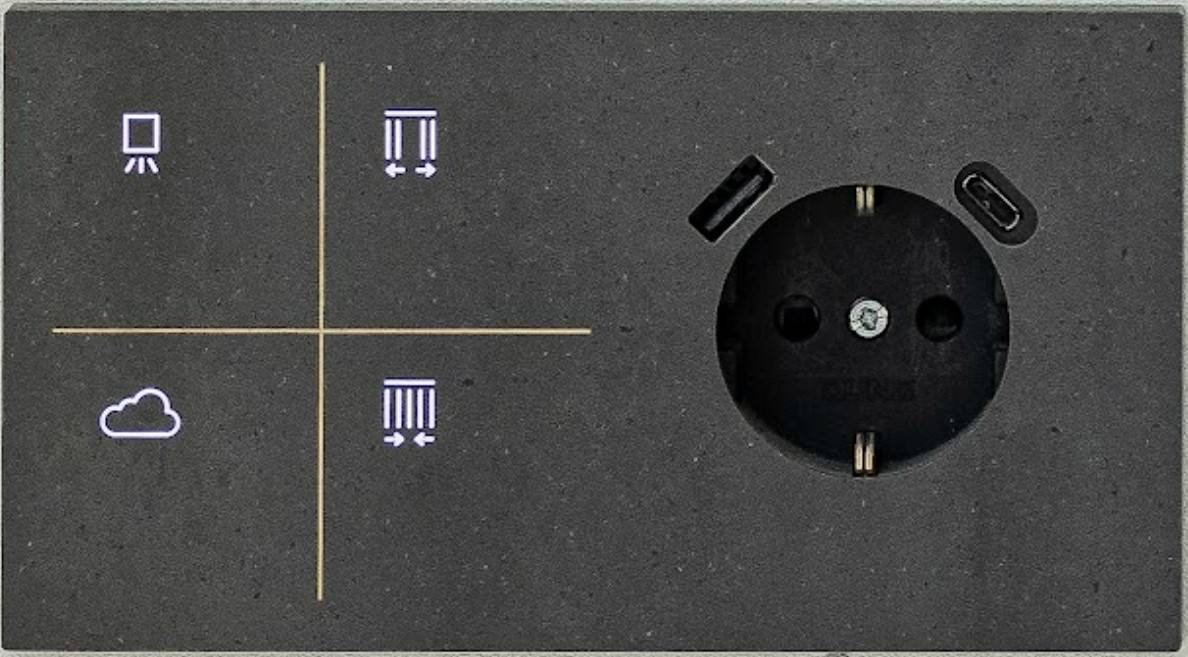
KNX NST Keypad with LEDs – Sensor & Button SACW 85/90-3
NS Touch · Order number SACW 85/90-3 · Switches › Keypad Sensor or Active
Download .knxprod KNX NST Keypad with LEDs 1.1 · 707 KB
Product
| Manufacturer | NS Touch |
|---|---|
| Product name | KNX NST Keypad with LEDs – Sensor & Button |
| Order number | SACW 85/90-3 |
| Product text | KNX NST Keypad with LEDs |
| Hardware | KNX NST Keypad with LEDs |
| Medium | Twisted Pair |
| Bus current (mA) | 17.5 |
| Rail mounted | No |
| Registration | Registered · 2025-05-27 |
| Languages | en-US, uk-UA |
| Catalog entry | M-02C0_H-SACW.2085.2F90.2D3-1_HP-0001-11-ADD1_CI-SACW.2085.2F90.2D3-1 |
| Fingerprint | ADD1 |
| SHA-256 | aaa8743b5e9a003c9c28db8a69a294a68f3ad3039b9c8f7c0a2fd7837ab11280 |
| First seen | 2026-11-25 |
| Markets | 69 markets |
Application program: KNX NST Keypad with LEDs 1.1
| Application number | $0001 |
|---|---|
| Version | 1.1 |
| Mask version | MV-07B0 (System B) |
| KNX Data Secure | Yes |
| Minimum ETS version | 5.0 |
| Parameters | 233 |
| Group objects | 24 |
Group objects (24)
| No | Name | Function | Size | DPT | Flags |
|---|---|---|---|---|---|
| 1 | {{argChannelName}} {{argChannelNumber}} - {{argFunctionName}}: {{0}} | Shutter - Moving | 1 Bit | 1.8 up/down | CRT |
| 1 | {{argChannelName}} {{argChannelNumber}} - {{argFunctionName}}: {{0}} | Send value (Percent) | 1 Byte | 5.1 percentage (0..100%) | CRT |
| 1 | {{argChannelName}} {{argChannelNumber}} - {{argFunctionName}}: {{0}} | Send value (Angle) | 1 Byte | 5.3 angle (degrees) | CRT |
| 1 | {{argChannelName}} {{argChannelNumber}} - {{argFunctionName}}: {{0}} | Send value (Temperature) | 2 Bytes | 9.1 temperature (°C) | CRT |
| 1 | {{argChannelName}} {{argChannelNumber}} - {{argFunctionName}}: {{0}} | Send value (Forced) | 2 Bit | 2.2 boolean control | CRT |
| 1 | {{argChannelName}} {{argChannelNumber}} - {{argFunctionName}}: {{0}} | Send value (8-bit) | 1 Byte | 5.10 counter pulses (0..255) | CRT |
| 1 | {{argChannelName}} {{argChannelNumber}} - {{argFunctionName}}: {{0}} | Send value (16-bit) | 2 Bytes | 7.1 pulses | CRT |
| 1 | {{argChannelName}} {{argChannelNumber}} - {{argFunctionName}}: {{0}} | Switch | 1 Bit | 1.1 switch | CRT |
| 1 | Logic {{argObjectNumber}}: {{0}} | Input | 1 Bit | 1.2 boolean | CW |
| 1 | Logic {{argObjectNumber}}: {{0}} | Input A | 1 Bit | 1.2 boolean | CW |
| 1 | Logic {{argObjectNumber}}: {{0}} | Input | 1 Byte | 5.10 counter pulses (0..255) | CW |
| 1 | Logic {{argObjectNumber}}: {{0}} | Input | 2 Bytes | 9.1 temperature (°C) | CW |
| 1 | Alarm | Beeper | 1 Bit | 1.1 switch | CWTU |
| 1 | Temperature: {{0}} | Temperature | 2 Bytes | 9.1 temperature (°C) | CRT |
| 2 | {{argChannelName}} {{argChannelNumber}} - {{argFunctionName}}: {{0}} | Toggle status | 1 Bit | 1.1 switch | CWU |
| 2 | Logic {{argObjectNumber}}: {{0}} | Input B | 1 Bit | 1.2 boolean | CW |
| 3 | {{argChannelName}} {{argChannelNumber}} - {{argFunctionName}}: {{0}} | Shutter - Stepping/Stop | 1 Bit | 1.7 step | CRT |
| 3 | {{argChannelName}} {{argChannelNumber}} - {{argFunctionName}}: {{0}} | Scene | 1 Byte | 17.1 scene number | CRT |
| 3 | Logic {{argObjectNumber}}: {{0}} | Input C | 1 Bit | 1.2 boolean | CW |
| 4 | Logic {{argObjectNumber}}: {{0}} | Input D | 1 Bit | 1.2 boolean | CW |
| 5 | Logic {{argObjectNumber}}: {{0}} | Output | 1 Bit | 1.2 boolean | CRT |
| 5 | Logic {{argObjectNumber}}: {{0}} | Output | 1 Byte | 5.10 counter pulses (0..255) | CRT |
| 272 | Day/Night | Switch | 1 Bit | 1.24 day/night | CWU |
| 273 | Cleaning mode | Block | 1 Bit | 1.1 switch | CWT |
Parameters (86)
| Parameter | Type | Default |
|---|---|---|
| Debounce time | list | 30 ms |
| Plate type | list | 4 fold button |
| Switch Type | list | Sensor |
| Plate type | list | Please select |
| Swipe direction | list | horizontal swipe |
| Double click enabled | unsignedInt 0…1 | 0 |
| Button 1 | unsignedInt 0…1 | 1 |
| Number of Logic settings | unsignedInt 0…5 | 0 |
| Button 2 | unsignedInt 0…1 | 1 |
| Button 3 | unsignedInt 0…1 | 1 |
| Button 4 | unsignedInt 0…1 | 1 |
| Button 5 | unsignedInt 0…1 | 0 |
| Button 6 | unsignedInt 0…1 | 0 |
| d_numberOfChannels | unsignedInt 0…255 | 0 |
| Swipe enabled | unsignedInt 0…1 | 0 |
| d_numberOfChannels | unsignedInt 0…2 | 0 |
| Blocking enable | unsignedInt 0…1 | 0 |
| Timeout for blocking | list | No Timeout defined |
| ####Invisible | list | ###HW-ID |
| Sensitivity settings | unsignedInt 0…255 | 153 |
| Enable loudness control for click | list | no |
| Loudness for day | unsignedInt 0…100 | 60 |
| Loudness for night | unsignedInt 0…100 | 60 |
| Timeout for double click | unsignedInt 1…600 | 500 |
| Sensitivity settings | unsignedInt 0…80 | 60 |
| dummy | unsignedInt 0…0 | 0 |
| Use general blocking | list | disabled |
| Scene number | list | Scene 1 |
| Send value | list | 0% |
| Send value | list | 0° |
| Send value [in °C x100] | signedInt -27300…32000 | 0 |
| Send value | list | deactivate forced |
| Send value | signedInt 0…255 | 0 |
| Send value | signedInt 0…65535 | 0 |
| Value type | list | Percent |
| Value for short press [in °C x100] | signedInt -27300…32000 | 0 |
| Value for long press [in °C x100] | signedInt -27300…32000 | 0 |
| Send value | list | on rising edge |
| Send value | list | Call scene |
| First scene number | list | Scene 1 |
| Second scene number | list | Scene 2 |
| Send value | list | nothing |
| Stop moving automatically | list | disabled |
| Automatically stop delay time (1...255s) | unsignedInt 1…255 | 1 |
| Input function | list | Switch |
| Send value | list | off |
| actualChannel | unsignedInt 0…255 | 0 |
| Assignment value of actualChannel | unsignedInt 0…255 | 0 |
| single channel dummy | unsignedInt 0…1 | 0 |
| Object name | text | |
| Send value [in °C] | float -273…320 | 0 |
| OM_inputUsage_subType_0 | unsignedInt 0…255 | 0 |
| Logic Function | list | NOT |
| Logic name | text | |
| Logic delay resolution | list | not active |
| Number of transmissions on output | list | 1 |
| Time resolution in | list | milliseconds |
| Value sent when 0 is received | unsignedInt 0…255 | 0 |
| Value sent when 1 is received | unsignedInt 0…255 | 128 |
| Byte value | unsignedInt 0…255 | 128 |
| Threshold value | unsignedInt 0…255 | 128 |
| Threshold value | float -273…670760 | 0 |
| Threshold select | list | Byte |
| Hysteresis | unsignedInt 0…255 | 0 |
| Number of input objects | list | 2 |
| Output bit otherwise | list | False |
| Output bit when byte is received | list | True |
| Desired Time value | unsignedInt 1…32767 | 1 |
| When input <= threshold - hysteresis | list | False |
| When input > threshold | list | True |
| Hysteresis | float -273…670760 | 0 |
| LF_sendCondition_0 | list | LF_SC_DontSend |
| Desired Logic delay time | unsignedInt 1…32767 | 1 |
| Desired Logic delay time | unsignedInt 0…32767 | 0 |
| Activate alarm function for LEDs | unsignedInt 0…1 | 0 |
| LED blinking mode | list | always off |
| Beeper Volume | unsignedInt 0…100 | 10 |
| LED blink duration when ON | list | 500 ms |
| LED blink duration when OFF | list | 500 ms |
| Beeper tone select | list | only LEDs active (No Beeper) |
| LED blink duration when ON | unsignedInt 0…65535 | 0 |
| LED blink duration when OFF | unsignedInt 0…65535 | 0 |
| Name of the room temperature measurement | text | |
| Temperature Offset | list | 0.0 °C |
| Send Cycle Time | list | Off |
| Send Difference | list | Off |
Version history
| Application | App no | Fingerprint | First seen | Size | File |
|---|---|---|---|---|---|
| KNX NST Keypad with LEDs 1.1 latest | $0001 | ADD1 | 2026-11-25 | 707 KB | Download |
About this file
This is the official ETS product database for the NS Touch KNX NST Keypad with LEDs – Sensor & Button (SACW 85/90-3), published by the manufacturer in the KNX online catalog. To use it, open ETS, go to Catalogs → Import and choose the downloaded .knxprod file. The device then appears in your catalog and can be added to a project. Older versions are kept so existing projects can be matched to the application program they were commissioned with.