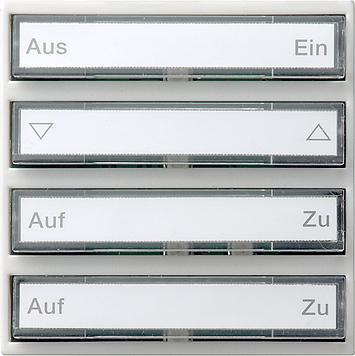
multi function push button 4fold FM 885 xx
 GIRA Giersiepen · Order number 885 xx · Taster › Push button, 4fold
sensor 4-way with label space Product family: Push-button Product type: Push-button 4-way Mountable on FM bus-coupler Order No. 570 00. With the multi-function push- button sensor lighting situations can be called up from the lighting scene push- button sensor, Order No. 888 .., lighting areas dimmed or switched and venetian blind controlled. The unit thus combines switching sensor (incl. toggle), lighting scene auxiliary unit, dimming value indicator, dim sensor and venetian blind sensor. Each button is freely definable. In-operation indication via green LED (may be illuminated as per the workplace regulations). Pre-printed labels with commonly used symbols included in delivery. Transparent labels Order No. 014 01 or tinted Order No. 014 06 for S-Color System and Trias Range as spare or for replacement. Fabricate: Gira Order No. 885 54 F-Line cream white Order No. 885 55 F-Line pure white Order No. 885 56 F-Line brown metallic Order No. 885 57 F-Line anthracite metallic Order No. 885 40 S-Color System pure white Order No. 885 41 S-Color System brown Order No. 885 42 S-Color System grey Order No. 885 43 S-Color System red Order No. 885 44 S-Color System yellow Order No. 885 45 S-Color System green Order No. 885 46 S-Color System blue Order No. 885 47 S-Color System black Order No. 885 49 S-Color System dark grey Order No. 885 20 High-grade Steel Range Order No. 885 15 Trias Range cream white Order No. 885 61 Trias Range brown/ metallic Order No. 885 16 Trias Range pure white Order No. 885 63 Trias Range grey/ metallic
Download .knxprod multi-function 104202 0.2 · 86 KB
Product
| Manufacturer | GIRA Giersiepen |
|---|---|
| Product name | multi function push button 4fold FM |
| Order number | 885 xx |
| Product text | Multifunktionstastsensor 4fach UP |
| Hardware | Multifunktionstastsensor 4fach UP |
| Medium | PowerLine, Twisted Pair |
| Bus current (mA) | 7 |
| Rail mounted | No |
| Registration | Registered · 1900/0 |
| Languages | de-DE, en-US, es-ES, fr-FR, nb-NO, sv-SE, nl-NL |
| Catalog entry | M-0008_H-8.20.2F.2F.20885.20xx-1-O0006_HP-1042-02-58B9-O0006_CI-885.20xx-1 |
| Fingerprint | 58B9 |
| SHA-256 | 9b655f56219a10288bd5381bdd6ee2348b71ba810dc492784e853033b660239e |
| First seen | 2026-11-25 |
| Markets | 39 markets |
Application program: Multifunktion 104202 0.2
| Application number | $1042 |
|---|---|
| Version | 0.2 |
| Mask version | MV-0011 (1.1) |
| KNX Data Secure | No |
| Parameters | 70 |
| Group objects | 25 |
Group objects (25)
| No | Name | Function | Size | DPT | Flags |
|---|---|---|---|---|---|
| 0 | Wippe 1 | Schalten links | 1 Bit | CWT | |
| 0 | Wippe 1 | Langzeitbetrieb | 1 Bit | CWT | |
| 0 | Wippe 1 | Schalten | 1 Bit | CWT | |
| 1 | Wippe 2 | Schalten links | 1 Bit | CWT | |
| 1 | Wippe 2 | Langzeitbetrieb | 1 Bit | CWT | |
| 1 | Wippe 2 | Schalten | 1 Bit | CWT | |
| 2 | Wippe 3 | Schalten links | 1 Bit | CWT | |
| 2 | Wippe 3 | Langzeitbetrieb | 1 Bit | CWT | |
| 2 | Wippe 3 | Schalten | 1 Bit | CWT | |
| 3 | Wippe 4 | Schalten links | 1 Bit | CWT | |
| 3 | Wippe 4 | Langzeitbetrieb | 1 Bit | CWT | |
| 3 | Wippe 4 | Schalten | 1 Bit | CWT | |
| 4 | Wippe 1 | Schalten rechts | 1 Bit | CWT | |
| 4 | Wippe 1 | Kurzzeitbetrieb | 1 Bit | CWT | |
| 5 | Wippe 2 | Schalten rechts | 1 Bit | CWT | |
| 5 | Wippe 2 | Kurzzeitbetrieb | 1 Bit | CWT | |
| 6 | Wippe 3 | Schalten rechts | 1 Bit | CWT | |
| 6 | Wippe 3 | Kurzzeitbetrieb | 1 Bit | CWT | |
| 7 | Wippe 4 | Schalten rechts | 1 Bit | CWT | |
| 7 | Wippe 4 | Kurzzeitbetrieb | 1 Bit | CWT | |
| 8 | Wippe 1 | Dimmen | 4 Bit | CT | |
| 9 | Wippe 2 | Dimmen | 4 Bit | CT | |
| 10 | Wippe 3 | Dimmen | 4 Bit | CT | |
| 11 | Wippe 4 | Dimmen | 4 Bit | CT | |
| 12 | Wippe 1 bis 4 | Wertgeber/Lichtszenennebenst. | 1 Byte | CWT |
Parameters (31)
| Parameter | Type | Default |
|---|---|---|
| Allgemein | list | AUS |
| Funktion Betriebs - LED | list | EIN |
| Funktion Wippe 1 | list | Schaltsensor |
| Funktion Wippe 2 | list | Dimmsensor |
| Funktion Wippe 3 | list | Jalousiesensor |
| Funktion Wippe 4 | list | Wertgeber, Lichtszenennebenstelle |
| Wippe 1 | list | Schaltsensor |
| Funktion der Status-LED | list | LED als Bestätigung |
| Funktion Status - LED | list | EIN |
| Anzahl der Schritte vor dem Dauerlauf (1...15) | unsignedInt 0…15 | 1 |
| Wert (0...255)/Lichtszene (1...8) Wippe 1 links | list | Lichtszene 1 abrufen, Wert = 0 |
| LED-Leuchtdauer bei Bestätigung | list | 3 s |
| heller dimmen um | list | 100 % |
| Zeit zwischen zwei Telegrammen Basis | list | 8 ms |
| Wert (0...255)/Lichtszene (1...8) Wippe 1 rechts | list | Lichtszene 2 abrufen, Wert = 1 |
| Befehl bei Betätigung der linken Taste | list | drücken = EIN, loslassen = --- |
| dunkler dimmen um | list | 100 % |
| Zeit zwischen zwei Telegrammen Faktor (0...255) | unsignedInt 0…255 | 46 |
| Befehl bei Betätigung der rechten Taste | list | drücken = AUS, loslassen = --- |
| Telegrammwiederholung ? | list | NEIN |
| Zeit zwischen zwei Telegrammen | list | 200 ms |
| Stoptelegramm senden ? | list | JA |
| Wippe 2 | list | Schaltsensor |
| Wert (0...255)/Lichtszene (1...8) Wippe 2 links | list | Lichtszene 3 abrufen, Wert = 2 |
| Wert (0...255)/Lichtszene (1...8) Wippe 2 rechts | list | Lichtszene 4 abrufen, Wert = 3 |
| Wippe 3 | list | Schaltsensor |
| Wert (0...255)/Lichtszene (1...8) Wippe 3 links | list | Lichtszene 5 abrufen, Wert = 4 |
| Wert (0...255)/Lichtszene (1...8) Wippe 3 rechts | list | Lichtszene 6 abrufen, Wert = 5 |
| Wippe 4 | list | Schaltsensor |
| Wert (0...255)/Lichtszene (1...8) Wippe 4 links | list | Lichtszene 7 abrufen, Wert = 6 |
| Wert (0...255)/Lichtszene (1...8) Wippe 4 rechts | list | Lichtszene 8 abrufen, Wert = 7 |
Version history
| Application | App no | Fingerprint | First seen | Size | File |
|---|---|---|---|---|---|
| multi-function 104202 0.2 latest | $1042 | 58B9 | 2026-11-25 | 86 KB | Download |
About this file
This is the official ETS product database for the GIRA Giersiepen multi function push button 4fold FM (885 xx), published by the manufacturer in the KNX online catalog. To use it, open ETS, go to Catalogs → Import and choose the downloaded .knxprod file. The device then appears in your catalog and can be added to a project. Older versions are kept so existing projects can be matched to the application program they were commissioned with.
More from GIRA Giersiepen
- push sensor 2 1fold with labeling field 1011 00
- push sensor 2 2fold with labeling field 1012 xx
- push sensor 2 3fold with labeling field 1013 00
- Pushbutton sensor 4.95 Komfort, 1-gang 1041 ..
- Pushbutton sensor 4.95 Komfort, 2-gang 1042 ..
- Pushbutton sensor 4.95 Komfort, 4-gang 1044 ..
- push sensor 2 1fold with controller 1061 00
- push sensor 2 2fold with controller 1062 00
- push sensor 2 3fold with controller 1063 00
- push sensor 2 4fold with controller 1064 2x
- push sensor 2 6fold with controller 1066 2x
- push sensor ITS 1fold with controller 1240 xxx