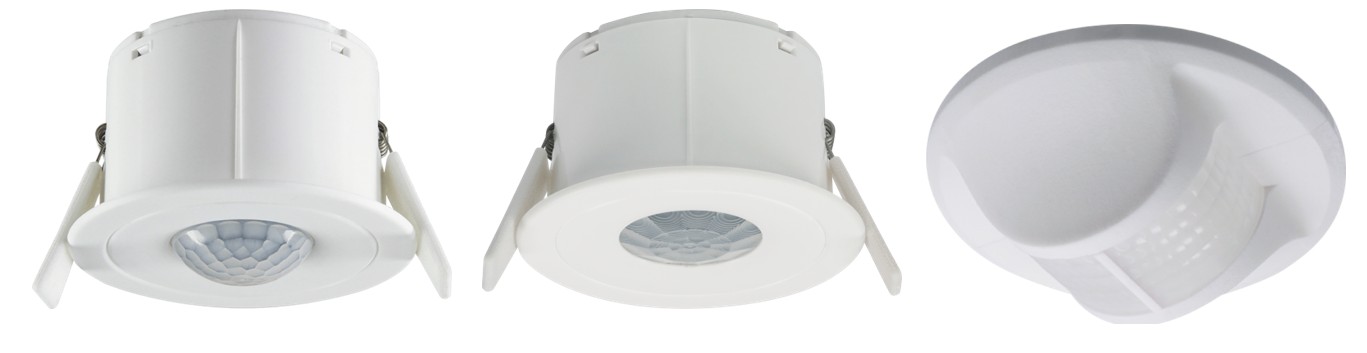
XD100 Motion, Brightness Sensor 48022
EAE · Order number 48022 · Physical sensors › Presence sensor
Presence sensor/1.5
Download .knxprod XD100 Motion, Brightness Sensor/1.5 1.5 · 97 KB
Product
| Manufacturer | EAE |
|---|---|
| Product name | XD100 Motion, Brightness Sensor |
| Order number | 48022 |
| Hardware | SMP XD100 EAE KNX |
| Medium | Twisted Pair |
| Bus current (mA) | 10 |
| Rail mounted | No |
| Width (mm) | 90 |
| Registration | Certified · 2015-05-11 |
| Languages | en-US, de-DE, es-ES, fr-FR, it-IT |
| Catalog entry | M-011E_H-48022-0_HP-B096-15-1A1B_CI-48022-1 |
| Fingerprint | 1A1B |
| SHA-256 | ecb5aa49d1c408632b3f2b349b55fa5b806fa37323737c7f03ddf741cf77c59e |
| First seen | 2026-11-25 |
| Markets | 69 markets |
Application program: XD100 Motion, Brightness Sensor/1.5 1.5
| Application number | $B096 |
|---|---|
| Version | 1.5 |
| Mask version | MV-0705 (7.5) |
| KNX Data Secure | No |
| Minimum ETS version | 4.0 |
| Parameters | 103 |
| Group objects | 51 |
Group objects (51)
| No | Name | Function | Size | DPT | Flags |
|---|---|---|---|---|---|
| 0 | General | In operation | 1 Bit | 1.2 boolean | CWT |
| 1 | General | Presence slave 1 | 1 Bit | 1.1 switch | CRW |
| 2 | General | Presence slave 2 | 1 Bit | 1.1 switch | CRW |
| 3 | General | Presence slave 3 | 1 Bit | 1.1 switch | CRW |
| 4 | General | Presence slave 4 | 1 Bit | 1.1 switch | CRW |
| 5 | Presence | Presence output | 1 Bit | 1.1 switch | CRT |
| 5 | Presence | Presence output | 1 Byte | 5.1 percentage (0..100%) | CRT |
| 5 | Presence | Presence output | 1 Byte | 5.10 counter pulses (0..255) | CRT |
| 5 | Presence | Presence output | 1 Byte | 18.1 scene control | CRT |
| 5 | Presence | Presence output | 1 Byte | 20.102 HVAC mode | CRT |
| 5 | Presence | Presence output | 2 Bytes | 7.1 pulses | CRT |
| 6 | Presence | Disable presence output | 1 Bit | 1.1 switch | CRWT |
| 7 | Presence | Switch ON delay time 0...5 | 1 Byte | 5.5 ratio (0..255) | CRWT |
| 8 | Presence | Stay ON time 10...65535 | 2 Bytes | 7.5 time (s) | CRWT |
| 9 | Temperature | Temperature value | 2 Bytes | 9.1 temperature (°C) | CRT |
| 10 | Brightness | Measured value | 2 Bytes | 9.4 lux (Lux) | CRT |
| 11 | Brightness | Calibration value | 2 Bytes | 9.4 lux (Lux) | CW |
| 12 | Constant Light | External brightness | 2 Bytes | 9.4 lux (Lux) | CRW |
| 13 | Constant Light | Setpoint value 10...1000 | 2 Bytes | 9.4 lux (Lux) | CRWT |
| 13 | Constant Light | Setpoint for switch off value 10...1000 | 2 Bytes | 9.4 lux (Lux) | CRWT |
| 14 | Constant Light | Setpoint for switch on value 10...1000 | 2 Bytes | 9.4 lux (Lux) | CRWT |
| 15 | Constant Light | Switch ON delay time 0...30 | 1 Byte | 5.5 ratio (0..255) | CRWT |
| 16 | Constant Light | Stay ON time 1...120 | 1 Byte | 5.5 ratio (0..255) | CRWT |
| 17 | Lighting Group 1 | Disable lighting level control | 1 Bit | 1.1 switch | CRW |
| 18 | Lighting Group 1 - Output | Switch | 1 Bit | 1.1 switch | CRT |
| 19 | Lighting Group 1 - Output | Dimming level | 1 Byte | 5.1 percentage (0..100%) | CRT |
| 20 | Lighting Group 1 - Input | Switch | 1 Bit | 1.1 switch | CRW |
| 21 | Lighting Group 1 - Input | Dimming level | 1 Byte | 5.1 percentage (0..100%) | CRW |
| 22 | Lighting Group 1 - Input | Dimming light | 4 Bit | 3.7 dimming control | CRW |
| 23 | Lighting Group 2 | Disable lighting level control | 1 Bit | 1.1 switch | CRW |
| 24 | Lighting Group 2 - Output | Switch | 1 Bit | 1.1 switch | CRT |
| 25 | Lighting Group 2 - Output | Dimming level | 1 Byte | 5.1 percentage (0..100%) | CRT |
| 26 | Lighting Group 2 - Input | Switch | 1 Bit | 1.1 switch | CRW |
| 27 | Lighting Group 2 - Input | Dimming level | 1 Byte | 5.1 percentage (0..100%) | CRW |
| 28 | Lighting Group 2 - Input | Dimming light | 4 Bit | 3.7 dimming control | CRW |
| 29 | Lighting Group 3 | Disable lighting level control | 1 Bit | 1.1 switch | CRW |
| 30 | Lighting Group 3 - Output | Switch | 1 Bit | 1.1 switch | CRT |
| 31 | Lighting Group 3 - Output | Dimming level | 1 Byte | 5.1 percentage (0..100%) | CRT |
| 32 | Lighting Group 3 - Input | Switch | 1 Bit | 1.1 switch | CRW |
| 33 | Lighting Group 3 - Input | Dimming level | 1 Byte | 5.1 percentage (0..100%) | CRW |
| 34 | Lighting Group 3 - Input | Dimming light | 4 Bit | 3.7 dimming control | CRW |
| 35 | Lighting Group 4 | Disable lighting level control | 1 Bit | 1.1 switch | CRW |
| 36 | Lighting Group 4 - Output | Switch | 1 Bit | 1.1 switch | CRT |
| 37 | Lighting Group 4 - Output | Dimming level | 1 Byte | 5.1 percentage (0..100%) | CRT |
| 38 | Lighting Group 4 - Input | Switch | 1 Bit | 1.1 switch | CRW |
| 39 | Lighting Group 4 - Input | Dimming level | 1 Byte | 5.1 percentage (0..100%) | CRW |
| 40 | Lighting Group 4 - Input | Dimming light | 4 Bit | 3.7 dimming control | CRW |
| 41 | HVAC | Disable HVAC output | 1 Bit | 1.1 switch | CRW |
| 42 | HVAC | Switch ON delay time 0...30 | 1 Byte | 5.5 ratio (0..255) | CRWT |
| 43 | HVAC | Stay ON time 1...120 | 1 Byte | 5.5 ratio (0..255) | CRWT |
| 44 | HVAC - Output | Switch | 1 Bit | 1.1 switch | CRT |
Parameters (98)
| Parameter | Type | Default |
|---|---|---|
| Detector mode | list | master |
| Enable presence | list | yes |
| Number of slaves | list | no slave |
| Device alive operation active | list | no |
| In operation bit | list | 1 |
| In operation send interval [sec] | unsignedInt 1…65535 | 300 |
| Transmission delay after bus return | unsignedInt 2…255 | 2 |
| Presence switch on delay [sec] | unsignedInt 0…5 | 0 |
| Min. number of movements | unsignedInt 1…20 | 1 |
| Break in presence detection [sec] | unsignedInt 0…59 | 2 |
| Stay on time can be changed by bus | list | no |
| Disable presence output | list | no |
| Send brightness on change | list | 50 lux |
| Cyclical sending of light value | list | inactive |
| Calibration | list | via object |
| Calibration factor ( x 0.1) | unsignedInt 1…200 | 18 |
| Operating mode | list | constant light control |
| Setpoint value as | list | parameter |
| Max. step size for dimming | list | 13 (5.0%) |
| Transmit dimming interval | list | 1s |
| Start and finish constant light level control | list | only dimming value telegram |
| Lighting group 2 offset group1 | signedInt -100…100 | 0 |
| Lighting group 3 offset group1 | signedInt -100…100 | 0 |
| Lighting group 4 offset group1 | signedInt -100…100 | 0 |
| Input dimming mode | list | dimming steps |
| Operation lighting | list | automatically 'ON' and 'OFF' |
| Switch on delay [sec] | unsignedInt 0…30 | 0 |
| Lighting stay ON time [min] | unsignedInt 1…120 | 1 |
| ON times change by bus | list | no |
| Disable constant light level control | list | no |
| Behavior disable constant light | list | detector sends no telegram |
| Behavior enable constant light | list | current status |
| Enable temperature | list | no |
| Enable brightness | list | no |
| Enable HVAC | list | no |
| Send temperature on change | list | inactive |
| Cyclical sending of temperature [min] (0 - inactive) | unsignedInt 0…60 | 15 |
| Switch on delay [min] | unsignedInt 0…30 | 5 |
| Stay on time [min] | unsignedInt 1…120 | 15 |
| Disable HVAC control | list | no |
| Behavior disable HVAC control | list | detector sends no telegram |
| Behavior enable HVAC control | list | current status |
| Number of lighting groups | list | 1 |
| Used brightness | list | internal |
| Min. cycle time for send presence | list | 10 sec |
| Behavior disabling presence output | list | detector sends no telegram |
| Behavior enabling presence output | list | current status |
| Overwrite settings for download | list | no |
| ETS Download | list | yes |
| Movement LED | list | show movement |
| Type of output | list | 1-bit |
| Output object sends at | list | switch on/off |
| Cyclical repeating time | unsignedInt 10…65535 | 30 |
| Value for switch off | unsignedInt 0…100 | 0 |
| Value for switch off | unsignedInt 0…255 | 0 |
| Value for switch off | list | scene 1 |
| Value for switch off | unsignedInt 0…65535 | 0 |
| Value for switch off | list | eco |
| Sending value for switch off cyclic | list | no |
| Value for switch on | unsignedInt 0…100 | 100 |
| Value for switch on | unsignedInt 0…255 | 255 |
| Value for switch on | list | scene 1 |
| Value for switch on | unsignedInt 0…65535 | 0 |
| Value for switch on | list | comfort |
| Sending value for switch on cyclic | list | no |
| Stay on time [sec] | time | 10 |
| Value for switch on | list | on |
| Value for switch off | list | off |
| pv_CyclicSending | list | no |
| pv_bOutputObjectValueOnOff_1_exists | list | yes |
| pv_bOutputObjectValueOnOff_0_exists | list | yes |
| pv_byOutputObjectValuePercentage_1_exist | list | yes |
| pv_byOutputObjectValuePercentage_0_exist | list | yes |
| pv_byOutputObjectValueByte_1_exists | list | yes |
| pv_byOutputObjectValueByte_0_exists | list | yes |
| pv_byOutputObjectValueScene_1_exists | list | yes |
| pv_byOutputObjectValueScene_0_exists | list | yes |
| pv_wOutputObjectValueDec_1_exists | list | yes |
| wOutputObjectValueDec_0_exists | list | yes |
| pv_byOutputObjectRTC_1_exists | list | yes |
| pv_byOutputObjectRTC_0_exists | list | yes |
| Switch on, if brightness in lower than xx LUX | unsignedInt 10…1000 | 100 |
| First dim value | unsignedInt 1…255 | 128 |
| Max. dimming value | unsignedInt 1…255 | 255 |
| Min. dimming value | unsignedInt 0…255 | 0 |
| Maximal variation from setpoint | list | 60 lux |
| Enable on setpoint | list | yes |
| Setpoint value [lux] | unsignedInt 10…1000 | 500 |
| Enable off setpoint | list | no |
| pv_bSendValueCyclical_1_exists | list | yes |
| pv_bSendValueCyclical_0_exists | list | yes |
| pv_SePointOff_exists | list | yes |
| Switch off, if brightness is higher then xx LUX | unsignedInt 10…1000 | 500 |
| Minimum number of detected motions during delay time | unsignedInt 1…50 | 3 |
| Motion stay on time [sec] | unsignedInt 5…60 | 20 |
| pv_HVACDelay_exists | list | yes |
| Detector sensitivity | list | high |
| pv_PresenceSwitchOn | list | yes |
Version history
| Application | App no | Fingerprint | First seen | Size | File |
|---|---|---|---|---|---|
| XD100 Motion, Brightness Sensor/1.5 1.5 latest | $B096 | 1A1B | 2026-11-25 | 97 KB | Download |
About this file
This is the official ETS product database for the EAE XD100 Motion, Brightness Sensor (48022), published by the manufacturer in the KNX online catalog. To use it, open ETS, go to Catalogs → Import and choose the downloaded .knxprod file. The device then appears in your catalog and can be added to a project. Older versions are kept so existing projects can be matched to the application program they were commissioned with.
More from EAE
- HB360 High Bay, Brightness Sensor 48255
- DA100 DALI-Gateway 8-Sensor Slot, Emergency Light 48001
- SW108 Switch Actuator 8-Channel 16A 48002
- UI108 Universal Interface,8-Channel 48003
- IPR100 IP Router 48004
- RC0800 Room Control Unit, 8 Output 48011
- RC0808 Room Control Unit, 8 Output, 8 Input 48012
- RC1212 Room Control Unit, 12 Output, 12 Input 48013
- RC1200 Room Control Unit, 12 Output 48014
- DA110 DALI-Gateway Individual Control/2.0 48023
- RC2018 Room Control Unit, 20 Output, 18 Input 48024
- RC2000 Room Control Unit, 20 Output 48027